Your cart is currently empty!
Category: Daily Goody
The Daily Goody is daily tip, fact, or lesson on podcast production. You can receive it daily or a weekly roundup with our dedicated newsletter.
-
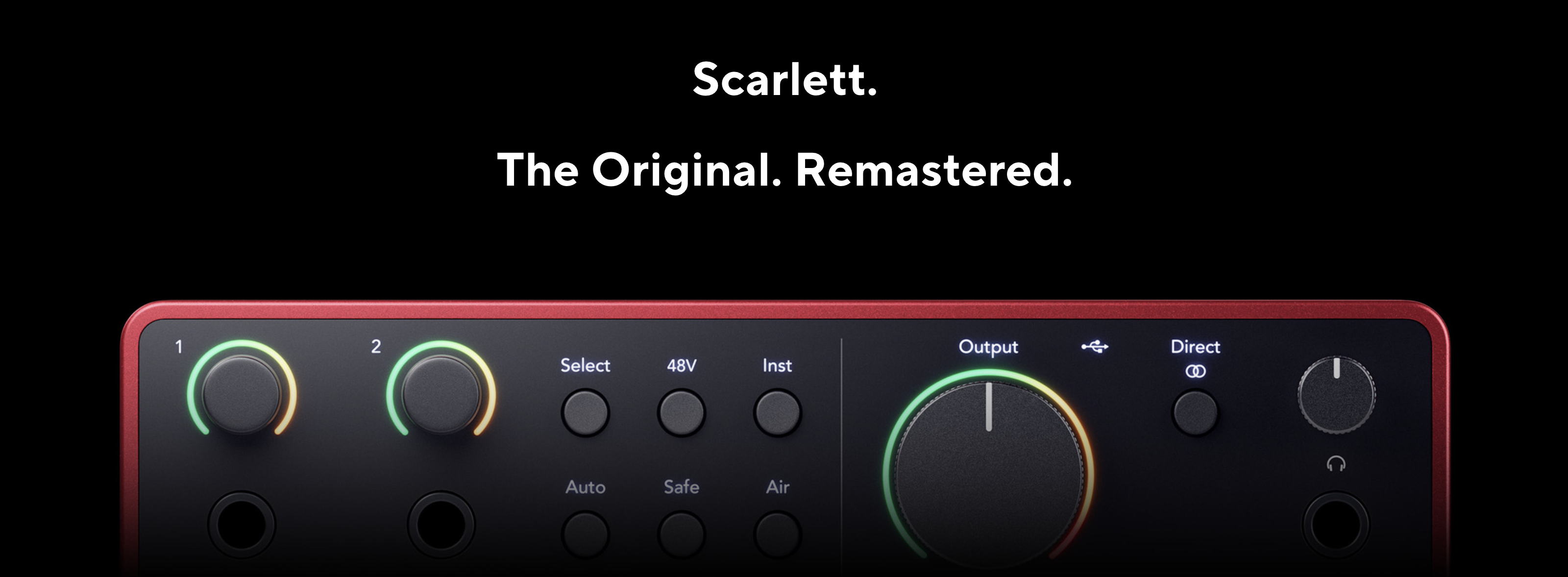
4th Gen. Focusrite Scarlett Series Interfaces – Solo, 2i2 and 4i4
The most popular audio interface in the world just got even better.
The 4th generation of the Focusrite Scarlett series has lots of impressive improvements:
- Remote-controlled 4th generation preamps
- 192kHz, 24-bit converters
- Auto-gain to set good levels
- Clip Safe to automatically avoid clipping
- Air mode: Presence and Harmonic Drive
- 120dB dynamic range
- Custom-designed headphone amp
- Loopback to record other audio sources
- Focusrite Control 2 software for PC and Mac
- Easy Start setup wizard
Pricing:
- Solo — $139.99
- 2i2 — $199.99
- 4i4 — $279.99
If you’re using one of these 4th Gen. interfaces please let me know how you like it!
Comment below.
Want to receive the Daily Goody in your email, daily or weekly? Subscribe free here.
And please keep in mind, the Daily Goody is only a tiny little tip, fact or lesson everyday. Please don’t expect any of these posts to be long, earth-shattering masterpieces that instantly answer every single question you can think of and completely transform you into a world class podcast engineer. “Little by little, a little becomes a lot.”
-
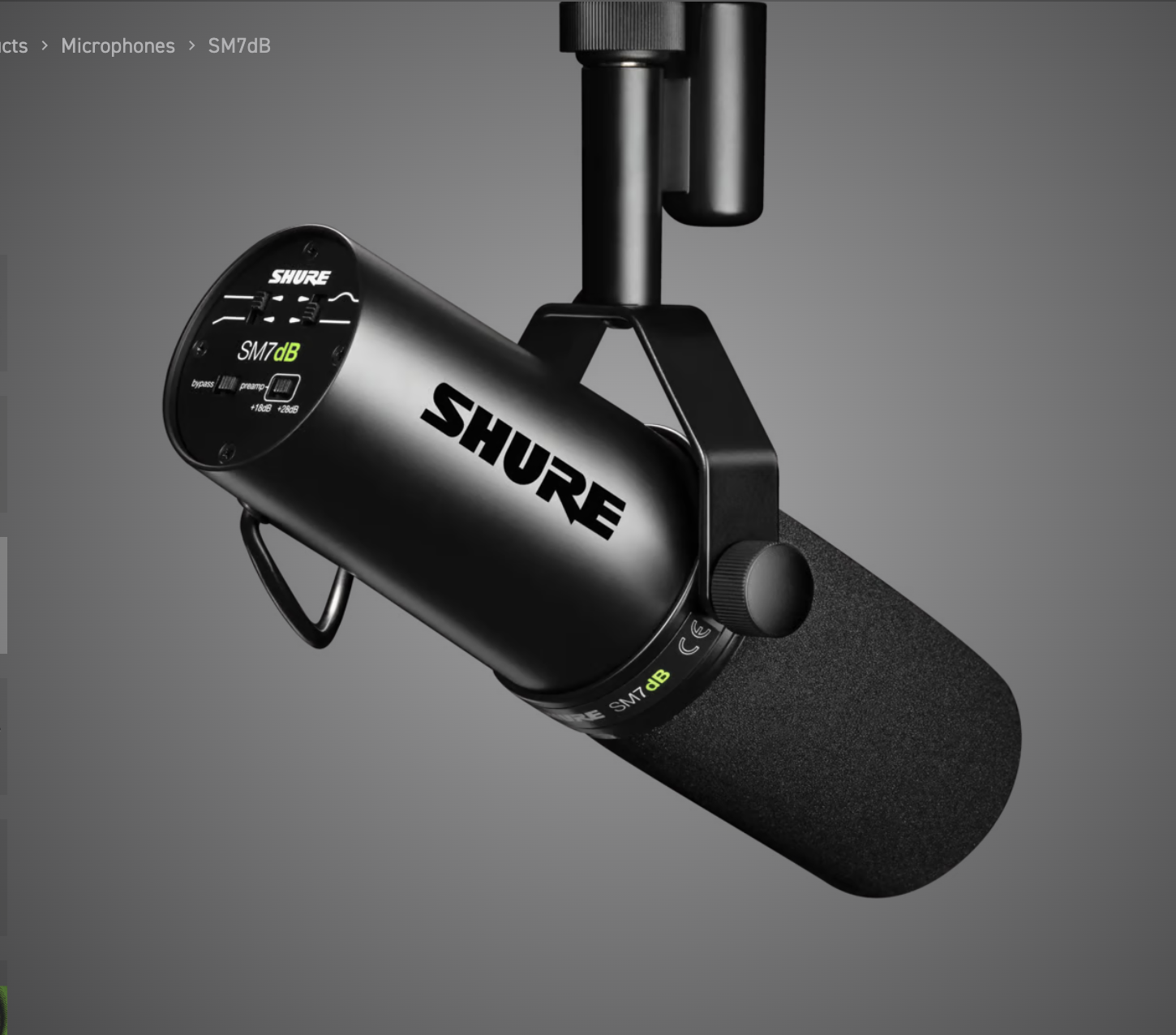
Shure SM7dB – Dynamic Vocal Microphone With Built-in Preamp
The new Shure SM7dB microphone adds a built-in preamp to the legendary SM7b microphone!
From Shure’s website:
An audio icon is reborn – the Shure SM7dB has the sound you’ve loved for years, but with the convenience of a built-in preamp providing all the extra gain you’ll ever need. The latest iteration of this legendary XLR dynamic microphone makes it easier for podcasters, streamers and musicians to get perfect vocals from any recording setup.

Built-in Preamp. Built on Legacy.
The SM7dB is a dynamic vocal microphone with built-in preamp providing up to +28 dB of low-noise, flat, transparent gain ideal for almost any interface and simplified audio chains.
- Selectable preamp boost of either +18dB or +28dB of extra gain
- Flat, wide-range frequency response for exceptionally clean and natural reproduction of both music and speech
- Preamp bypass switch deactivates the preamp to revert to original SM7B performance
- Bass roll-off and mid-range emphasis (presence boost) EQ controls
- Superior rejection of electromagnetic hum, optimized for shielding against broadband interference emitted by computer monitors
- Internal “air suspension” shock isolation virtually eliminates mechanical noise transmission
- Highly effective pop filter eliminates need for any add-on protection against explosive breath sounds, even for close-up vocals or narration
- Yoke mounting with captive stand nut for easy mounting and dismounting provides precise control of microphone position
- Classic cardioid polar pattern, uniform with frequency and symmetrical about axis, to provide maximum rejection and minimum coloration of off-axis sound
- Rugged construction and excellent cartridge protection for outstanding reliability
In the box:
- 1 SM7dB
- 1 Close-Talk Windscreen
- 1 3/8” Thread Adapter
Want to receive the Daily Goody in your email, daily or weekly? Subscribe free here.
And please keep in mind, the Daily Goody is only a tiny little tip, fact or lesson everyday. Please don’t expect any of these posts to be long, earth-shattering masterpieces that instantly answer every single question you can think of and completely transform you into a world class podcast engineer. “Little by little, a little becomes a lot.”
-
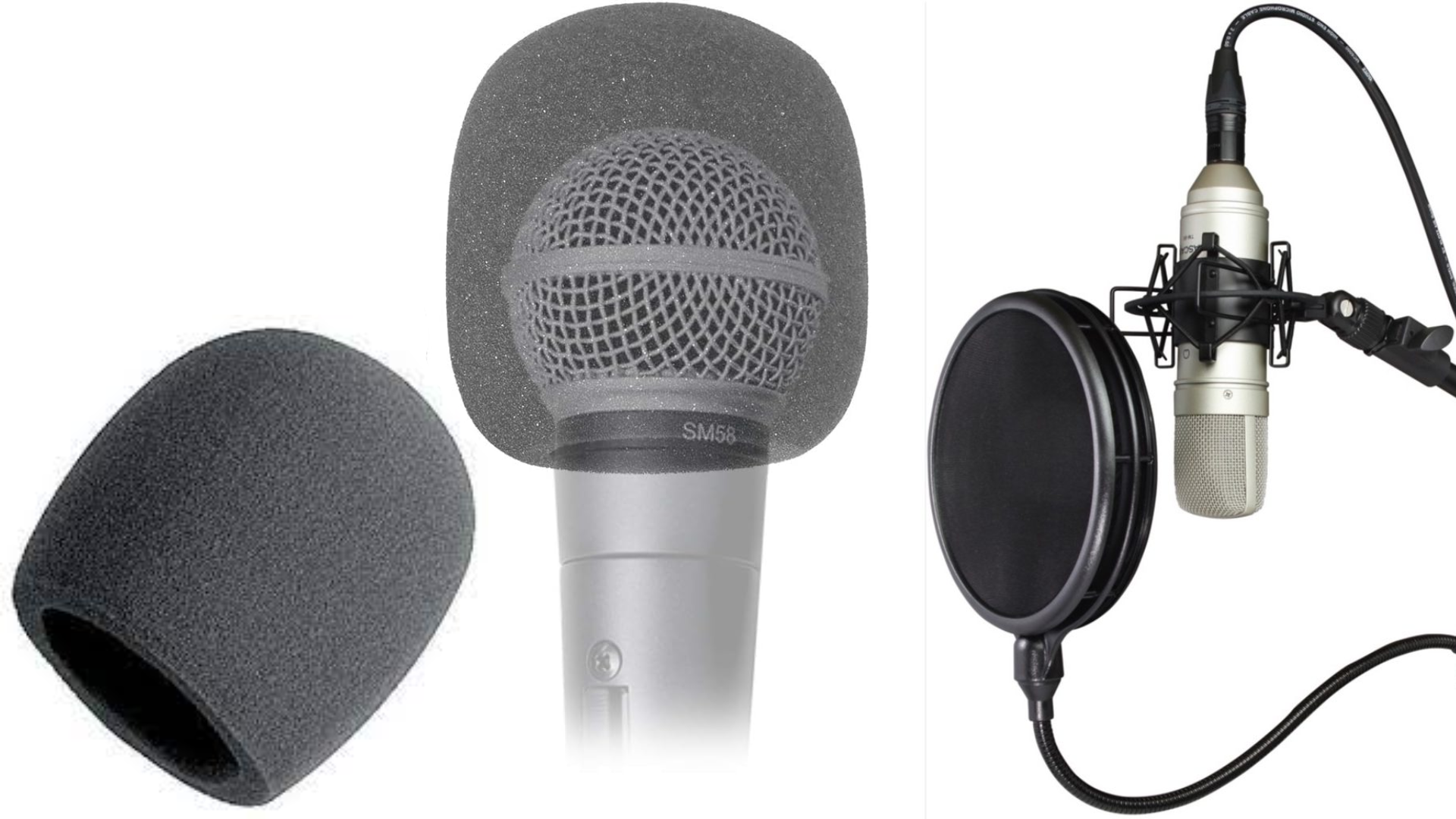
What Is the Difference Between a Pop Filter and a Windscreen?
From audio-technica:
Windscreens and pop filters are used in conjunction with microphones to assist in reducing excessive pressures on a microphone’s element. These pressures may come in the form of wind current, breath blasts and vocal plosives. Both windscreens and pop filters are common tools of the trade used in both live and studio applications. Similar in their performance, windscreens and pop filters can often be used interchangeably to accomplish the same task.
Windscreens (shown on the left in the above image) are usually made from a foam material and are designed to fit snugly over the microphone element casing. Many microphones incorporate an internal windscreen in the grill to protect the microphone element, but even these types of microphones can benefit from additional sound pressure protection in certain situations, so don’t be afraid to outfit them with another windscreen. One thing to note, a mic windscreen often will dampen higher frequencies more than a pop filter will.
Pop filters (shown on the right in the above image) usually consist of acoustically transparent foam and/or mesh and work by being placed in front of the microphone element. They are commonly used for recording vocals in a studio setting. The pop filter was originally implemented by using a hanger or embroidery ring to place stretched leg stockings between the audio source (vocalist) and the microphone element. This allowed for maximum sonic transparency while effectively reducing excessive plosives such as “p’s” and “b’s.” Pop filters are often used with higher end vocal condenser microphones.
Want to receive the Daily Goody in your email, daily or weekly? Subscribe free here.
And please keep in mind, the Daily Goody is only a tiny little tip, fact or lesson everyday. Please don’t expect any of these posts to be long, earth-shattering masterpieces that instantly answer every single question you can think of and completely transform you into a world class podcast engineer. “Little by little, a little becomes a lot.”
-
Announcing Sep. 12, 2023 Next Cohort Start Date for Podcast Engineering School!
5 steps to a happy, healthy and wealthy life producing podcasts from home:
- Learn and develop world-class skills for producing podcasts
- Start working from home producing podcasts for clients
- Earn lots of money (due to your world-class skills)
- Set your own hours
- Develop a solid career that you can stay in for the rest of your life, if you want
Your journey can start on September 12, 2023 at Podcast Engineering School.
If you want to connect with me and chat about the details let me know! Contact me here.
I believe in you 5 million percent (give or take LOL) ~Chris
Want to receive the Daily Goody in your email, daily or weekly? Subscribe free here.
And please keep in mind, the Daily Goody is only a tiny little tip, fact or lesson everyday. Please don’t expect any of these posts to be long, earth-shattering masterpieces that instantly answer every single question you can think of and completely transform you into a world class podcast engineer. “Little by little, a little becomes a lot.”
-
What Are Your Goals for Your Podcast and How Can I Help?
It’s extremely useful to have a goal (or multiple goals) for your podcast, even if the goal is simply to have fun! Or maybe you want to grow your audience and earn more money. Or make industry connections and get your message in front of new audiences.
Comment below and tell us what your goals are, and how we can help you achieve them sooner rather than later or never 🙂
Want to receive the Daily Goody in your email, daily or weekly? Subscribe free here.
And please keep in mind, the Daily Goody is only a tiny little tip, fact or lesson everyday. Please don’t expect any of these posts to be long, earth-shattering masterpieces that instantly answer every single question you can think of and completely transform you into a world class podcast engineer. “Little by little, a little becomes a lot.”
-
VIDEO: Don’t Judge the Sound of a Microphone While You’re Speaking Into It
FYI, the original blog post is HERE with more info.
Want to receive the Daily Goody in your email, daily or weekly? Subscribe free here.
And please keep in mind, the Daily Goody is only a tiny little tip, fact or lesson everyday. Please don’t expect any of these posts to be long, earth-shattering masterpieces that instantly answer every single question you can think of and completely transform you into a world class podcast engineer. “Little by little, a little becomes a lot.”
-
VIDEO: Temporary Podcast Studios at Conferences, etc.
Want to receive the Daily Goody in your email, daily or weekly? Subscribe free here.
And please keep in mind, the Daily Goody is only a tiny little tip, fact or lesson everyday. Please don’t expect any of these posts to be long, earth-shattering masterpieces that instantly answer every single question you can think of and completely transform you into a world class podcast engineer. “Little by little, a little becomes a lot.”
-
VIDEO: Headphone Amplifiers – Do You Need One for Podcasting?
Want to receive the Daily Goody in your email, daily or weekly? Subscribe free here.
And please keep in mind, the Daily Goody is only a tiny little tip, fact or lesson everyday. Please don’t expect any of these posts to be long, earth-shattering masterpieces that instantly answer every single question you can think of and completely transform you into a world class podcast engineer. “Little by little, a little becomes a lot.”
-
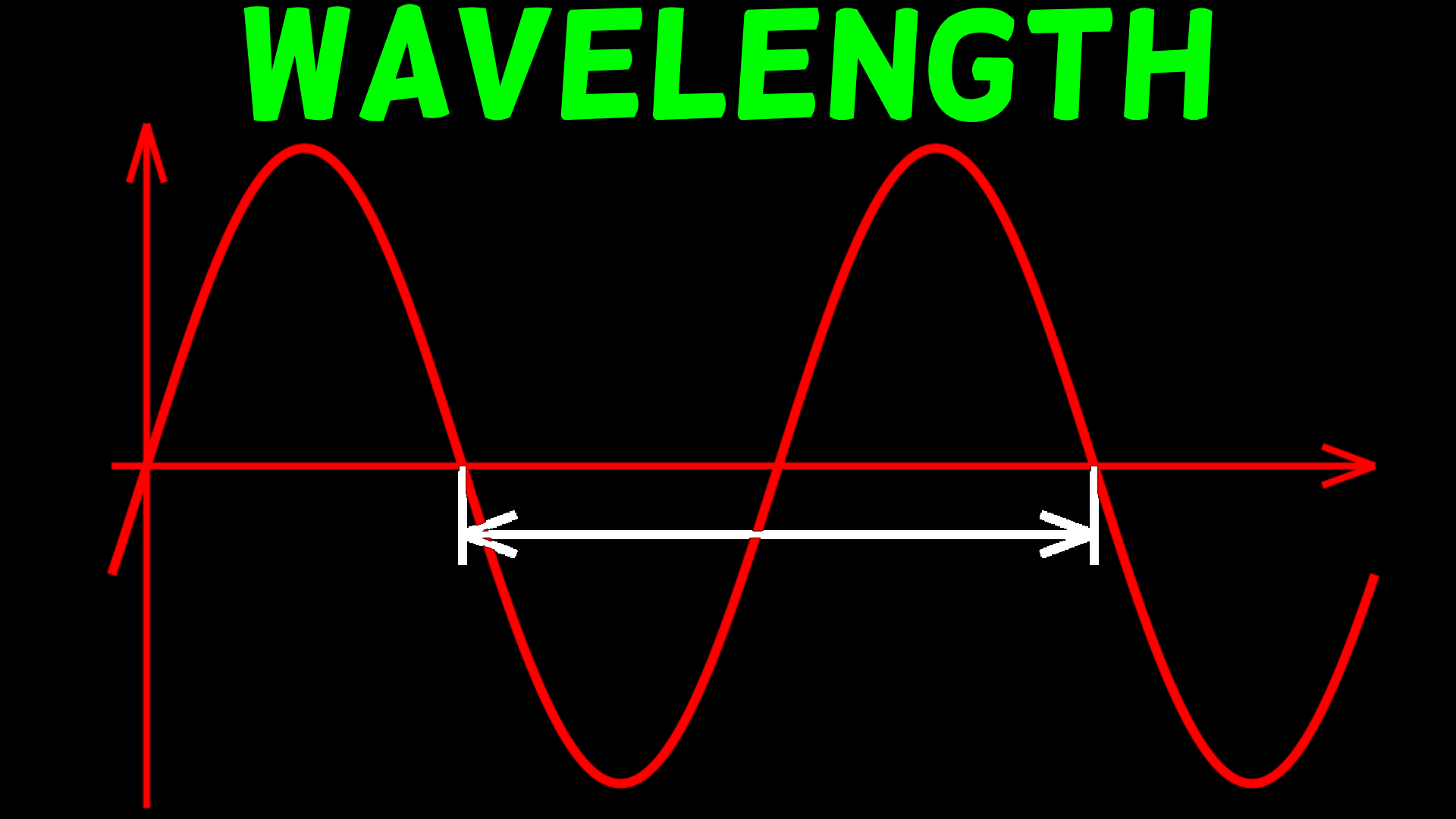
VIDEO: Wavelength and Frequency in Perspective
Want to receive the Daily Goody in your email, daily or weekly? Subscribe free here.
And please keep in mind, the Daily Goody is only a tiny little tip, fact or lesson everyday. Please don’t expect any of these posts to be long, earth-shattering masterpieces that instantly answer every single question you can think of and completely transform you into a world class podcast engineer. “Little by little, a little becomes a lot.”
-
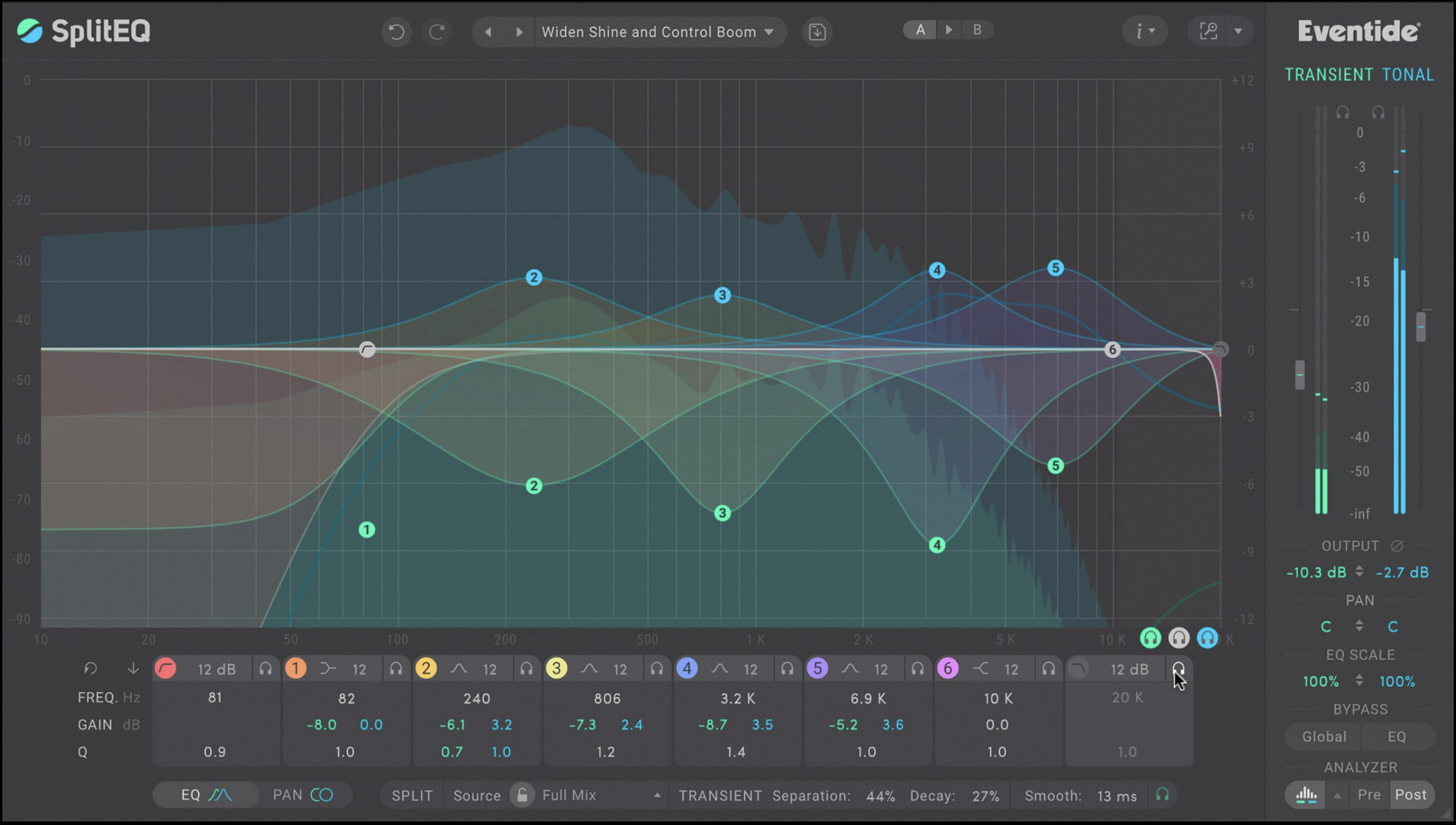
Using SplitEQ for Dialog and Podcast Editing
I just watched this brand new video demonstrating how SplitEQ can clean up and enhance podcast audio. (I own this plugin and I really like it.)
SplitEQ (an 8-Band Parametric EQ) from Eventide is a great-sounding EQ but it’s unique superpower is that it also allows you to separately adjust transient information and tonal information.
The SplitEQ analyzes incoming audio and separates it into two separate streams: Transient (noise, pops, mic plosives, vocal sibilance, attacks), and Tonal (sustained notes, harmonics, tone, ambiance).
For podcast recordings of individual voices, enhancing some transients can add clarity and intelligibility, and reducing some tonal information can remove room tone and muddiness.
Features:
- World-class 8-band parametric EQ with pristine musical filters
- EQ Transient and Tonal parts of a sound separately using Eventide’s patented Structural Split™ technology
- Control Transient and Tonal Output levels
- Enhance the stereo-field with continuous Transient and Tonal panning controls (L/R and Mid/Side modes)
- Control the underlying Split technology for fine tuning and experimentation
- Globally scale the EQ curves together or independently
- Peak, Notch, Bandpass, High Shelf, Low Shelf, Tilt Shelf, High Pass, and Low Pass filter types with slopes from 6 to 96 dB/octave
- Innovative real-time spectrum analyzer displays the Transient and Tonal streams independently
- Comprehensive Presets Library includes 150+ presets
- A/B buttons allow quick auditioning of two presets or settings plus Undo/ Redo functionality
- Resizable GUI with zoom options
- Three Color Schemes: Original, Dark and Colorblind Accessible
Eventide offers you a 30-day demo to try it before buying it 😉
*I DON’T MAKE ANY MONEY FROM THIS AND I’M NOT BEING PAID BY EVENTIDE.
Have you tried SplitEQ yet? Comment below.
Want to receive the Daily Goody in your email, daily or weekly? Subscribe free here.
And please keep in mind, the Daily Goody is only a tiny little tip, fact or lesson everyday. Please don’t expect any of these posts to be long, earth-shattering masterpieces that instantly answer every single question you can think of and completely transform you into a world class podcast engineer. “Little by little, a little becomes a lot.”
-
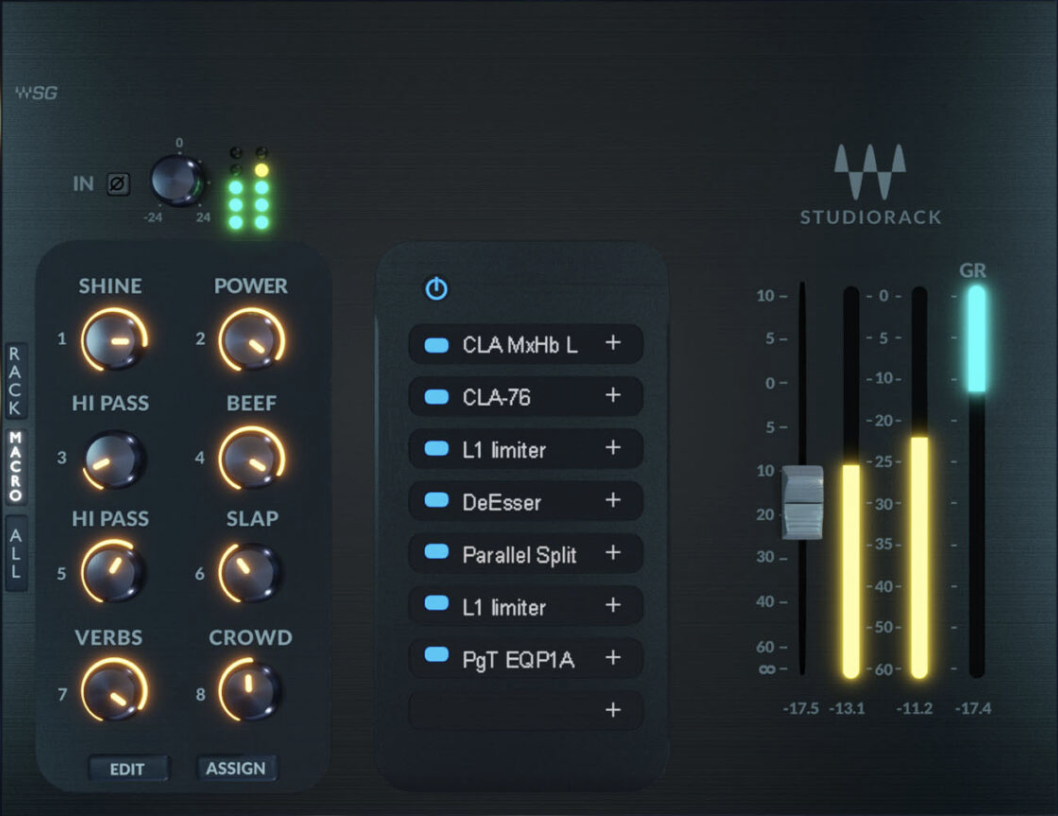
Waves Plug-ins Now OBS Studio-Compatible
This integration is very good for livestreamers…
From this MIX article:
Waves Audio plug-ins now officially run in OBS Studio, allowing users to apply them to video streams for Twitch, YouTube and more.
To run Waves Audio plug-ins in OBS Studio, users install the free Waves StudioRack plug-in chainer from Waves Central, insert Waves StudioRack on any audio source from the filters menu in the software, and continue loading Waves plug-ins inside StudioRack.
With Waves’ StudioRack now compatible with OBS Studio, users can apply Waves StudioRack’s audio processing capabilities to the sound quality of their recorded videos, podcasts, and live-streamed content.
With the new compatibility, users can clean unwanted background noise with AI-powered noise reduction; make voices sound more rich and present; improve the sound of zoom calls and phone microphones; ensure output levels are appropriate; change voice pitch, add effects, and vocoders; and add zero-latency real-time pitch correction for vocals in musical performances in live streams.
Waves Audio also now provides numerous AI-optimized StudioRack plug-in chains, which are intended to elevate the quality of streaming; to find them within the software, users should keep an eye out for Waves’ StudioVerse custom “OBS” tagged chains.
Are you going to try this?!?! Comment below.
Want to receive the Daily Goody in your email, daily or weekly? Subscribe free here.
And please keep in mind, the Daily Goody is only a tiny little tip, fact or lesson everyday. Please don’t expect any of these posts to be long, earth-shattering masterpieces that instantly answer every single question you can think of and completely transform you into a world class podcast engineer. “Little by little, a little becomes a lot.”
-
Podcast Movement 2023 in Denver, August 21-24
Podcast Movement, the world’s largest podcasting conference, is happening this summer in Denver, Colorado from August 21-24, 2023 at the Gaylord Rockies Resort.
There will be loads of top-notch presentations, training, networking, expo hall vendors, parties and fun!
Someone you know might be speaking there 😉
Yes, it will cost a boat load of money to attend but it’s ALWAYS worth it!
Are you planning on attending? Let’s meet up! Comment below.
Want to receive the Daily Goody in your email, daily or weekly? Subscribe free here.
And please keep in mind, the Daily Goody is only a tiny little tip, fact or lesson everyday. Please don’t expect any of these posts to be long, earth-shattering masterpieces that instantly answer every single question you can think of and completely transform you into a world class podcast engineer. “Little by little, a little becomes a lot.”
-
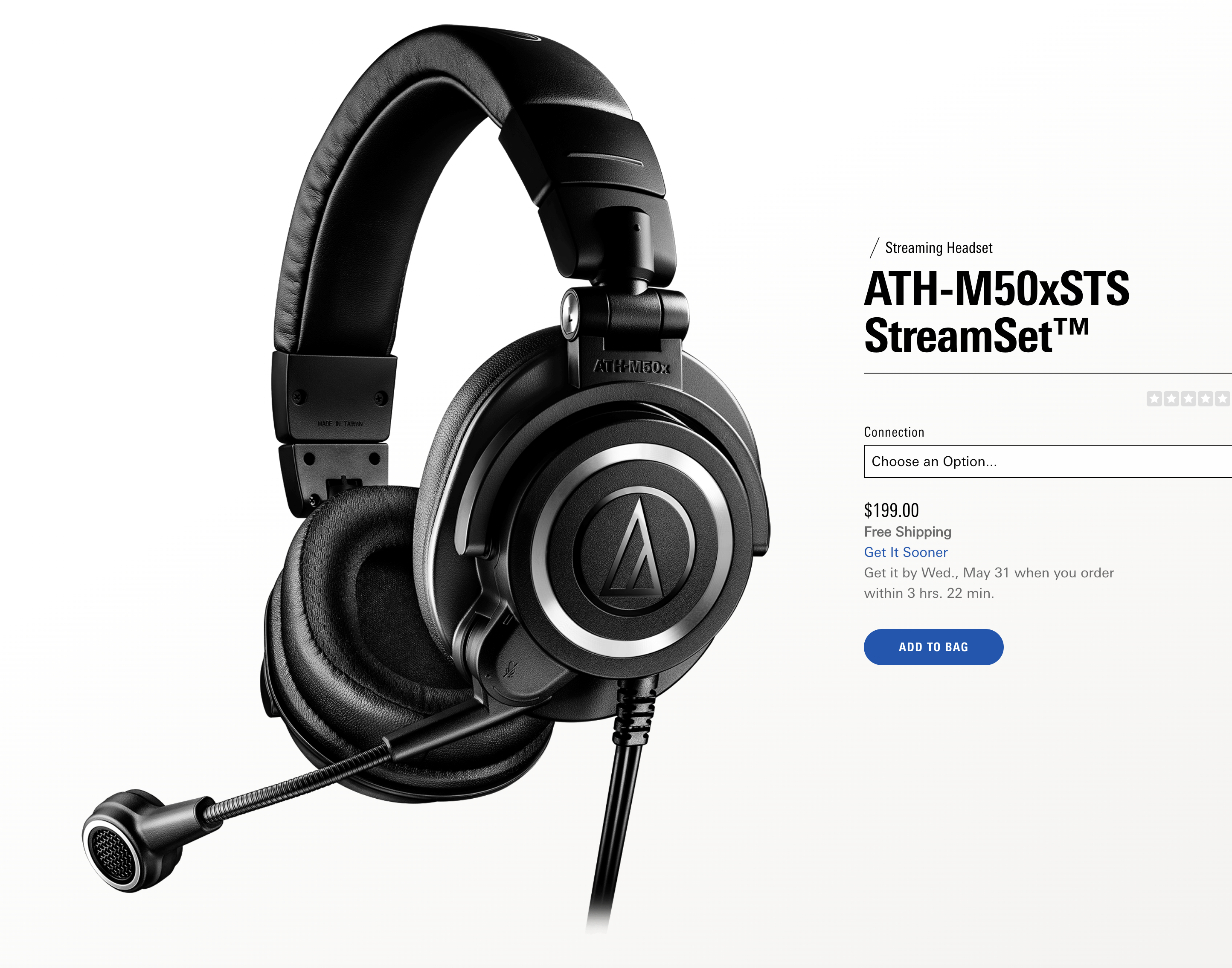
New Headphones with Microphone Attached: ATH-M50xSTS StreamSet™
I recently experienced a tour of Descript by Margaret Ereneta and during it she was wearing these headphones with attached microphone: ATH-M50xSTS StreamSet™.
For around $199 they are a great headphone/microphone combo created especially for livestreamers. They come in XLR or USB.
Margaret actually mails the USB version to guests to wear during their remote interviews with her. All they have to do is plug it into their computer and adjust the microphone so it’s closer to their mouth.
To my ears, the microphone itself sounded very good.
Have you tried these yet? Comment below.
Want to receive the Daily Goody in your email, daily or weekly? Subscribe free here.
And please keep in mind, the Daily Goody is only a tiny little tip, fact or lesson everyday. Please don’t expect any of these posts to be long, earth-shattering masterpieces that instantly answer every single question you can think of and completely transform you into a world class podcast engineer. “Little by little, a little becomes a lot.”
-
The Frequency Wars (When EQ’ing)
This video presentation will help you and your podcast productions sound much better!
I discuss how to EQ and balance each podcast participants voice, how to think about the audio frequency spectrum in terms of 3 (basic) or 5 (advanced) different sections, as well as sibilance and plosives.
*CAREER Option: Learn how to produce podcasts professionally from home and earn a great living doing it!
Want to receive the Daily Goody in your email, daily or weekly? Subscribe free here.
And please keep in mind, the Daily Goody is only a tiny little tip, fact or lesson everyday. Please don’t expect any of these posts to be long, earth-shattering masterpieces that instantly answer every single question you can think of and completely transform you into a world class podcast engineer. “Little by little, a little becomes a lot.”
-
You Don’t Have To Be the Greatest Audio Engineer in the World To Be a Highly Paid Podcast Producer!
If you want to have a successful career and earn lots of money producing/editing podcasts from home, you definitely need professional training in audio production. But you definitely don’t need to be the best audio engineer in the world. I’m living proof!
In addition to production skills you’ll need to put a lot of energy and time into reaching out to people and meeting and talking with potential clients. Most potential clients will not choose to work with you, but it’s a numbers game – if you speak with lots of people you WILL acquire good high-paying clients. It’s inevitable.
FYI, in Podcast Engineering School I teach audio production as well as how to get clients.
As in most areas of life, the average individual who puts in lots of time and effort will always have much more success compared to a naturally gifted individual who is lazy and doesn’t put forth much effort.
That fact should encourage you to make it happen……IF you want it 🙂
If you’d like me to help you map out a potential career for yourself producing podcasts from home, contact me and let’s chat!
Want to receive the Daily Goody in your email, daily or weekly? Subscribe free here.
And please keep in mind, the Daily Goody is only a tiny little tip, fact or lesson everyday. Please don’t expect any of these posts to be long, earth-shattering masterpieces that instantly answer every single question you can think of and completely transform you into a world class podcast engineer. “Little by little, a little becomes a lot.”
-
Should I Bring MP3, M4A or WAV Files Into My DAW?
Since uncompressed files (WAV or AIFF) are the highest quality/resolution audio files, I always recommend recording in WAV format and using WAV format files all the way through production up until you create the final MP3 file for publishing.
But some folks record in compressed formats like MP3 or M4A, etc. (which I don’t recommend)
Regarding the use of MP3 or M4A files in post-production, this exchange I had with a listener explains things:
- Question: If you receive audio files for your podcast editing session that were recorded in MP3 or M4A compressed format, is it worth converting them to WAV (uncompressed) format before importing them into your DAW? For example, Piezo (a Skype call recorder) records in M4A AAC 256kbps Stereo — should I bring this M4A file directly into my DAW session or should I first convert it to WAV format and bring the WAV file into my DAW?
- Answer: You can just bring M4A or MP3 recordings directly into your DAW session. But if you need to clean up the audio first, I suggest doing what I do: First I bring the M4A/MP3 files into iZotope RX, etc. and process them as needed to clean them up, and then I export them from RX as a WAV file (24 bit), and then I import those WAV files into my DAW.
What are your thoughts on using these various file types in your productions? Comment below.
Want to receive the Daily Goody in your email, daily or weekly? Subscribe free here.
And please keep in mind, the Daily Goody is only a tiny little tip, fact or lesson everyday. Please don’t expect any of these posts to be long, earth-shattering masterpieces that instantly answer every single question you can think of and completely transform you into a world class podcast engineer. “Little by little, a little becomes a lot.”
-
Tour/Demo of Descript App and Q&A with Margaret Ereneta, Podcast Producer
Learn all about Descript, its features, limitations, and why you might want to use it for your podcast audio/video post-production. Margaret Ereneta, podcast producer of One80 Podcast, was kind enough to explain how easy it is to use Descript.
FYI, here’s the headset Margaret was wearing/using — ATH-M50xSTS StreamSet™
Also, here’s the One80 Podcast’s Instagram account.
OTHER LINKS:
Podcast production tips email list signup: http://eepurl.com/geOdAD
Career Option: Learn how to produce podcasts professionally from home and earn a great living doing it!
Want to receive the Daily Goody in your email, daily or weekly? Subscribe free here.
And please keep in mind, the Daily Goody is only a tiny little tip, fact or lesson everyday. Please don’t expect any of these posts to be long, earth-shattering masterpieces that instantly answer every single question you can think of and completely transform you into a world class podcast engineer. “Little by little, a little becomes a lot.”
-
Ignoring Levels?: Music vs. Hosts vs. Guests
It seems like half of the new podcasts I check out have a major issue in terms of audio quality — they have a level imbalance between intro music and each host and each guest. Intro music is usually way too loud (so listeners can’t even hear the host when they start talking), or way too quiet (making listeners JUMP when the host comes in MUCH louder than the music). And either host or guest is significantly lower in volume than the other, making it annoying for listeners to set a playback level where they can hear everything without straining to hear or getting their ears blown out every 90 seconds.
This is audio production 101 and experienced podcasters should not still be getting this wrong. In the mixing phase of production they should adjust the level of each of these elements to make them all play back at proper levels.
But sadly most podcasters aren’t even aware of this issue. And if you tell them about their audio quality shortcomings they won’t care — they’ll say something like, “Well, I’ve done 300 episodes and no one has complained.” Well, they haven’t complained TO YOU, but they’ve had to endure your bad audio even if they didn’t consciously know why.
Of course editors/producers should be nailing the mix every single episode.
And regular podcasters who want to do as little post-production as possible should at least use something like Auphonic’s Adaptive Leveler to accomplish a decent mix and avoid publishing bad audio.
Now get off my lawn. HA
What are your thoughts on this particular podcasting epidemic? Comment below!
Want to receive the Daily Goody in your email, daily or weekly? Subscribe free here.
And please keep in mind, the Daily Goody is only a tiny little tip, fact or lesson everyday. Please don’t expect any of these posts to be long, earth-shattering masterpieces that instantly answer every single question you can think of and completely transform you into a world class podcast engineer. “Little by little, a little becomes a lot.”
-
For Soundchecking, Riverside.fm Does Quick, Handy 10-Second Test Recordings!
I recently recorded a podcast episode with a remote guest using Riverside.fm and I was very pleased to see a new feature (for me, at least).
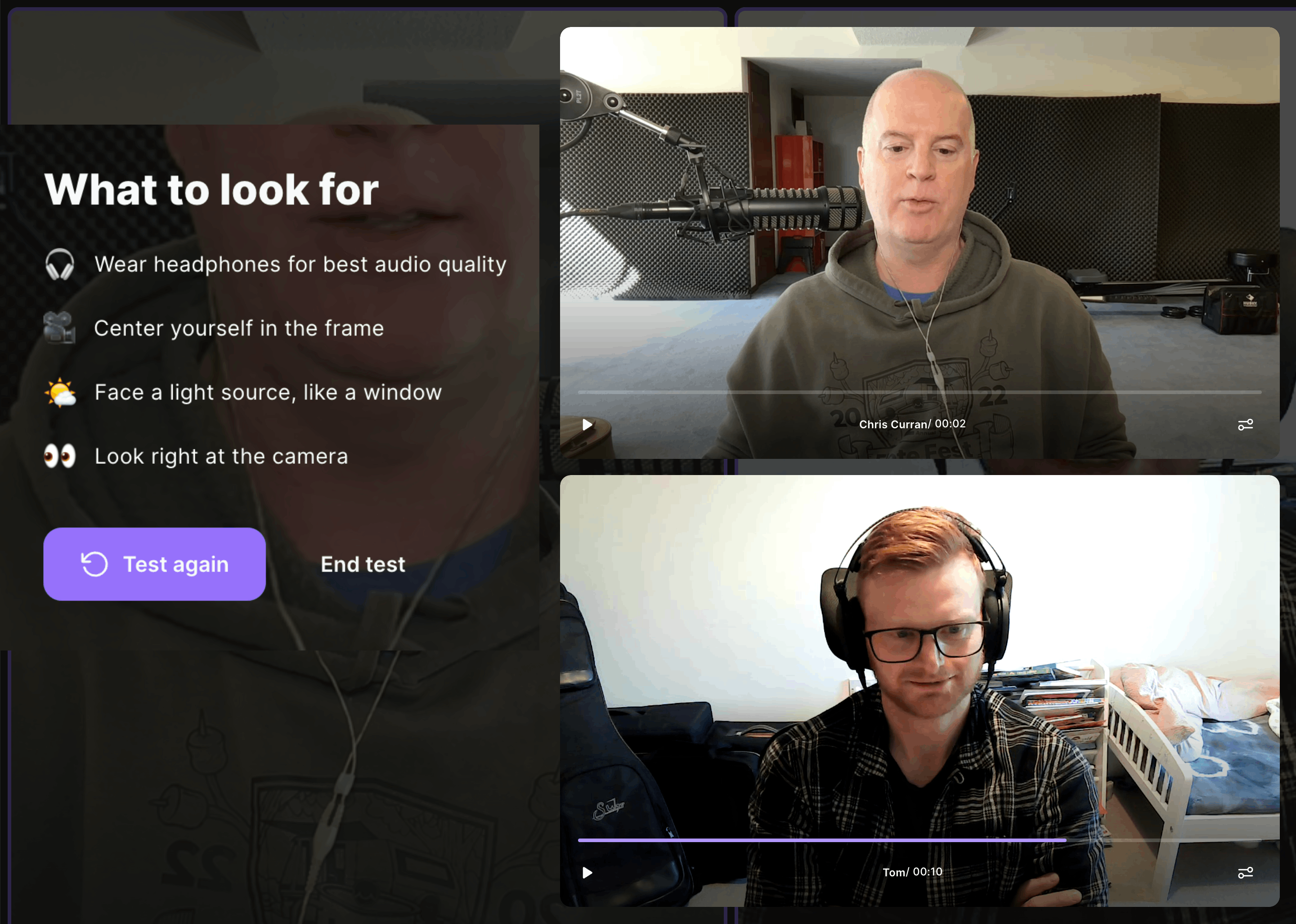
Before you start recording, Riverside prompts you offering to record a 10 second soundcheck. If you do, it records all participants for 10 seconds and then displays the audio/video on the screen for you to play and evaluate! And even guests can play back the test audio! See the screenshot above of me and Tom Pink – we could each click play and listen to the short recordings.
This is handy for soundchecking because it allows you (and everyone) to hear each person’s audio quality and level. Then, if anyone’s audio quality or level needs to be adjusted, they can make those adjustments before recording the entire episode, ensuring that you get the best recordings possible.
This may also be a great way for you to let guests hear the quality of their audio (especially if it’s bad) so that hopefully they’ll better understand the need to make adjustments to their sound before recording the episode.
Have you tried this yet? Comment below.
Want to receive the Daily Goody in your email, daily or weekly? Subscribe free here.
And please keep in mind, the Daily Goody is only a tiny little tip, fact or lesson everyday. Please don’t expect any of these posts to be long, earth-shattering masterpieces that instantly answer every single question you can think of and completely transform you into a world class podcast engineer. “Little by little, a little becomes a lot.”