Your cart is currently empty!
Author: Chris Curran
-
Avoid Constantly Saying “Mm-Hmm” or “Uh-Huh”

When you’re a participant on a podcast avoid constantly saying “Mm-hmm” or “Uh-huh” while another participant is talking.
Uttering these sounds spontaneously in moments when it’s a genuine expression of your understanding or epiphany is totally natural, but constantly uttering those sounds every ten seconds can be distracting and/or annoying to the listeners.
In fact, this is usually just another verbal crutch that some people are in the habit of using. To overcome this, challenge yourself: Be silent and listen intently.
Want to receive the Daily Goody in your email, daily or weekly? Subscribe free here.
And please keep in mind, the Daily Goody is only a tiny little tip, fact or lesson everyday. Please don’t expect any of these posts to be long, earth-shattering masterpieces that instantly answer every single question you can think of and completely transform you into a world class podcast engineer. “Little by little, a little becomes a lot.”
.
-
Riverside.fm Records Audio and Video Locally for Each Participant
Riverside.fm is a new platform I just learned about but haven’t tried yet. I want to try this one as well as the upcoming release of Zencastr’s new version.
Our friend Mathew Passy has tried Riverside.fm and likes it, but admits they are still working out some kinks.
Description from their website:
- Record your podcast’s audio AND video locally.
- Separate audio and video tracks for each guest.
- Livestream it to YouTube/Facebook/Twitter.
- Let your listeners call in via video.
- Start a free trial with no credit card required.
Have you tried it? What has your experience been so far?
Want to receive the Daily Goody in your email, daily or weekly? Subscribe free here.
And please keep in mind, the Daily Goody is only a tiny little tip, fact or lesson everyday. Please don’t expect any of these posts to be long, earth-shattering masterpieces that instantly answer every single question you can think of and completely transform you into a world class podcast engineer. “Little by little, a little becomes a lot.”
.
-
Keyboard Typing “Thumps” Coming Through the Mic
When anyone uses a desk-based microphone (like a Blue Yeti) or even a handheld microphone on a desk-based stand, they should be aware that the mic will probably pick up the low frequency thumping noise of their typing on their keyboard.
To avoid this you can use a shock mount, get the mic off the surface of the desk using a boom arm, or avoid typing on the keyboard.
Want to receive the Daily Goody in your email, daily or weekly? Subscribe free here.
And please keep in mind, the Daily Goody is only a tiny little tip, fact or lesson everyday. Please don’t expect any of these posts to be long, earth-shattering masterpieces that instantly answer every single question you can think of and completely transform you into a world class podcast engineer. “Little by little, a little becomes a lot.”
.
-
BEWARE of This Nonsensical Squadcast “Feature” Every Time a Participant Drops off a Session
I wish to state up front that I really like Squadcast and I especially like their owners and staff – VERY good people. And my opinion is that Squadcast is currently the best available option for virtual recording sessions for podcasts. I use Squadcast regularly and pay for it monthly.
The purpose of this post is to SAVE YOU from major production headaches by teaching you how to avoid a nonsensical and annoying “feature” of Squadcast. And if this “feature” hasn’t yet bitten you in the butt you may not think this “feature” is a big deal, and you may also think I’m making a mountain out of a molehill, but when this “feature” DOES bite you in the butt you will fully understand how nonsensical it is.
OK, so…
Beware of Squadcast if a participant drops off the session because THE MOMENT THEY DROP OFF Squadcast STOPS RECORDING EVERYONE!!!
Really?!?!?!
What you HAVE to do EVERY TIME ANYONE drops off is:
- STOP the conversation dead in its tracks, even if the person who dropped off was just listening to the others talk
- WAIT until the dropped person reconnects
- PRESS RECORD AGAIN
Really?!?!?!
In my professional opinion I think this “feature” is terrible because Squadcast is a tool that RECORDS PEOPLE, so for it to STOP recording at ANY time is completely unacceptable.
Now, Squadcast will tell you that they record backups of all sessions so that the “missing audio” can be recovered, which is usually true, but the quality of that “recovered” audio is significantly worse than the normal Squadcast quality, and it may contain glitches because it is recorded AFTER the audio has travelled over the internet, plus Squadcast admits that it MAY be out of sync with the other tracks. Plus, you will have to do SIGNIFICANTLY more post-production work to piece together and sync-up various files, etc. Wonderful.
I hope Squadcast will fix this ASAP, but their management has given me several irrelevant/weird reasons why they are going to stick with their current practice of stopping recording when someone drops off. In their defense, I suspect fixing this “feature” is not simple or easy, so therefor Squadcast may be taking the easier/cheaper route of not correcting this, which is kind of understandable in a business sense, but very unfortunate for Squadcast users.
Again, I really like Squadcast and I especially like their owners and staff – VERY good people. And my opinion is that Squadcast is currently the best available option for virtual recording sessions. For now, I will continue to use and pay for Squadcast.
But this is pure madness.
What do you think?
Want to receive the Daily Goody in your email, daily or weekly? Subscribe free here.
And please keep in mind, the Daily Goody is only a tiny little tip, fact or lesson everyday. Please don’t expect any of these posts to be long, earth-shattering masterpieces that instantly answer every single question you can think of and completely transform you into a world class podcast engineer. “Little by little, a little becomes a lot.”
.
-
One Viable Way to Get New Potential Clients Into Your Local Physical Podcast Studio
One viable way to get new potential clients into your local physical podcast studio:
Start a local business podcast and invite local business people to be a guest on your show. When they come into your studio to be a guest and after they have a great experience being a guest, mention that you produce podcasts for local business people and if they ever want to talk about how that works you’re willing to explain things.
FYI, I’ve had success with this strategy in the past.
Want to receive the Daily Goody in your email, daily or weekly? Subscribe free here.
And please keep in mind, the Daily Goody is only a tiny little tip, fact or lesson everyday. Please don’t expect any of these posts to be long, earth-shattering masterpieces that instantly answer every single question you can think of and completely transform you into a world class podcast engineer. “Little by little, a little becomes a lot.”
.
-
Loupedeck CT and Loupedeck+ Controllers

Check out these two controllers which can help speed up editing and production in general.
I haven’t tried either of them yet, but they look cool.
Want to receive the Daily Goody in your email, daily or weekly? Subscribe free here.
And please keep in mind, the Daily Goody is only a tiny little tip, fact or lesson everyday. Please don’t expect any of these posts to be long, earth-shattering masterpieces that instantly answer every single question you can think of and completely transform you into a world class podcast engineer. “Little by little, a little becomes a lot.”
.
-
What is a Decibel?
The decibel (dB) is commonly used in acoustics as a unit of sound pressure level. Basically, decibel levels describe how loud something is. (Here’s more technical info)
Here are the decibel levels of sounds you’re familiar with:
- Normal conversation with someone 1 meter away: 40-60 dB
- Passenger car from 10 meters away: 60-80 dB
- Traffic on a busy roadway from 10 meters away: 80-90 dB
- Jack hammer from 1 meter away: 100 dB
- Two-stroke chainsaw from 1 meter away: 110 dB
- Threshold of pain: 130-140 dB
- Stun grenade: 158–172 dB
- .30-06 rifle being fired from 1 meter to shooter’s side: 171 dB
NOTE: There are many free apps you can install on your phone to measure the sound pressure levels wherever you are 😉
Want to receive the Daily Goody in your email, daily or weekly? Subscribe free here.
And please keep in mind, the Daily Goody is only a tiny little tip, fact or lesson everyday. Please don’t expect any of these posts to be long, earth-shattering masterpieces that instantly answer every single question you can think of and completely transform you into a world class podcast engineer. “Little by little, a little becomes a lot.”
.
-
Audio Trivia Friday – June 12, 2020
In what year was the first digital audio recorder developed?
A. 1967
B. 1971
C. 1975
D. 1978
E. 1982Guess first, …………….and then see the answer here.
Want to receive the Daily Goody in your email, daily or weekly? Subscribe free here.
And please keep in mind, the Daily Goody is only a tiny little tip, fact or lesson everyday. Please don’t expect any of these posts to be long, earth-shattering masterpieces that instantly answer every single question you can think of and completely transform you into a world class podcast engineer. “Little by little, a little becomes a lot.”
.
-
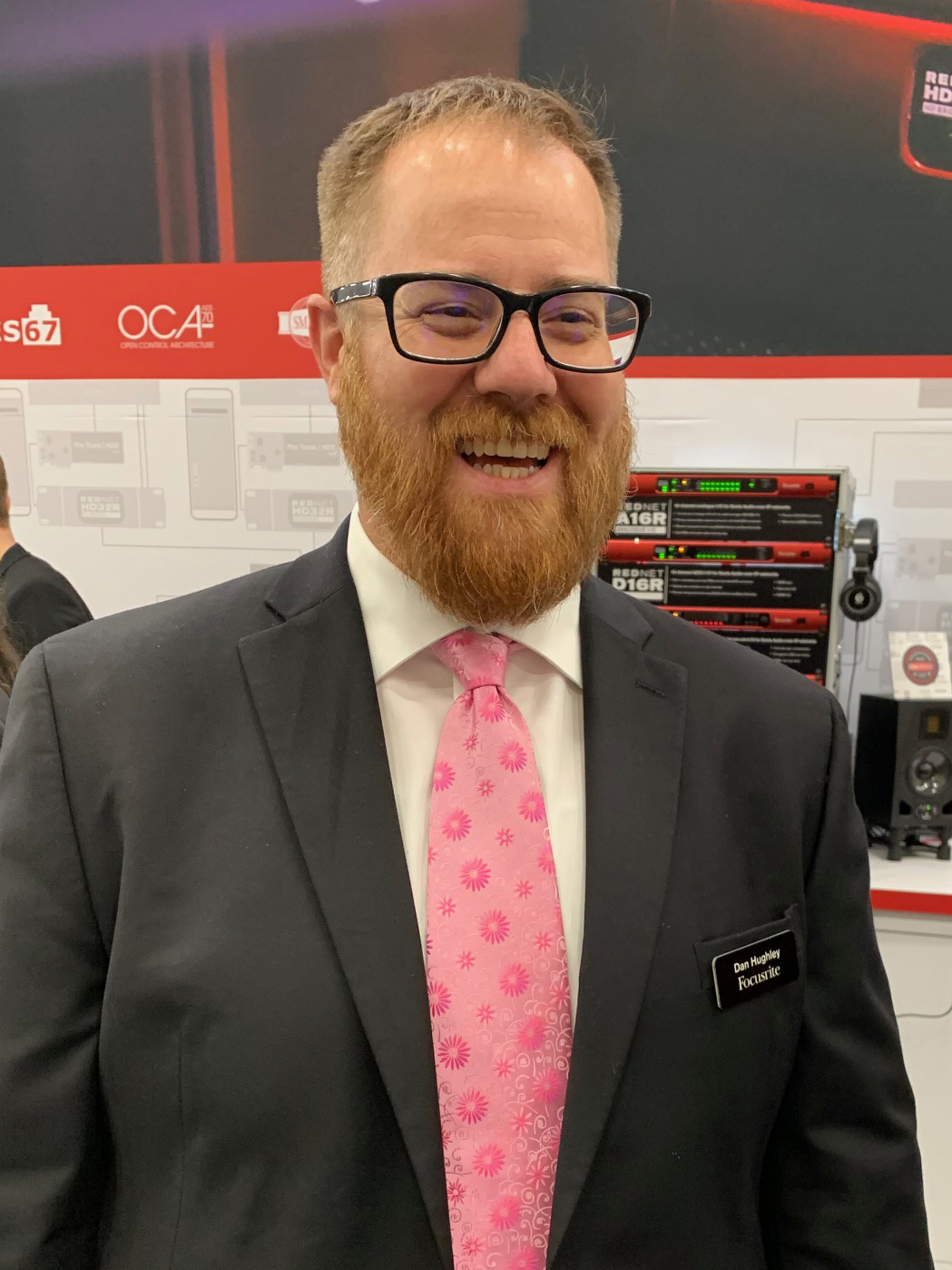
Dan Hughley from Focusrite – PES 186
My guest Dan Hughley – Marketing Manager at Focusrite, Audio Engineer and Producer, host of The Focusrite Pro Podcast (for which the post-production is done by PES graduate Bryan Entzminger from Top Tier Audio!). Dan is also the Executive Producer of the infamous Johnny Podcast Podcast (Spotify, Facebook, Apple).
We discussed a ton, including:
- Shure SM7b microphone
- Soyuz Launcher gain booster – by design it colors the sound a bit (normally uses a DM1 Dynamite)
- Scarlett 2i2 3rd gen. WITH the Air button engaged. (FYI, Dan normally uses a Focusrite Clarett)
- Hindenburg Journalist Pro (EQ, Magic Levels, saved profiles, etc.)
- Squadcast for recording interviews
- Ampify (to create the intro music for The Johnny Podcast Podcast!)
Thanks for being a great guest, Dan!
.
-
Zencastr’s New Video Beta Platform – Join the Waitlist
Zencastr has a new Video Beta Platform with a select group of quality podcasters.
In the Video Beta, they are including a whole new set of features designed to create a better and more thoughtful experience for you, your guests and your audience. The video platform includes a modern redesign with more intuitive function.
So what’s new?
- HD Video: Record double-ended 720P HD Vidcasts
- Automatic Post Production: Automatically mix and render videos up to 2K with Hi-Fi audio
- Green Room: Allow guests to join your show smoothly from this staging prep area
- New Video Mixes: Easily publishable to YouTube, Vimeo or the Vidcast platform of your choosing
- Faster Streaming Uploads: Reduce long waits at the end of the podcast
- New Local Backups: Save directly to your hard drive so you never lose content
Join the waitlist here.
Want to receive the Daily Goody in your email, daily or weekly? Subscribe free here.
And please keep in mind, the Daily Goody is only a tiny little tip, fact or lesson everyday. Please don’t expect any of these posts to be long, earth-shattering masterpieces that instantly answer every single question you can think of and completely transform you into a world class podcast engineer. “Little by little, a little becomes a lot.”
.
-
Don’t Blindly Emulate Everything That Popular Podcasts Do
Don’t blindly emulate everything that popular podcasts do.
Because whatever they are doing may NOT be the best for you in your situation.
Give careful consideration before changing your equipment, workflow, on-air content, marketing strategy, etc.
Want to receive the Daily Goody in your email, daily or weekly? Subscribe free here.
And please keep in mind, the Daily Goody is only a tiny little tip, fact or lesson everyday. Please don’t expect any of these posts to be long, earth-shattering masterpieces that instantly answer every single question you can think of and completely transform you into a world class podcast engineer. “Little by little, a little becomes a lot.”
.
-
How to Set Your Per-Episode Pricing to Ensure That You Reach Your Annual Income Goal?
How to set your per-episode pricing for your podcast production/editing services to ensure that you reach your annual income goal? In short, decide how much money you’d like to earn per year doing podcast production/editing, and then work the math backwards to determine how much you have to charge per episode. Then, secure enough clients at that rate.
Here’s the detailed method:
- Decide how much money (gross revenue) you’d like to earn per year from your production services. Then divide by 12 to determine your monthly gross income goal.
- Decide how many total hours per week you’re committed working on podcast production. Then multiply by four to determine how many hours per month you’re committed to working.
- Figure out the average amount of hours it takes you to produce one average episode (average length, average number of participants, average mixing time, average attention to editing detail, average time for ancillary tasks like tagging, posting, etc. — this will require research and testing, and/or reviewing how long previous episodes have taken you to produce).
- Figure out how many podcasts episodes you’re able to produce each month by dividing the total hours per month you’re able to work by the amount of time it takes you to produce one average episode.
- Figure out how many episodes you’re able to produce per month by dividing your total available monthly working hours by the amount of time it takes you to produce one average episode.
- Figure out how much you need to charge clients per one average episode by dividing your monthly gross income goal by the number of episodes you’re able to produce per month.
- Then, secure enough clients at that per-episode rate.
And now you know what to charge clients to ENSURE that you realize your yearly income goal! (as long as you secure enough clients at that rate)
Want to receive the Daily Goody in your email, daily or weekly? Subscribe free here.
And please keep in mind, the Daily Goody is only a tiny little tip, fact or lesson everyday. Please don’t expect any of these posts to be long, earth-shattering masterpieces that instantly answer every single question you can think of and completely transform you into a world class podcast engineer. “Little by little, a little becomes a lot.”
.
-
How Much Blank Space Do You Leave at the Beginning of Episodes?
How much blank space do you leave at the beginning of podcast episodes?
I leave somewhere between 0.9 and 1.0 seconds, because some audio players will quickly fade in the audio instead of just playing it at full volume from the very beginning, and I don’t want the first word or sound to be faded in.
#DontMessWithMyAudioBro
Want to receive the Daily Goody in your email, daily or weekly? Subscribe free here.
And please keep in mind, the Daily Goody is only a tiny little tip, fact or lesson everyday. Please don’t expect any of these posts to be long, earth-shattering masterpieces that instantly answer every single question you can think of and completely transform you into a world class podcast engineer. “Little by little, a little becomes a lot.”
.
-
De-breath Plugins
Sometimes a podcast participant’s breaths (or breathing sound in general) will be so loud and prominent that you want to reduce them, especially when using a good amount of compression.
So, how to reduce/suppress those breath sounds?
Well, you could reduce the volume of every single breath MANUALLY! Ugh. Or you could use a de-breath plugin.
Here are two de-breath plugins that are good:
- iZotope RX Breath Control
- Waves DeBreath
In my experience you have to be very careful when dialing in the proper settings for your use case because if the settings aren’t correct it will miss some breaths or reduce other sounds in addition to breaths.
Do you know of any others?
Want to receive the Daily Goody in your email, daily or weekly? Subscribe free here.
And please keep in mind, the Daily Goody is only a tiny little tip, fact or lesson everyday. Please don’t expect any of these posts to be long, earth-shattering masterpieces that instantly answer every single question you can think of and completely transform you into a world class podcast engineer. “Little by little, a little becomes a lot.”
.
-
Chris’s Goody Bag – PES 185
I overview recent Daily Goody‘s (from April 10 – April 23). Here’s the link to view all those blog posts. And don’t forget that you can sign up to receive the Daily Goody in your email every day or once per week. Sign up here.
Here are the Daily Goody posts that we discussed in this episode:
- Not Ruining Your Audio in the Last Step of Production
- Clients That Understand and Obey Your Audio Advice…
- Giving Audio Advice to Individuals Who Want to Start a Podcast
- What is Latency in Terms of Audio Production?
- Plantronics Blackwire 3200 Series Headsets
- 10 Different Monitor Controllers
- Brainworx bx_console Focusrite SC
- Guests With Noisy Spouses in the Next Room
- Clarification on Squadcast’s Optional Echo-Cancellation Feature
- LifeAfter – A Well-Mixed Narrative Podcast
Announcements:
- Regarding all the stress caused by the virus and other sad events, you may want to check out my Mystic Show which explores spirituality, mindfulness and meditation.
- Due to my severe lack of marketing skills, please consider sharing this episode with any podcasters you know – you could send them a note saying, “Btw, here’s a show about podcast audio production you may find helpful.”
- You are welcome to support my content creation if you so desire.
- The start date for the next PES will be July 7, 2020
What did you learn in this episode? Let me know by commenting below.
I appreciate you listening, and if you have any questions please let me know 🙂
If you know anyone who would like to learn more about the technical production of podcasts, please share this show with them.
.
-
FabFilter Saturn 2

The FabFilter Saturn 2 plugin was recently released.
It’s an updated and improved version of Saturn, which I’ve used for years for saturation and more.
Here’s Fabfilter’s description of Saturn 2:
Distortion and saturation play a very important role in music production. From subtle, clean and warm tube or tape saturation to the wildest multiband guitar amp effects: FabFilter Saturn 2 delivers.
Saturn 2 introduces a host of new features such as a redesigned interface with modulation visualization, new subtle saturation and linear phase processing for mastering, many new distortion styles, and more.
Have you tried Saturn before? Or do you want to try Saturn 2?
Want to receive the Daily Goody in your email, daily or weekly? Subscribe free here.
And please keep in mind, the Daily Goody is only a tiny little tip, fact or lesson everyday. Please don’t expect any of these posts to be long, earth-shattering masterpieces that instantly answer every single question you can think of and completely transform you into a world class podcast engineer. “Little by little, a little becomes a lot.”
.
-
A Recent Hearing Impaired Guest
Recently I recorded a guest who was using earbuds that were feeding back within themselves, as lots of cheap earbuds do. When I asked her to turn her monitoring volume down a bit, she informed me that she was hearing impaired and needed to have her earbuds cranked up all the way in order to hear everything properly.
Solution?
I turned on the echo-cancellation on within Squadcast.
*Important: I made sure to instruct the person interviewing her to NOT chime in with things like “Uh-Huh” and “OK” and “Ahhh” while the guest was speaking because that will basically ruin part of the guests track due to echo-cancellation “ducking” phenomena.
Want to receive the Daily Goody in your email, daily or weekly? Subscribe free here.
And please keep in mind, the Daily Goody is only a tiny little tip, fact or lesson everyday. Please don’t expect any of these posts to be long, earth-shattering masterpieces that instantly answer every single question you can think of and completely transform you into a world class podcast engineer. “Little by little, a little becomes a lot.”
.
-
Audio Quality of Guests Connecting via Zoom.us
Even after enabling the “turn on original sound” setting in Zoom, which is the highest audio quality Zoom can deliver, the quality of the VoIP signal audio (and all Zoom recordings) is frustratingly poor.
Recently a couple guests had to join my client’s show via Zoom (because they couldn’t connect any better way) and their sound was so dull, unclear and inarticulate that it required lots of mixing effort on my part to make them sound decent and presentable.
I know that especially due to COVID that lots of folks are learning and using Zoom, but my goodness the audio quality of Zoom is quite bad.
I feel like literally any other method of connecting and recording would sound better (except maybe Skype).
I totally understand that the ease of use of Zoom is why users like it a lot, but of course this comes at a severe cost of audio quality, which it seems most people are willing to accept.
Want to receive the Daily Goody in your email, daily or weekly? Subscribe free here.
And please keep in mind, the Daily Goody is only a tiny little tip, fact or lesson everyday. Please don’t expect any of these posts to be long, earth-shattering masterpieces that instantly answer every single question you can think of and completely transform you into a world class podcast engineer. “Little by little, a little becomes a lot.”
.
-
Oxford Inflator V3

The Oxford Inflator V3 from Sonnox is one of those plugins that you have to try to understand what it does; it’s not simply a straight ahead EQ or compressor.
I am liking this plugin A LOT, and I’m now using it in every episode I produce.
Here’s its description from the Sonnox webpage:
A unique and powerful Plug-In to increase loudness, without sacrificing sonic quality or dynamic range. Add power and presence to your mix without the pumping of compression, or use on individual channels to bring them forward and add weight. Perfect to help vocals cut through the mix.
When driven harder, Inflator delivers tube-like musical warmth and provides the ‘sonic glue’ you need to gel your mix together!
“Inflator is a rare Plug-In…I can’t live without it. It simply makes everything sound better…”
“Just the right amount of Inflator will breathe life into anything you run through it!
FEATURES
-
-
-
-
-
- Louder mixes without the issues associated with compressors
- Add apparent dynamic range to previously clipped signals
- Simple user interface
- Flexible Direct and Band-split modes
- A long-time secret weapon of audio professionals
-
-
-
-
Have you tried this plugin yet?
Want to receive the Daily Goody in your email, daily or weekly? Subscribe free here.
And please keep in mind, the Daily Goody is only a tiny little tip, fact or lesson everyday. Please don’t expect any of these posts to be long, earth-shattering masterpieces that instantly answer every single question you can think of and completely transform you into a world class podcast engineer. “Little by little, a little becomes a lot.”
.
-