Your cart is currently empty!
Author: Chris Curran
-
What is Sibilance?
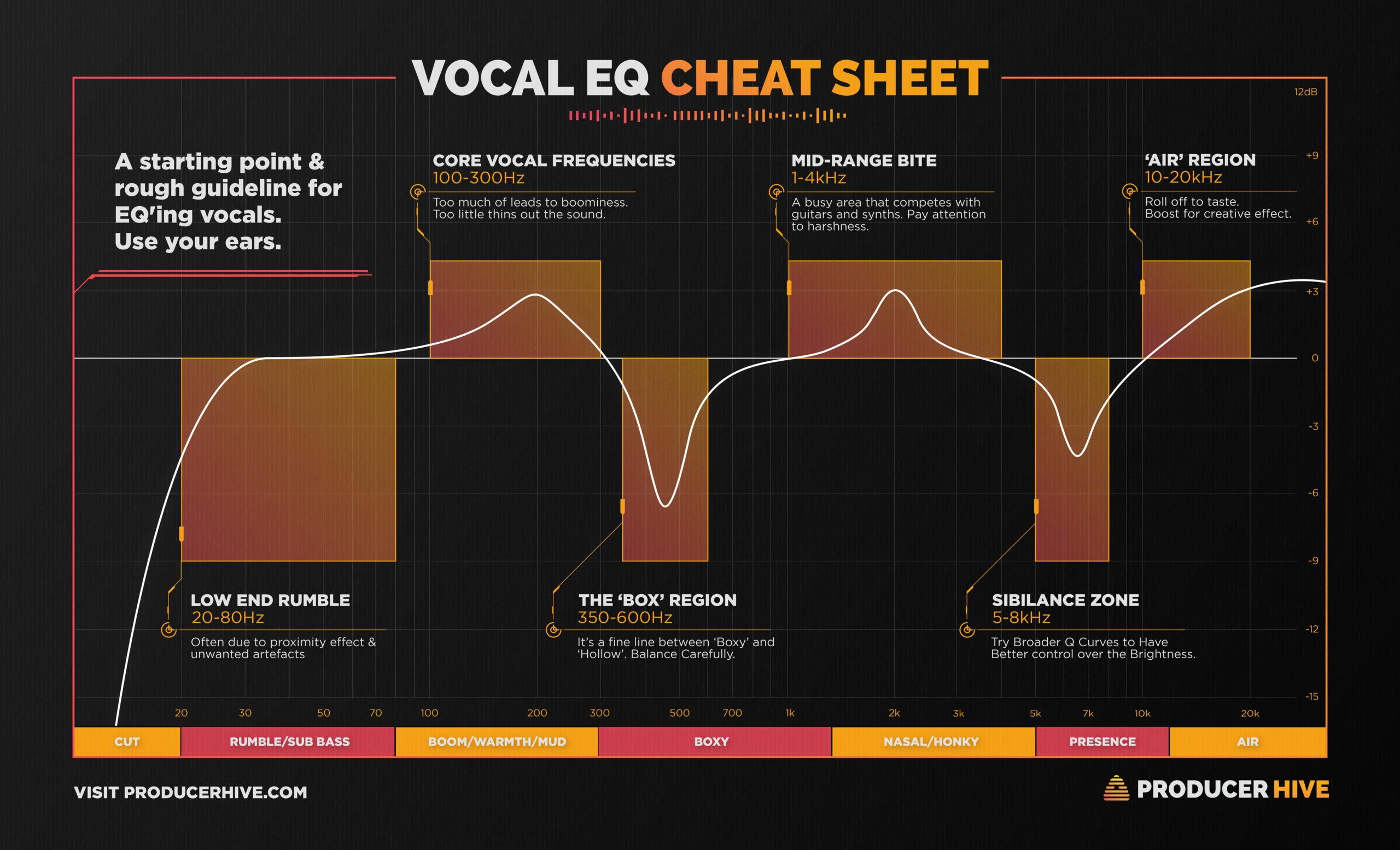
Sibilance refers to overly accentuated frequencies in the human voice typically between 5-10 kHz. The overly accentuated sound of S’s, Sh’s, T’s, Z’s, etc. can be extremely harsh, annoying and even painful.
NOTE: Each individual human voice is different — some individuals naturally have harsh sibilance while others don’t, and of course every shade in between.
NOTE 2: Particular microphones can exacerbate the sibilance of particular individuals, but it’s NOT solely due to any particular microphones, it’s due to the COMBINATION of a particular persons voice being recorded through a particular microphone. The combination of the frequency curve of a particular person’s voice being captured through the frequency curve of a particular microphone creates a unique resulting sound.
How to remove harsh sibilance from audio? Use a de-esser, but don’t overdo it because the resulting audio will sound like the person has a lisp! You don’t want to remove too much clarity from the sound, you just want to tame those sharp, painful frequencies.
Good de-essers:
- Scheps Omni Channel Plugin from Waves — an excellent channel strip plugin that actually has 2 de-essers built-in!
- soothe2 — My favorite de-esser; it’s a huge step up from traditional de-essers.
- Fabfilter Pro-DS — My favorite traditional de-esser; an amazing de-esser.
If a person’s recorded voice has extreme sibilance I will often use two de-essers in series 😉
How do you handle sibilance? Comment below!
Want to receive the Daily Goody in your email, daily or weekly? Subscribe free here.
And please keep in mind, the Daily Goody is only a tiny little tip, fact or lesson everyday. Please don’t expect any of these posts to be long, earth-shattering masterpieces that instantly answer every single question you can think of and completely transform you into a world class podcast engineer. “Little by little, a little becomes a lot.”
-
The Only Time When Audio Quality Affects Audience Size
If your podcast audio is annoying and difficult to hear and understand, your audience size will be less than what it should be because MANY listeners will simply turn off your podcast due to the horrible listening experience.
Does that mean you need world-class audio quality? No. All you need is “good enough” audio quality.
Here are the things to avoid or fix to ensure your audio is “good enough”:
- One or more participants sound very distant and difficult to understand. This happens because their microphone is not close enough to their mouth and/or their recording space is ultra-reverberant.
- One or more participants has nasty jarring plosives.
- One or more participants has nasty irritating sibilance.
- One or more participants has significantly loud background noise like air ducts, air conditioners, the road outside the window, family members in the next room, the computer fan, etc.
- One or more participants is making annoying extraneous sounds like banging on their desk, clicking a pen, tapping their foot, moving their microphone around unnecessarily, rearranging their desk mid-interview, etc.
- One or more participants is drifting on- and off-mic, which means at times they are loud as hell (very close to their mic) and other times they are dreadfully quiet (very far from their mic). These folks need to learn good mic technique, or use significant compression in post-production.
- Some participants audio is way louder or way quieter than others. This causes the listener to “ride their volume knob”, which means constantly alternating between turning down the loud person and turning up the quiet person.
- Intro/outro music being WAY TOO LOUD and the listener gets blasted with loud volume, causing them to “ride their volume knob” (see definition just above).
In summary, the only time audio quality affects audience size is when the audio is terrible, annoying and difficult to listen to.
What are your thoughts? Comment below.
Want to receive the Daily Goody in your email, daily or weekly? Subscribe free here.
And please keep in mind, the Daily Goody is only a tiny little tip, fact or lesson everyday. Please don’t expect any of these posts to be long, earth-shattering masterpieces that instantly answer every single question you can think of and completely transform you into a world class podcast engineer. “Little by little, a little becomes a lot.”
-
Tips for EQ’ing a Lavalier Microphone in Post-production
In my experience most lavalier microphone recordings are a bit dark, muddy and/or lacking clarity. This happens because the microphone is below the person’s mouth and not in front of their mouth, which means the mic doesn’t capture as much mid and high frequencies because those frequencies are more directional and are mostly projected forward in the direction they are speaking as opposed to down and into the lavalier microphone. I apologize for that horrible Frankenstein sentence 🙁
Here’s how I usually EQ lavalier microphones in post-production:
- Typically to remove 1-4 dB of low-mid muddiness using a bell curve centered around 200-350 Hz with a Q between 1-2.
- Typically I add 1-4 dB of high shelving EQ starting around 2-5 kHz.
- Sometimes I remove 1-2 dB of nasally-ness (is that a word??) using a bell curve centered around 700-800 Hz with a Q between 1-2.
How do you handle lavalier recordings in post? Comment below!
Want to receive the Daily Goody in your email, daily or weekly? Subscribe free here.
And please keep in mind, the Daily Goody is only a tiny little tip, fact or lesson everyday. Please don’t expect any of these posts to be long, earth-shattering masterpieces that instantly answer every single question you can think of and completely transform you into a world class podcast engineer. “Little by little, a little becomes a lot.”
-
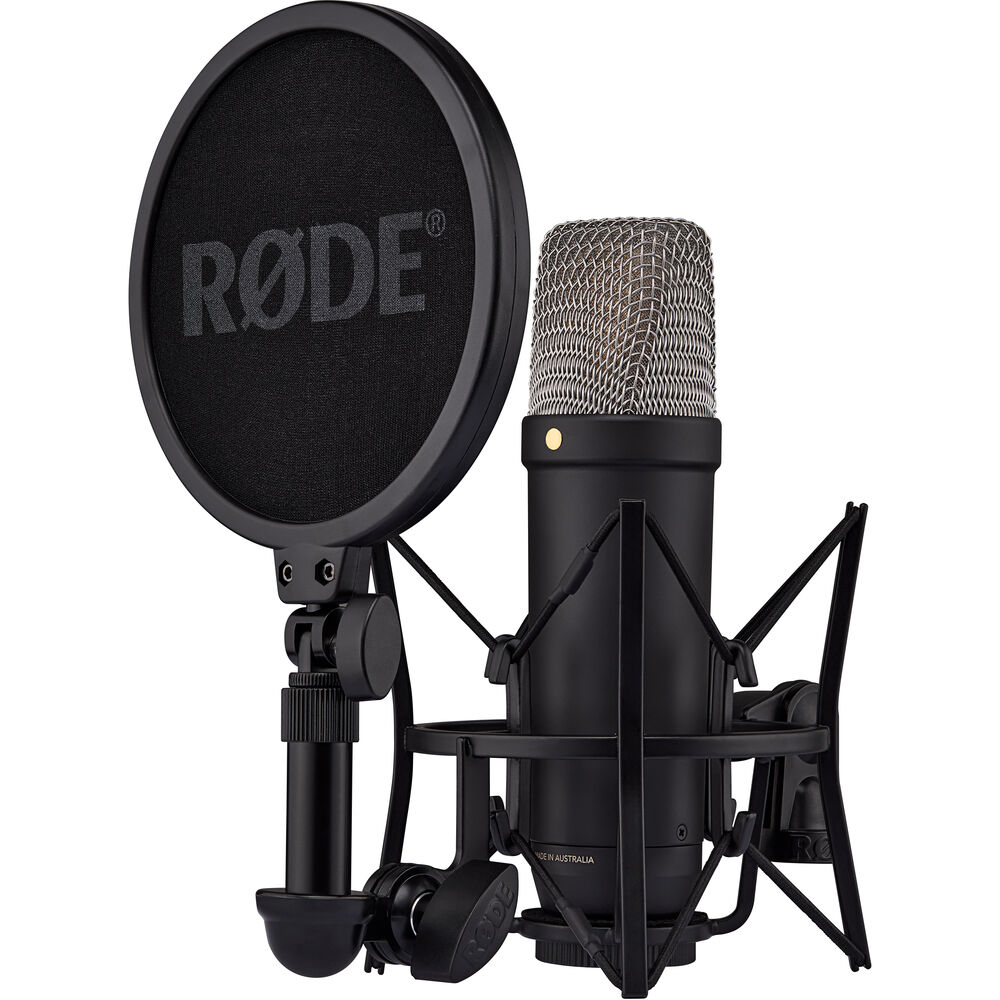
RØDE NT1 5G Hybrid Condenser Microphone (with 32-bit Float)
Exceptional new microphone just released! It’s a new version of the RØDE NT1 (originally released in 1991).
The RODE NT1 5th Generation Large-Diaphragm Cardioid Condenser XLR/USB Microphone ($249) was unveiled a few days ago and Allan Tépper has written a very good “first look and a first listen” article on it.
Highlights:
- It’s a “hybrid” microphone having analog XLR and digital USB-C outputs
- It’s the first to offer true 32-bit floating with its built-in A-to-D (analog to digital converter)
- It’s the first to have a USB connection inside of an XLR connector
- and more
I own and LOVE my NT1 so I expect this new version to be excellent as well.
Check out Allan’s article for more information.
What are your thoughts on the new features and specifications? Comment below. The 32-bit float definitely excites me 🙂
Want to receive the Daily Goody in your email, daily or weekly? Subscribe free here.
And please keep in mind, the Daily Goody is only a tiny little tip, fact or lesson everyday. Please don’t expect any of these posts to be long, earth-shattering masterpieces that instantly answer every single question you can think of and completely transform you into a world class podcast engineer. “Little by little, a little becomes a lot.”
-
Compressors vs. Levelers: When to Use One Over the Other?
PLEASE NOTE:
- By compressors I’m referring to traditional compressors like CLA-2A, CLA-76, etc., as well as compressors found within channel strip plugins like the Scheps Omni Channel, SSL G-Channel, etc.
- By levelers I’m referring to leveler plugins like Vocal Rider, etc. (See full definition below)
Both compressors and levelers reduce/compress the dynamic range of audio but they accomplish this in different ways.
When to use a compressor:
When the raw audio has a fairly consistent level with occasional loud peaks/outbursts, AND the level never gets extremely quiet due to the participant mumbling or trailing off at the end of sentences, etc. I would say this describes about 80% of raw podcast audio.
When to use a leveler:
When the raw audio has a HUGE dynamic range due to occasional loud peaks/outbursts AND occasional extremely quiet mumbling or trailing off at the end of sentences, etc. I would say this describes about 20% of raw podcast audio. FYI, with extremely dynamic audio like this I usually use both a compressor and a leveler, usually compressor first then leveler, also making sure not to use either one too aggressively.
A good definition of a leveler:
A leveler acts a little bit like a compressor in that it changes the level of audio signals it is processing. Unlike a compressor which typically only lowers the level of signals above its threshold, a leveler acts as a sort of automatic level control and will increase or decrease the level of program material to maintain a consistent volume over time. Sometimes levelers are referred to as automatic gain controls (AGC). These devices do not usually need to generate rapid changes in a signal like a compressor or limiter, but will change the material gradually over a specified period of time in order to achieve a near constant output level. As such, peaks of a short duration will get through as though no device was in line so it may also be necessary to use a compressor or limiter in conjunction with a leveler.
What is your experience with these processors? Comment below!
Want to receive the Daily Goody in your email, daily or weekly? Subscribe free here.
And please keep in mind, the Daily Goody is only a tiny little tip, fact or lesson everyday. Please don’t expect any of these posts to be long, earth-shattering masterpieces that instantly answer every single question you can think of and completely transform you into a world class podcast engineer. “Little by little, a little becomes a lot.”
-
Ten Terrific Tips for Podcast Production – PES 244
I overview 10 podcast production tips and techniques from recent Daily Goody posts Feb. 14 thru Mar. 9, 2022 (see list below). You can sign up to receive Daily Goody’s in your email every day or a weekly roundup. Sign up here.
Daily Goody posts that I discussed in this episode:
- The Debate Over Editing Out Breaths vs. Leaving Breaths In
- How To Handle Clients That Won’t Heed Your Advice To Improve Their Audio Quality
- Using Pixels to Track Podcast Ad Stats?
- Here’s the article I mentioned
- Reasons I Sometimes Use Volume Boost in My Podcast Player App
- RØDE Broadcaster (Microphone)
- What Equipment Do You Recommend for New Podcasters?
- Here’s the post I mentioned: An Inexpensive Podcasting Equipment Setup to Sound Great
- Fabfilter Pro-DS, an Exceptional De-esser
- When a Remote Guests’ Internet Fails and They Disconnect
- Want Me to Dial-in Custom Settings for Your Voice? (EQ, Compression, Etc.)
- Editing the Timing Between a Question and the Answer
Other Notes:
- If you ever have questions please reach out!
- The start date for the next PES semester is April 4, 2023! (fyi, the course is delivered once per quarter)
- If you’d like to share this show with any of your podcaster friends, feel free to send them a message saying, “Btw, here’s a show about podcast audio production you may find helpful” with this link: https://podcastengineeringschool.com/subscribe/
- My smaller course for editors/producers who want more good clients: Getting New Clients at Higher Rates
Let me know if you have any questions or need any help with anything,
~Chris -
Handling Podcast Clients That Send You Their Audio Last Minute and Expect You to Drop Everything to Produce It Immediately
Before considering this question you should first have a solid contract with each client that addresses the minimum amount of time your client must expect between when they send you their raw audio and when you will complete the production of that episode. Personally I specify 5 business days, and other producers specify a different timeframe I’m sure. (What’s your timeframe? Comment below)
Then, if your client requests or demands to have an episode produced in less time than they agreed to for any reason, you have the choice to either:
- Satisfy their demand at your inconvenience.
- Tell them they will have to wait and unfortunately miss their “deadline”.
- Charge them an additional fee to expedite the production. (Note: This fee should also be clearly spelled out in the contract.)
Are there any other options you can think of? Comment below.
And if a particular client continually takes advantage of you by disobeying the contract they agreed to, consider firing them.
Want to receive the Daily Goody in your email, daily or weekly? Subscribe free here.
And please keep in mind, the Daily Goody is only a tiny little tip, fact or lesson everyday. Please don’t expect any of these posts to be long, earth-shattering masterpieces that instantly answer every single question you can think of and completely transform you into a world class podcast engineer. “Little by little, a little becomes a lot.”
-
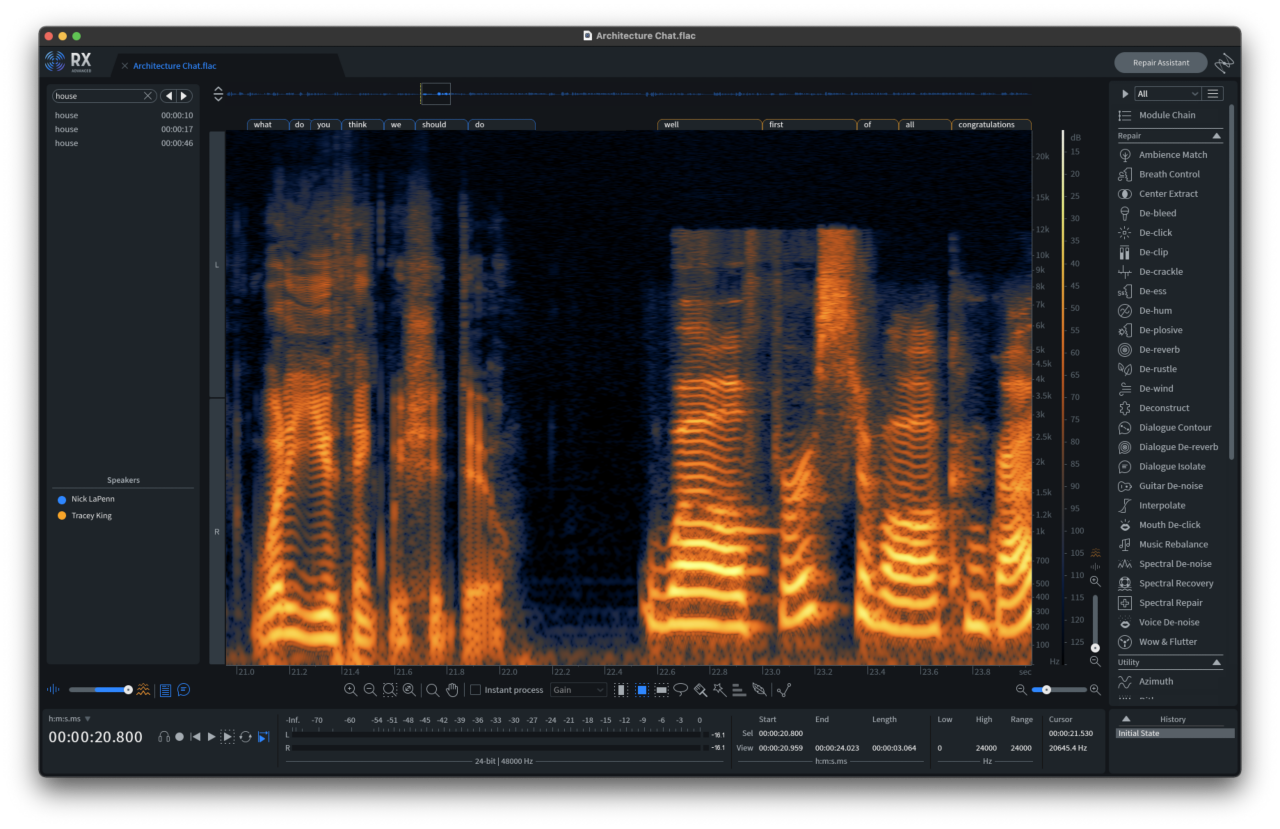
Using a Spectrogram to Precisely Identify Sibilance Frequencies
A spectrogram is a visual display of how loud audio events are at different frequencies. This means you can use your eyes (in addition to your ears) to help identify various audio phenomena including sibilance, plosives, etc.
Not all applications have a spectral display but iZotope RX and Adobe Audition do, among other smaller lesser-known apps.
To help you dial in the settings of a de-esser, you can first look at the spectral display of a recording and see the precise frequency range where the sibilance is. Then set your de-esser accordingly.
Have you ever used a spectrogram display like this? Comment below.
Want to receive the Daily Goody in your email, daily or weekly? Subscribe free here.
And please keep in mind, the Daily Goody is only a tiny little tip, fact or lesson everyday. Please don’t expect any of these posts to be long, earth-shattering masterpieces that instantly answer every single question you can think of and completely transform you into a world class podcast engineer. “Little by little, a little becomes a lot.”
-
Updating Your Audio/Video Apps and Plugins
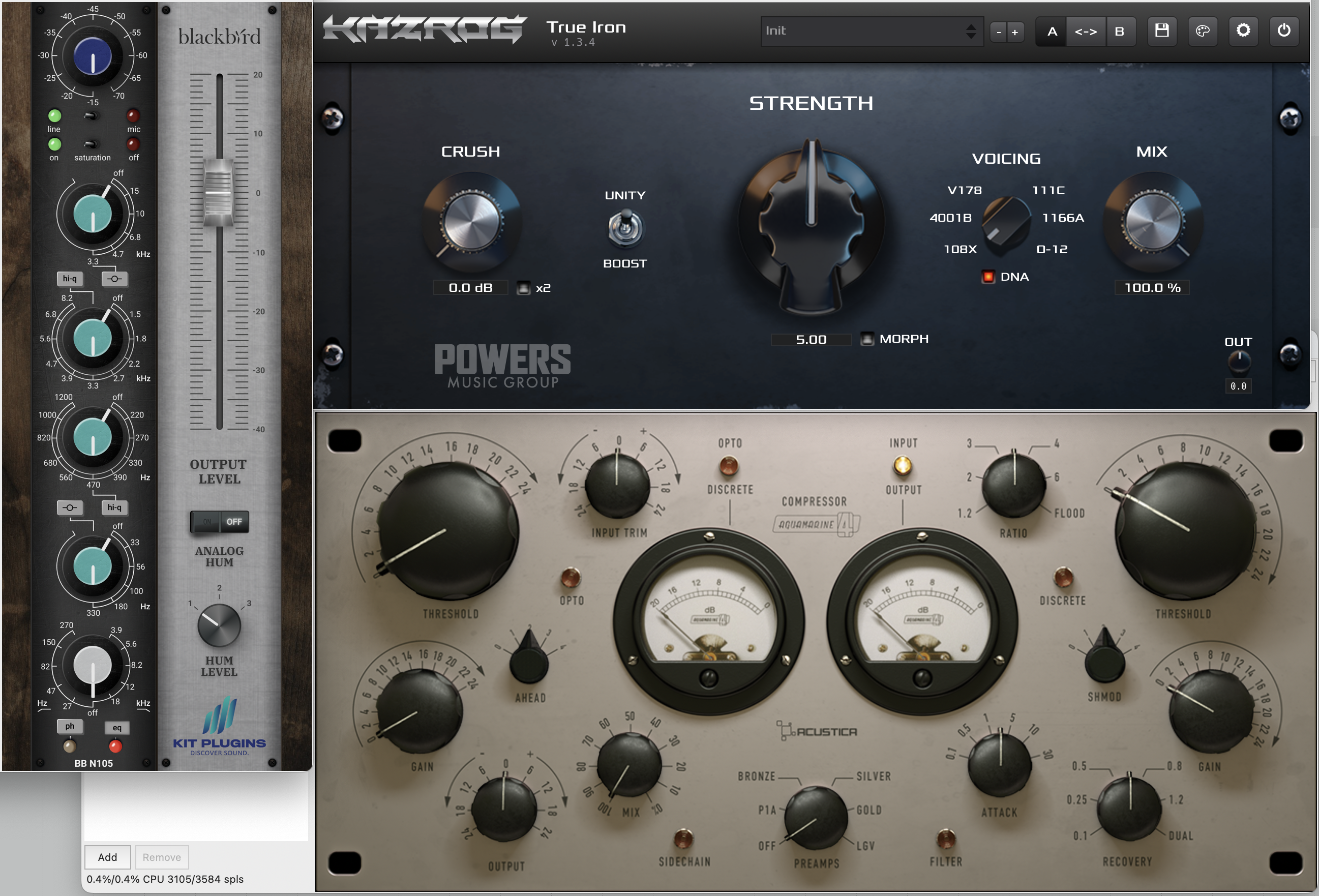
I just updated iZotope RX 10, Audio Hijack, and various plugins including True Iron, BB N105, Aquamarine 4, Trackspacer, and a few others.
I sometimes forget to check for updates for weeks/months but every so often I go through all my plugins and look for updates and update them.
How do you handle app and plugin updates? Comment below!
Want to receive the Daily Goody in your email, daily or weekly? Subscribe free here.
And please keep in mind, the Daily Goody is only a tiny little tip, fact or lesson everyday. Please don’t expect any of these posts to be long, earth-shattering masterpieces that instantly answer every single question you can think of and completely transform you into a world class podcast engineer. “Little by little, a little becomes a lot.”
-
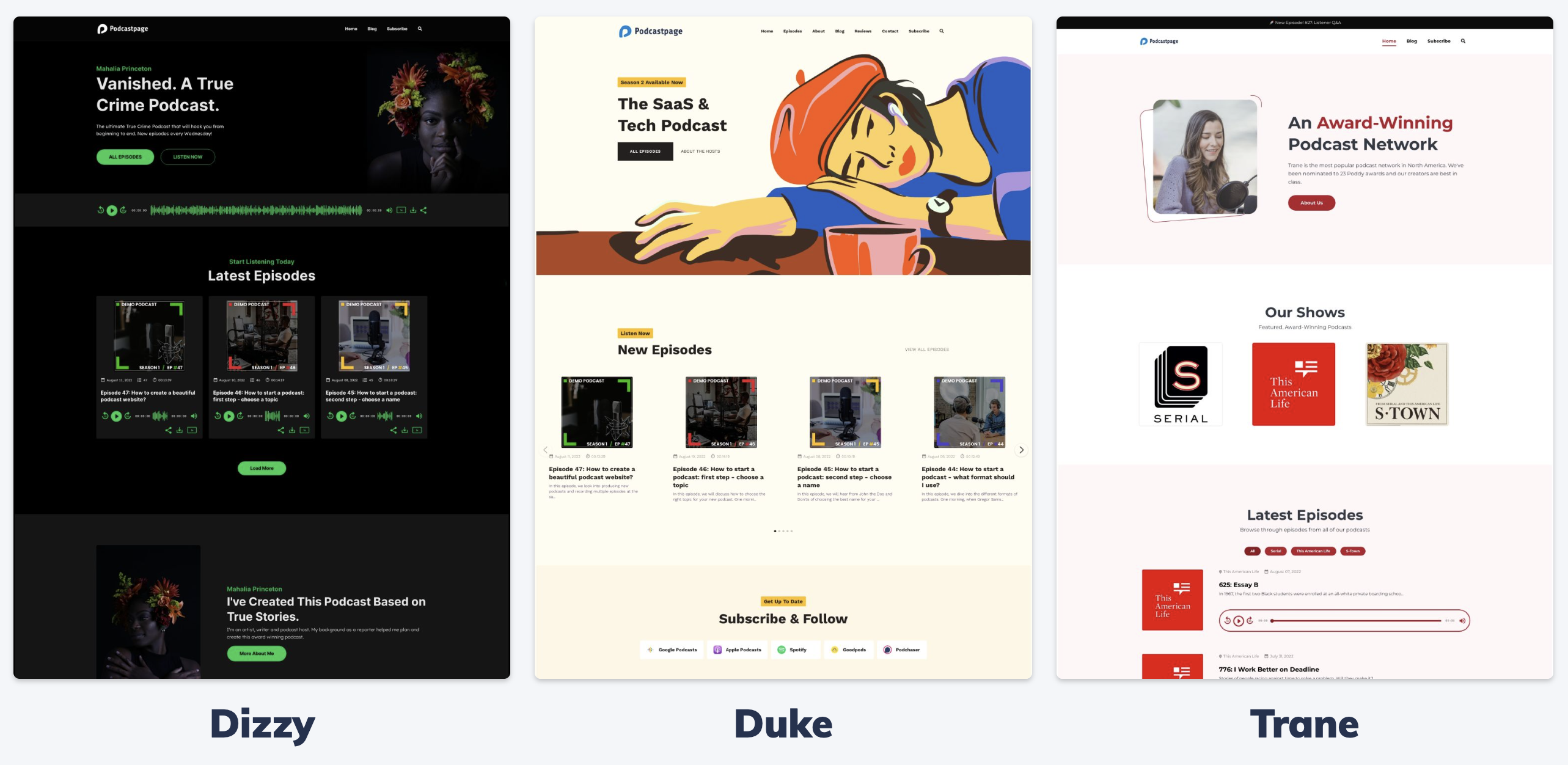
Podcastpage.io – Website Building Platform Dedicated for Podcasters
I recently spoke with the creator of Podcastpage.io and it seems to be an excellent way for podcasters to easily have and maintain a robust website for their podcast.
I don’t use their service yet but if/when I start a new podcast I’m going to carefully consider Podcastpage.io. A Podcastpage.io website is definitely easier to manage than a WordPress site, and it’s definitely more feature rich than the websites offered by the biggest podcast media hosting companies like Libsyn and Blubrry.
More info from their website:
Podcastpage.io is a website building platform that is dedicated for podcasters. You can create a full website for your show, include custom pages, blog posts, and easily connect your podcast to import all existing (and future) episodes as well. It comes with built-in podcasting features right out of the box, so it’ll make your life easier when creating a website for your show. You can easily add an audio player, add your podcast subscribe/follow buttons, import transcripts, and make it easier and more fun to listen to your episodes and share the website.
Podcastpage comes with a drag & drop page builder, so creating your pages and layouts (without compromising on design) is as easy as it gets. There are several podcast website templates you can choose from, and an easy site-wide customizer for your global styles. It comes with built-in SEO, and you won’t have to deal with plugins, maintenance, updates or any other headache. It’s a full “No Code” platform so you don’t have to be an expert or a web designer to get started and launch your website.
There are many included integrations you can use to take your site to the next level, for example connect your YouTube channels or playlist and import new videos continuously. Add your latest Instagram posts to the website, or connect your Twitter account to auto-tweet new episodes as those are released.
Do you use Podcastpage.io? Comment below!
Want to receive the Daily Goody in your email, daily or weekly? Subscribe free here.
And please keep in mind, the Daily Goody is only a tiny little tip, fact or lesson everyday. Please don’t expect any of these posts to be long, earth-shattering masterpieces that instantly answer every single question you can think of and completely transform you into a world class podcast engineer. “Little by little, a little becomes a lot.”
-
Adobe Podcast Speech Enhancement (FREE)
I briefly tried out the new and free Adobe Podcast Speech Enhancement algorithm. It’s a web page where you can upload your audio, the algorithm will process it, and then you can download the processed audio.
The algorithm removes background noise, room reverb, plosives and microphone handling noise, among other things. It also makes voices sound closer (proximity) if they were originally recorded further away from a microphone.
My first test, which was a bit unfair, I uploaded an obscenely and disgustingly bad piece of audio which the algorithm cleaned up considerably, but the resulting audio sounded pretty bad and kind of destroyed (which is also normal with all other de-noise plugins when trying to fix incredibly bad audio).
Then I watched several YouTube videos of other people testing the speech enhancement, including this one which was helpful.
My Simple Initial Conclusions:
When removing a small or moderate amount of noise and reverb, etc., the algorithm works well; it can definitely save mildly-bad recordings.
When removing a large or extreme amount of noise and reverb, etc., the algorithm simply can’t make it sound good — actually, no current algorithm can. That’s just too difficult of a job for these algorithms.
In the YouTube video I watched, the host processed his normal microphone sound which was already excellent quality, and the algorithm significantly worsened the quality of the audio. It removed lots of clarity.
A Bit of Audio Wisdom:
DO NOT rely on any plugins or processors to make your audio sound good. When recording podcasts capture high quality audio that is free from significant background noise, reverb, plosives, etc. An ounce of prevention is worth a pound of cure 😉
Have you tried Adobe Podcast Speech Enhancement yet? Comment below!
Want to receive the Daily Goody in your email, daily or weekly? Subscribe free here.
And please keep in mind, the Daily Goody is only a tiny little tip, fact or lesson everyday. Please don’t expect any of these posts to be long, earth-shattering masterpieces that instantly answer every single question you can think of and completely transform you into a world class podcast engineer. “Little by little, a little becomes a lot.”
-
Libsyn Connect Beta (Remote Podcast Recording Portal)
Just announced from Libsyn:
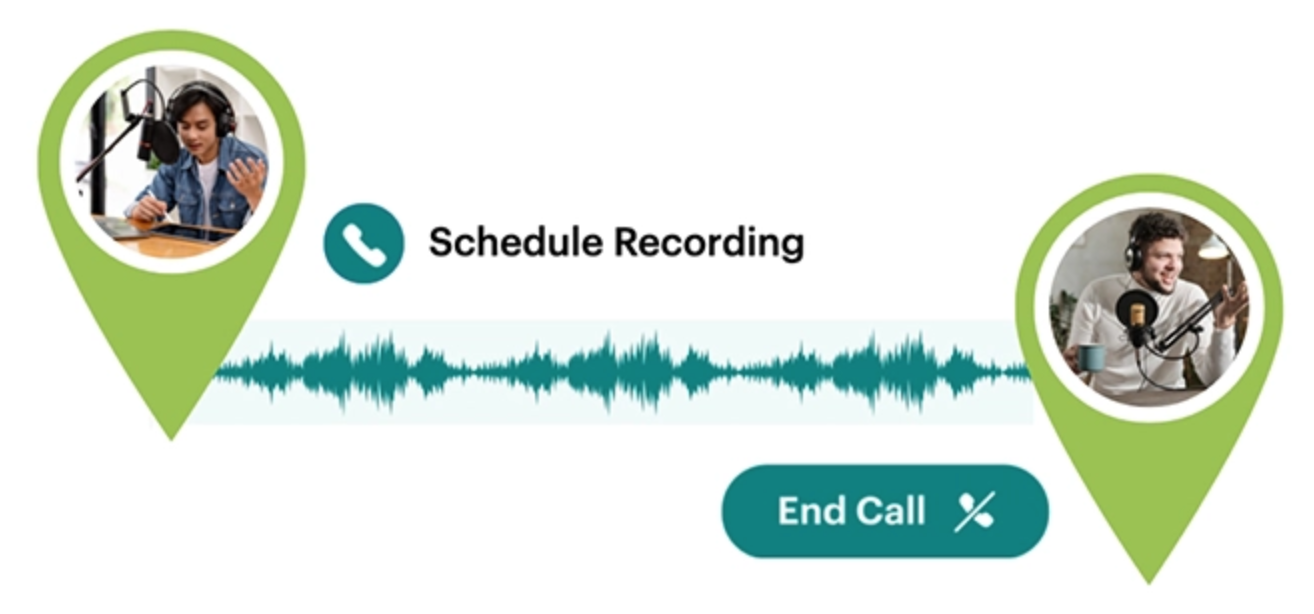
Introducing easy, high-quality remote recording with Libsyn Connect Beta. With Connect, you won’t need third-party services like Zoom, Squadcast, Riverside or Zencastr for remote audio recording. Connect provides a way to invite your co-host or guest(s) and get high-quality audio recordings within your Libsyn workflow.
Libsyn Connect Beta is available with All Plans for a limited time through February 7th. Upgrade your Libsyn plan to a $20+ plan for continued access to Connect after February 7th, 2023.
Connect Beta Remote Recording Features:
- Schedule a call recording for later or start one now
- Invite guests with just a 1-click link (no accounts needed)
- See all calls — completed and scheduled
- Set start time & duration
- Share call notes
- Chat window for collaboration during a call
- Record separate tracks
- Get superior, high-quality audio (always)
- Download for post-production editing
- Access recordings from your Media Library
- Store your Connect recordings for FREE
- Compatible with popular browsers – Safari too!
Are you going to try Libsyn Connect Beta? I am, because I already use Libsyn. Comment below.
Want to receive the Daily Goody in your email, daily or weekly? Subscribe free here.
And please keep in mind, the Daily Goody is only a tiny little tip, fact or lesson everyday. Please don’t expect any of these posts to be long, earth-shattering masterpieces that instantly answer every single question you can think of and completely transform you into a world class podcast engineer. “Little by little, a little becomes a lot.”
-
New Auphonic AutoEQ Filtering (Beta)
Auphonic’s new AutoEQ automatically analyzes and optimizes the frequency spectrum of a voice recording, to remove sibilance (De-esser) and to create a clear, warm, and pleasant sound.
Listen to the audio examples and read more HERE.
Will you try this new feature soon? Comment below.
Want to receive the Daily Goody in your email, daily or weekly? Subscribe free here.
And please keep in mind, the Daily Goody is only a tiny little tip, fact or lesson everyday. Please don’t expect any of these posts to be long, earth-shattering masterpieces that instantly answer every single question you can think of and completely transform you into a world class podcast engineer. “Little by little, a little becomes a lot.”
-

The Time Flexibility of Independent Podcast Producers/Editors Who Work From Home
One of the big benefits of running your own podcast production business working from home for remote clients is that you can have significant time flexibility. Need to pick up your child from school? No problem. Need to quit early on Friday to leave for a fun weekend? No problem. Juggling life and family obligations is easier when you have flexibility with your work schedule.
I’ll address part-time as well as full time:
Part-time independent podcast producers who work from home usually have a full-time day job as well, so they have to produce podcasts on evenings and/or weekends. Typically their clients will send recorded episode audio to be produced within a certain number of days, and the producer can decide which day/time they want to actually produce that audio. Sometimes clients will ask for “rush jobs” because they recorded an episode last minute, but editors can easily train their clients not to rely on rush jobs.
Full-time independent podcast editors/producers who work from home usually work normal business hours but they also have the flexibility to take days off or half-days off depending on their workload, deadlines and client activity. Alternatively, some producers choose to work less than 40 hours per week so they can focus more of their attention on other projects or hobbies, etc. What a glorious lifestyle!
Add your thoughts in the comments below.
Want to receive the Daily Goody in your email, daily or weekly? Subscribe free here.
And please keep in mind, the Daily Goody is only a tiny little tip, fact or lesson everyday. Please don’t expect any of these posts to be long, earth-shattering masterpieces that instantly answer every single question you can think of and completely transform you into a world class podcast engineer. “Little by little, a little becomes a lot.”
-
Kazrog True 252 (7-Band Graphic Equalizer)
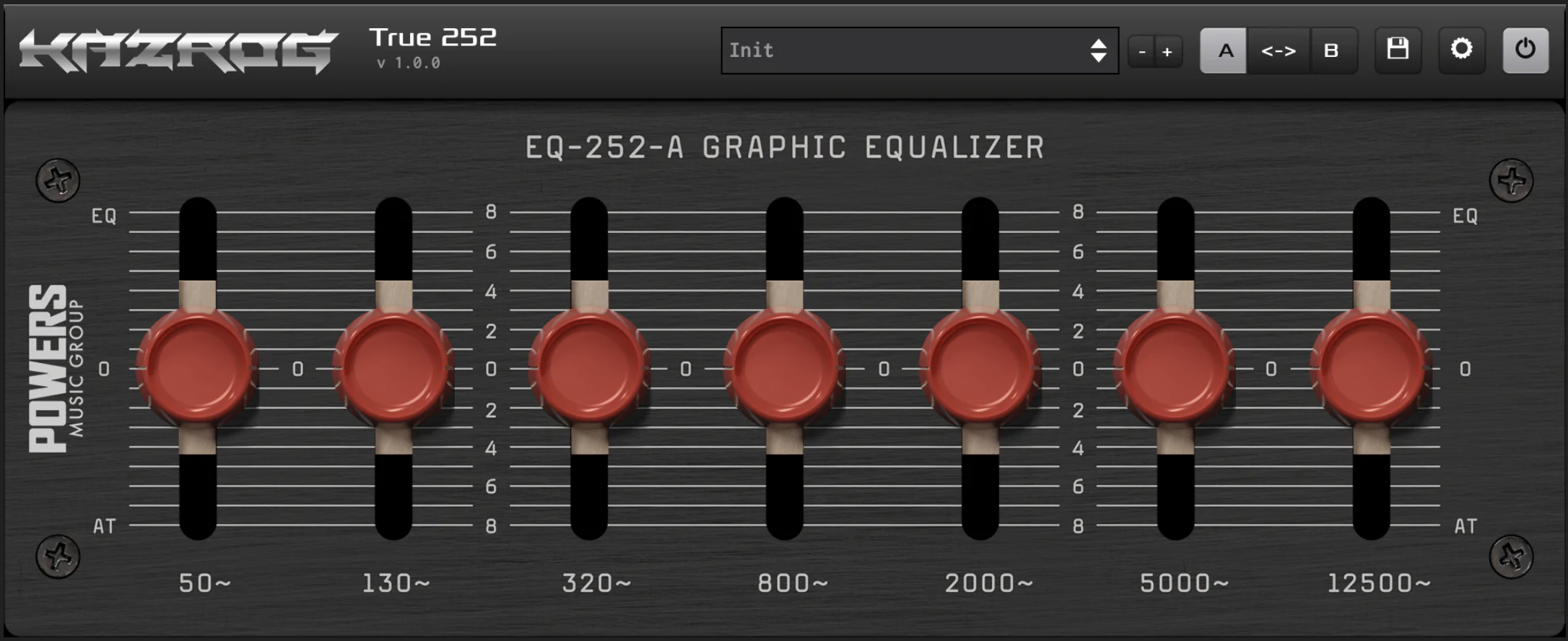
The Kazrog True 252 equalizer plugin ($39.99) sounds SO good. It’s a 7-band graphic equalizer, and graphic EQ’s are the simplest kind of EQ’s to use. It can add warmth (low end) and clarity (high end) that sound extremely clean and pleasant.
How do graphic EQ’s work? Graphic equalizers have multiple bands with preset frequency centers which the user can boost or cut (see image of the True 252 above). The user simply boosts or cuts the gain of each preset frequency band to enhance the sound.
The frequency centers of the True 252 are 50 Hz, 130 Hz, 320 Hz, 800 Hz, 2000 Hz, 5000 Hz and 12500 Hz. Each band is specifically chosen to affect an important area of the frequency spectrum.
I’m in the honeymoon phase with this plugin so of course I want to add it to every track! HA
Have you ever used a graphic equalizer? Comment below!
Want to receive the Daily Goody in your email, daily or weekly? Subscribe free here.
And please keep in mind, the Daily Goody is only a tiny little tip, fact or lesson everyday. Please don’t expect any of these posts to be long, earth-shattering masterpieces that instantly answer every single question you can think of and completely transform you into a world class podcast engineer. “Little by little, a little becomes a lot.”
-
Can Spiders Chew Through Audio Cables? Also, Enrollment Is Open for PES! (Starts April 4th, 2023)
Wow, I’m getting desperate for things to write about HA! FYI, this is post #801 of my Daily Goody podcast production tips, tricks and info which you can sign up to receive HERE. Or you can simply browse all the posts HERE. 801!!!
Regarding spiders, no, they won’t chew through cables or bother your studio setup in any way, except for scaring you from time to time! But if you’re curious what spiders can actually bite through, check out this article.
Regarding APRIL 4 — that’s when the next cohort of Podcast Engineering School starts! You probably know 10 people who would love to develop an in-demand professional skill, work from home, earn really good money, and always be in-demand. Please tell them about Podcast Engineering School.
Also don’t miss all the videos I’m putting out on our PES YouTube channel.
What do you fear more than spiders? Anything? COMMENT BELOW!
Want to receive the Daily Goody in your email, daily or weekly? Subscribe free here.
And please keep in mind, the Daily Goody is only a tiny little tip, fact or lesson everyday. Please don’t expect any of these posts to be long, earth-shattering masterpieces that instantly answer every single question you can think of and completely transform you into a world class podcast engineer. “Little by little, a little becomes a lot.”
-
What Is an Independent Podcast Producer/Editor?
An independent podcast producer/editor is a person who works for themselves producing podcasts for clients. They can do this full time or part-time. Most run their business and do all their work from home, but some do on-site work as well.
Full time podcast producers, if they are trained professionals, can develop a wonderful career and excellent income ($100k+). They don’t have to answer to any bosses and can make their own schedules. Of course this type of career comes with lot of responsibility to work hard, put in the time, continue developing professionally, talking with potential clients, etc.
Part-time podcast producers/editors typically have a separate day job (which is their main, dependable income source) and they produce podcasts on evenings and/or weekends to earn extra money.
Producing full time is a very rewarding career! I’ve been doing it since 2012 😉
What are your thoughts? Comment below.
Want to receive the Daily Goody in your email, daily or weekly? Subscribe free here.
And please keep in mind, the Daily Goody is only a tiny little tip, fact or lesson everyday. Please don’t expect any of these posts to be long, earth-shattering masterpieces that instantly answer every single question you can think of and completely transform you into a world class podcast engineer. “Little by little, a little becomes a lot.”
-
The Reality of Processing Podcast Audio Using Your Eyes vs. Using Your Ears
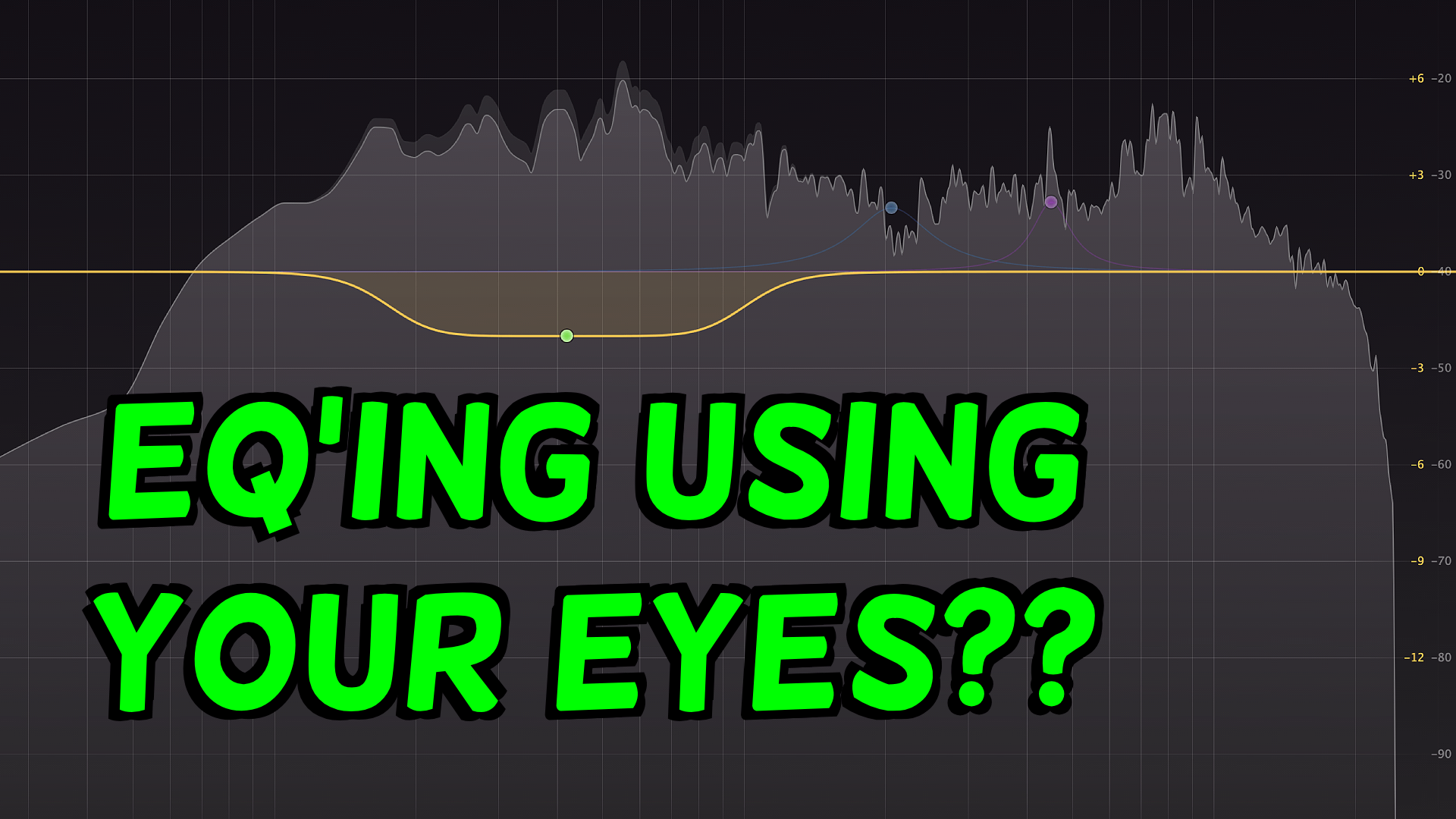
First question you may have is: How do people process audio using only their eyes? Example 1: By only looking at an EQ’s frequency curve analysis and making EQ adjustments based solely on that visual information, instead of listening to how the EQ is affecting the sound. Example 2: By only looking at a compressor’s gain reduction meter and making compressor adjustments based solely on that visual information, instead of listening to how the compressor is affecting the sound. There are many more examples.
The practice of ONLY using your eyes when producing audio is HIGHLY NOT recommended because what you see visually is a TERRIBLY incomplete representation of how the audio sounds.
Of course there are many helpful ways in which using visual information when producing audio can be extremely helpful, but visual information should never be the only information you use.
Tattoo this on your chest: Your ears should always be the final judge when producing audio. Period.
Furthermore, using only your eyes to EQ audio is not always perfectly reliable because, regardless of the raw recording’s frequency curve, each individual human voice has a unique timbre (tone color) and each different microphone has a unique timbre. This means you will NOT want every recording’s EQ curve to be identical. For instance, some microphones sound better with accentuated lower frequencies BECAUSE the microphone itself does an exceptional job of representing the clarity and articulation of the mid/higher frequencies, so “seeing” accentuated low end with your eyes doesn’t always mean you should reduce the level of those low frequencies.
Does any of this make sense to you? LOL
Let me know what you think in the comments 🙂
Want to receive the Daily Goody in your email, daily or weekly? Subscribe free here.
And please keep in mind, the Daily Goody is only a tiny little tip, fact or lesson everyday. Please don’t expect any of these posts to be long, earth-shattering masterpieces that instantly answer every single question you can think of and completely transform you into a world class podcast engineer. “Little by little, a little becomes a lot.”
-
Be Aware: Why People Turn Off Your Podcast Due to Audio Issues
Why exactly do listeners get frustrated with bad sounding audio and angrily turn off the offending podcast? Because it makes listeners do work instead of simply enjoying the content!
Here are the audio issues that annoy listeners the most:
- One or more participants sound very distant and difficult to understand. This happens because their microphone is not close enough to their mouth and/or their recording space is ultra-reverberant.
- One or more participants is making annoying extraneous sounds like banging on their desk, clicking a pen, tapping their foot, moving their microphone around unnecessarily, rearranging their desk mid-interview, etc.
- One or more participants is drifting on- and off-mic, which means at times they are loud as hell (very close to their mic) and other times they are dreadfully quiet (very far from their mic). These folks need to learn good mic technique, or use significant compression in post-production.
- Some participants audio is mixed way louder or way softer than others. This causes the listener to “ride their volume knob”, which means constantly alternating between turning down the loud person and turning up the quiet person.
- Intro/outro music is WAY TOO LOUD and the listener gets blasted with loud volume, causing them to “ride their volume knob” (see definition just above).
- One or more participants has nasty jarring plosives.
- One or more participants has nasty irritating sibilance.
- One or more participants has significantly loud background noise like air ducts, air conditioners, the road outside the window, family members in the next room, the computer fan, etc.
Did I miss any?
Have you ever turned off a podcast due to horrible sound? Comment below!
Want to receive the Daily Goody in your email, daily or weekly? Subscribe free here.
And please keep in mind, the Daily Goody is only a tiny little tip, fact or lesson everyday. Please don’t expect any of these posts to be long, earth-shattering masterpieces that instantly answer every single question you can think of and completely transform you into a world class podcast engineer. “Little by little, a little becomes a lot.”