Your cart is currently empty!
Author: Chris Curran
-

2023: The Year of Earning Lots of Money Producing Podcasts From Home!
Opportunities abound!
You can do this part-time on nights and weekends, or you can commit to going full-time with your own podcast production business, start onboarding clients and earn lots of money working from home as a professional podcast engineer/producer.
These days it’s a valuable and in-demand career path to produce podcasts professionally. You could work the rest of your life producing podcasts, working for yourself, making your own schedule, and enjoying the income and self-confidence you deserve. If you’re a professional.
May you start your New Year well. I wish you health, prosperity and long life 🙂
Want to receive the Daily Goody in your email, daily or weekly? Subscribe free here.
And please keep in mind, the Daily Goody is only a tiny little tip, fact or lesson everyday. Please don’t expect any of these posts to be long, earth-shattering masterpieces that instantly answer every single question you can think of and completely transform you into a world class podcast engineer. “Little by little, a little becomes a lot.”
-
Why the Massive Improvement in Audio Quality of Podcasters, YouTubers and Streamers From 2020-2022?
Remember in 2020 when lockdowns started and tons of people (including ultra-popular media figures) started Livestreaming, YouTubing and attending Zoom meetings from home? Do you also remember that ALL THAT AUDIO WAS HORRENDOUS SOUNDING?!?!
I do. Most of those folks just dove into creating content using their computer’s built-in microphone AND THEY THOUGHT THIS WOULD SOUND JUST FINE?!?!? Wow. It was brutal.
But over the 2+ years since lockdowns first began, it seems like everyone (thank God) has realized the importance of good audio, purchased a good microphone and now has good (or at least decent) sound.
There are MANY new streamers that I used to watch in 2020 who had awful audio quality, but over the past 2 years they have bought decent microphones and even have it close to their mouths! Yay!
FYI, I believe the microphone industry had its biggest boom ever during lockdowns and afterwards. Can anyone confirm this?
Did you also witness anyone starting with abysmal audio quality, and then realize it, and then improve massively? Comment below!
Want to receive the Daily Goody in your email, daily or weekly? Subscribe free here.
And please keep in mind, the Daily Goody is only a tiny little tip, fact or lesson everyday. Please don’t expect any of these posts to be long, earth-shattering masterpieces that instantly answer every single question you can think of and completely transform you into a world class podcast engineer. “Little by little, a little becomes a lot.”
-
Why Q1 Is the Perfect Time To Grow Your Podcast Production Business (Prepare Now!)
If you’re currently looking to onboard new podcast production clients, Q1 of 2023 is your next best opportunity to have massive growth in your business.
Why?
- Larger companies can access their 2023 budget money starting in January and this allows them to start new projects like podcasts in Q1.
- The New Year is when lots of people make decisions to start new projects, including starting a podcast. Usually they’ve been considering it for a while but the New Year provides the spark that finally lights their fire.
Jump into January with massive action and focus if you want to grow your production business!
Oh, and I have this course, of course 😉 HA —> Getting New Clients at Higher Rates
What do you think about January timeframe in this regard? Comment below!
Want to receive the Daily Goody in your email, daily or weekly? Subscribe free here.
And please keep in mind, the Daily Goody is only a tiny little tip, fact or lesson everyday. Please don’t expect any of these posts to be long, earth-shattering masterpieces that instantly answer every single question you can think of and completely transform you into a world class podcast engineer. “Little by little, a little becomes a lot.”
-
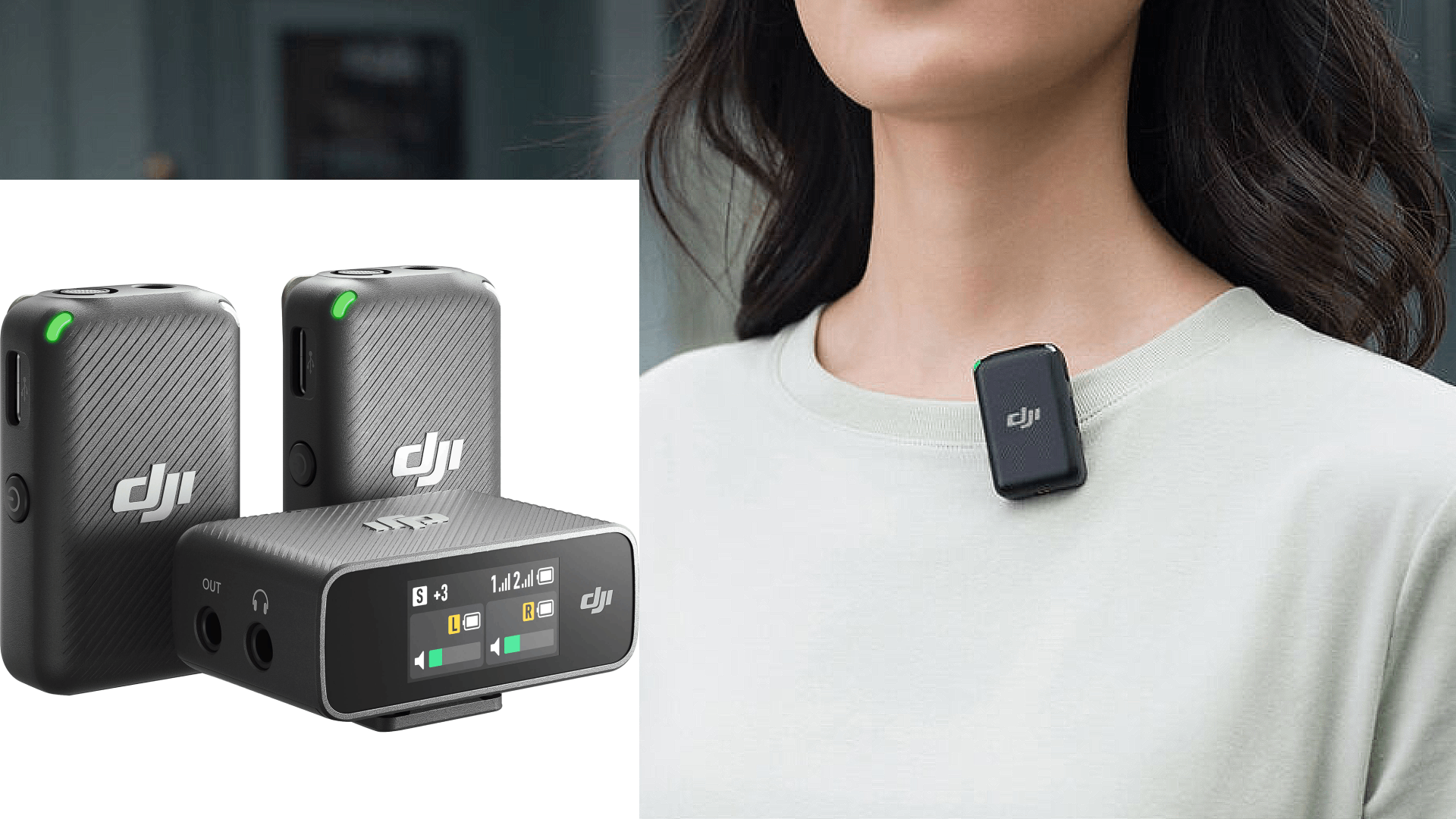
DJI Mic (Dual Wireless Microphone/Recorder System)
Btw, this system is comparable to the RODE Wireless GO II system.
I just bought this system to bring with me on my Holiday travels to record my Mom. I had researched the DJI Mic and the RODE Wireless GO II and decided to purchase the DJI for various reasons.
The DJI Mic comes with:
- Two clip-on microphones which are both recorders as well as wireless transmitters. (It’ll be a pain-free experience for my Mom to just clip the very small microphone to her shirt and forget it’s there.)
- One receiver which can route both mics audio to a video camera, phone, livestream, audio recorder, etc.
- A super-handy charging case which houses and charges both transmitters and the receiver.
- The necessary cables
MORE INFO here: DJI Mic 2-Person Compact Digital Wireless Microphone System/Recorder for Camera & Smartphone (2.4 GHz)
What are your thoughts on this? Comment below!
Want to receive the Daily Goody in your email, daily or weekly? Subscribe free here.
And please keep in mind, the Daily Goody is only a tiny little tip, fact or lesson everyday. Please don’t expect any of these posts to be long, earth-shattering masterpieces that instantly answer every single question you can think of and completely transform you into a world class podcast engineer. “Little by little, a little becomes a lot.”
-
Ten Advanced Podcast Production Tips – PES 243
I overview 9 podcast production tips and techniques from recent Daily Goody posts Jan. 19 thru Feb. 11, 2022 (see list below). You can sign up to receive Daily Goody’s in your email every day or a weekly roundup. Sign up here.
Daily Goody posts that I discussed in this episode:
- Expecting a Plugin Preset to Do What the Name Says
- My Experience Opening and Operating a Brick and Mortar Podcast Studio for 3 Years – PES 230
- When Editing Out Silence To Increase Pacing, Be Sure To…
- Loudness Range of Final Episodes – What’s Good and What’s Bad?
- The “White Glove” Service: Engineering Client Recording Sessions Remotely
- Using Cable Labels to Reduce “Spaghetti” Confusion in Your Studio
- Best Sounding Microphone Emulation *For My Voice* Using My Sphere L22 Microphone
- Gain Rider Plugin: DynaRide2
- Should You Ask Remote Guests to Record Their Own Audio Locally?
- Best Recording Tip for Someone Who Speaks at a Soft, Low Volume
- [VIDEO] MaxxVolume Plugin for Podcast Production (Handy as Heck!)
- As I mentioned, here’s episode 225 where I used the Sphere L22 with the U47 emulation.
Other Notes:
- If you ever have questions please reach out!
- The start date for the next PES semester is January 10, 2023! (fyi, the course is delivered once per quarter)
- If you’d like to share this show with any of your podcaster friends, feel free to send them a message saying, “Btw, here’s a show about podcast audio production you may find helpful” with this link: https://podcastengineeringschool.com/subscribe/
- My smaller course for editors/producers who want more good clients: Getting New Clients at Higher Rates
Let me know if you have any questions or need any help with anything,
~Chris -
Hear for Yourself: One Sounds Good, the Other Horrible
Analyze and compare the sound of these two videos. (below)
This audio comparison demonstrates the importance of good audio resolution and encoding quality, as well as serving as a nice little ear-training exercise 😉
*TO HEAR THE BIGGEST DIFFERENCES, LISTEN TO:
- The clarity of the high frequencies. (Especially the hi-hats, but guitars and vocals, too. The badly encoded version is very “swishy/smeared/blurry” sounding in the high-mids and high frequencies. Terrible.)
- The general level of low frequencies (The good one has plenty of low end and a nice fullness, the bad one has much less low frequency level and therefore sounds very midrangy)
GOOD sounding Unforgiven II:
Encoded properly BAD sounding Unforgiven II:
Encoded badly What is your evaluation of this comparison? Comment below!
Want to receive the Daily Goody in your email, daily or weekly? Subscribe free here.
And please keep in mind, the Daily Goody is only a tiny little tip, fact or lesson everyday. Please don’t expect any of these posts to be long, earth-shattering masterpieces that instantly answer every single question you can think of and completely transform you into a world class podcast engineer. “Little by little, a little becomes a lot.”
-
How to Share Audio Plugin Settings With Others
Of course you can always save your own plugin settings for the purpose of using the same exact settings on your voice next week or next year. But it’s also possible to share these settings with others and vice versa.
For instance, I offer folks (for free) my starting preset for the Scheps Omni Channel plugin from Waves. I can send you an .xps file which you would load into your Scheps Omni Channel plugin and voilà. If you want me to send you that, send me a message.
It’s easy to export and import the specific settings of individual plugins:
- Many plugins allow you to export and import preset files from within the plugin itself. For instance, Waves plugins allow you to “Save” and “Load” (export and import) plugin settings in the form of .xps preset files.
- There also seems to be a more generic way to export/import VST/VST3 plugin preset files, which seems to be facilitated by the DAW you’re using: VST3 Preset file (.vstpreset), and VST patch/bank file (.fxp/.fxb).
I’m sure there are other ways and probably better ways. Do you know of any? Please share in the comments!
Want to receive the Daily Goody in your email, daily or weekly? Subscribe free here.
And please keep in mind, the Daily Goody is only a tiny little tip, fact or lesson everyday. Please don’t expect any of these posts to be long, earth-shattering masterpieces that instantly answer every single question you can think of and completely transform you into a world class podcast engineer. “Little by little, a little becomes a lot.”
-

Is It Necessary To Use Compression on Your Voice When Livestreaming?
If you want professional sounding audio, the answer is Yes. But without compression you can still sound good by using good microphone technique.
How/where to use compression when livestreaming:
- Some streaming software, like OBS, contain audio processors (including compression) that you can use to process your voice in real-time when Livestreaming.
- Some microphones, like the Shure MV7, have real-time compression built into them, which you can turn on and adjust via the microphones app.
- You can plug your microphone into a hardware channel strip, like the dbx 286s, to compress your voice in real-time when Livestreaming.
- You can use routing software (like Audio Hijack, Sound Syphon or Voice Meeter, etc.) to add a compressor to your voice in real-time when Livestreaming.
Have you ever used compression when Livestreaming? Comment below with your juicy details 😉
Want to receive the Daily Goody in your email, daily or weekly? Subscribe free here.
And please keep in mind, the Daily Goody is only a tiny little tip, fact or lesson everyday. Please don’t expect any of these posts to be long, earth-shattering masterpieces that instantly answer every single question you can think of and completely transform you into a world class podcast engineer. “Little by little, a little becomes a lot.”
-
Is Recording Audio in 24-bit _REALLY_ That Much Better Than 16-bit??
Yes, 24-bit audio recordings contain 256 times more detail and resolution (!!!) than 16-bit audio. 24-bit audio can record 16,777,216 discreet values for loudness levels (or a dynamic range of 144 dB), versus 16-bit audio which can represent 65,536 discrete values for the loudness levels (or a dynamic range of 96 dB).
However, in terms of recording audio of individuals speaking on podcasts, it’s perfectly OK to record in 16-bit.
NOTE: Audio processors and plugins (like de-noise, de-reverb, etc.) can do a much better job when you feed them 24-bit audio because it gives them lots more information to work with.
QUESTION for you — do you record your raw audio in 16-bit or 24-bit? Comment below.
Want to receive the Daily Goody in your email, daily or weekly? Subscribe free here.
And please keep in mind, the Daily Goody is only a tiny little tip, fact or lesson everyday. Please don’t expect any of these posts to be long, earth-shattering masterpieces that instantly answer every single question you can think of and completely transform you into a world class podcast engineer. “Little by little, a little becomes a lot.”
-
Nine More Production Tips For You – PES 242
FYI: You can see the video version of this episode on Podcast Engineering School’s YouTube channel HERE.
I overview 9 podcast production tips and techniques from recent Daily Goody posts Dec.13, 2021 thru Jan.17, 2022 (see list below). You can sign up to receive Daily Goody’s in your email every day or a weekly roundup. Sign up here.
Daily Goody posts that I discussed in this episode:
- Putting the Finishing Touch on Your Podcast Audio Before Publishing
- How Much Would You Like To Earn Producing Podcasts, $25k/year? $50k? $100k?
- Corey Marie Green, Author of The Podcaster’s Audio Handbook – PES 228
- Get Fuller Sound by Manipulating Harmonics
- Do This Before New Years Day
- Urgent Advice for Any Podcaster Using a Blue Yeti
- Chris’s Goody Bag – PES 229
- Do You Breakdown and Put Away Your Equipment After Recording, Or…?
- Brainworx bx_console AMEK 9099
- Please Don’t Ever Use Your Computers Built-in Microphone for Recording Podcasts
- Riverside’s Noise Suppression Feature
- VIDEO: CLA-2A Compressor/Limiter Plugin (Waves) for Podcast Production
Other Notes:
- If you ever have questions please reach out!
- The start date for the next PES semester is January 10, 2023! (fyi, the course is delivered once per quarter)
- If you’d like to share this show with any of your podcaster friends, feel free to send them a message saying, “Btw, here’s a show about podcast audio production you may find helpful” with this link: https://podcastengineeringschool.com/subscribe/
- My smaller course for editors/producers who want more good clients: Getting New Clients at Higher Rates
Let me know if you have any questions or need any help with anything,
~Chris -
Do You Edit Podcasts While Standing up or Sitting Down?
Do you edit podcasts while standing up or sitting down?
I always produce audio while sitting down, but someday I want to buy a standing desk so I can get up off my ***. HA!
Comment below with your posture preferences!
Want to receive the Daily Goody in your email, daily or weekly? Subscribe free here.
And please keep in mind, the Daily Goody is only a tiny little tip, fact or lesson everyday. Please don’t expect any of these posts to be long, earth-shattering masterpieces that instantly answer every single question you can think of and completely transform you into a world class podcast engineer. “Little by little, a little becomes a lot.”
-
Be Sure To Use Stereo Versions of Plugins on Stereo Tracks *IF…
Be sure to use stereo versions of plugins on stereo tracks IF you want to hear the stereo track in stereo. Because when you use a mono plugin on a stereo track, you will only hear one side of the stereo track (usually the left, I believe).
Want to receive the Daily Goody in your email, daily or weekly? Subscribe free here.
And please keep in mind, the Daily Goody is only a tiny little tip, fact or lesson everyday. Please don’t expect any of these posts to be long, earth-shattering masterpieces that instantly answer every single question you can think of and completely transform you into a world class podcast engineer. “Little by little, a little becomes a lot.”
-
6 Ways To Speed Up Your Podcast Editing Process
Without sacrificing the quality of your edits, here are 6 ways you can speed up significantly and edit podcast audio MUCH faster:
- Use keyboard shortcuts for your most used commands.
- Listen to and verify every edit immediately after making it so when you get to the end of the file you’re done.
- Don’t even attempt super-tricky edits (like removing the umm from “and-umm”), unless you’re getting paid extra to remove literally every single umm, etc.
- Speed up playback to 1.5x or more. Sadly, some applications don’t have this functionality.
- If you’re editing someone else’s podcast and they regularly use lots of filler words and generally have poor presentation skills, work with them (gently) to overcome these deficiencies.
- Get in the mindset and habit of zipping through your editing quickly while, of course, always maintaining the highest quality editing.
Do you have any other ideas to add to the list? Comment below 🙂
Want to receive the Daily Goody in your email, daily or weekly? Subscribe free here.
And please keep in mind, the Daily Goody is only a tiny little tip, fact or lesson everyday. Please don’t expect any of these posts to be long, earth-shattering masterpieces that instantly answer every single question you can think of and completely transform you into a world class podcast engineer. “Little by little, a little becomes a lot.”
-
How To Get Amazing Deals on Audio Plugins
Most audio plugins go on sale from time to time, so the way to get the best deals on awesome plugins is to monitor their prices and wait until they go on sale. The easiest way to monitor prices is to get on the email lists of all the plugin companies you want to monitor, and they will let you know when their plugins are on sale.
This may seem like a considerable amount of work but in less than a minute each day you can scan those emails for deals.
And sometimes the sales are really amazing like 80-90% off!
Want to receive the Daily Goody in your email, daily or weekly? Subscribe free here.
And please keep in mind, the Daily Goody is only a tiny little tip, fact or lesson everyday. Please don’t expect any of these posts to be long, earth-shattering masterpieces that instantly answer every single question you can think of and completely transform you into a world class podcast engineer. “Little by little, a little becomes a lot.”
-
What Is Microphone Technique and Why Is It Important and Helpful When Recording Podcasts?
Microphone technique is art of managing your proximity to a microphone.
Bad microphone technique results in a sound and audio signal level that is:
- Wildly dynamic (oscillating between sometimes extremely loud and sometimes extremely quiet)
- Very unpleasant for listeners to experience (oscillating between painfully loud and literally inaudible)
- Prone to clipping and distortion
- Much more difficult to process in post-production
Good microphone technique avoids all the issues listed above and provides all listeners with a good listening experience during which they can focus on the content and not be continually distracted by audio issues.
How to have good microphone technique:
- Consciously establish a good default distance (3-6 inches) from the microphone for when you’re speaking at normal volume, and stay there when speaking at normal volume.
- If and when you raise the volume of your voice considerably, move your mouth further away from the microphone (by leaning back a bit or turning away slightly).
- If and when you lower the volume of your voice, move your mouth closer to the microphone. (for softer, more intimate moments and whispering, etc.)
When you first start doing this, it will feel incredibly awkward and difficult, but very soon you will develop the habit of good microphone technique and you’ll never have to consciously think about it again!
How good is your microphone technique? Comment below.
Want to receive the Daily Goody in your email, daily or weekly? Subscribe free here.
And please keep in mind, the Daily Goody is only a tiny little tip, fact or lesson everyday. Please don’t expect any of these posts to be long, earth-shattering masterpieces that instantly answer every single question you can think of and completely transform you into a world class podcast engineer. “Little by little, a little becomes a lot.”
-

Fabfilter Pro-Q 3 – The Best EQ User Interface on the Market
In addition to being one of the best sounding EQ plugins available, and in addition to probably being the most feature-rich EQ plugin available, the Fabfilter Pro-Q 3‘s user interface experience is arguably the best around due to how visual, intuitive and helpful it is to the user.
Many podcast editors and producers absolutely LOVE to mix with their eyes as well as their ears, and the Pro-Q 3 literally shows all the frequency levels present in a sound. It even identifies specific frequencies that appear to be spiking above the rest, showing you exactly where and how much you may want to attenuate.
It’s not cheap (~$169), but overall it’s arguably the best EQ available in the world today, and the majority of audio professionals probably concur with this assessment/opinion.
Here’s an overview video from Fabfilter themselves: Introduction to FabFilter Pro-Q 3
You can get a 30-day free trial HERE.
If you already use this plugin, how much do you LOVE IT?!?! Right?
Want to receive the Daily Goody in your email, daily or weekly? Subscribe free here.
And please keep in mind, the Daily Goody is only a tiny little tip, fact or lesson everyday. Please don’t expect any of these posts to be long, earth-shattering masterpieces that instantly answer every single question you can think of and completely transform you into a world class podcast engineer. “Little by little, a little becomes a lot.”
-
Audio Adjectives and What Different Frequencies Like
Starting at 20:47 in episode 100 I demonstrate what various frequency ranges sound like and also discuss the audio “adjectives” associated with each range.
You’ll hear what these audio adjectives actually sound like: Big, Small, Boomy, Muddy, Boxy, Hollow, Midrangy, Biting, Presence, Clarity, Brightness, “Air,” and that telephone sound.
Let me know what you think.
Want to receive the Daily Goody in your email, daily or weekly? Subscribe free here.
And please keep in mind, the Daily Goody is only a tiny little tip, fact or lesson everyday. Please don’t expect any of these posts to be long, earth-shattering masterpieces that instantly answer every single question you can think of and completely transform you into a world class podcast engineer. “Little by little, a little becomes a lot.”
-
How To Use a High-pass Filter To Increase the Clarity of a Voice
The human voice is essentially a mid-range instrument, which means that most of its information resides in the mid-range of the frequency spectrum.
Humans can hear frequencies between around 20 Hz and 20,000 Hz, and the human voice does contain information along this entire spectrum, but the vast majority of the sound (including the most important frequencies for intelligibility) resides between around 250Hz and 4kHz.
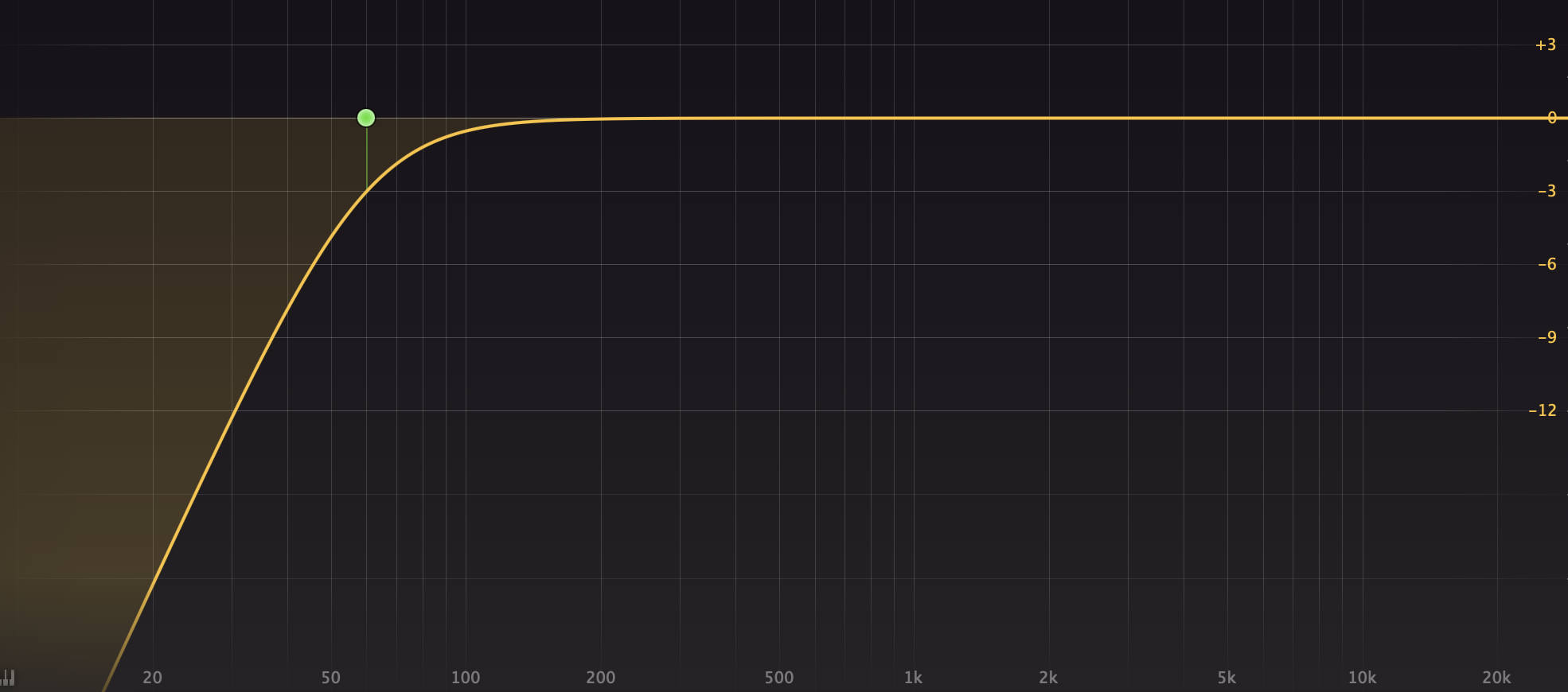
A high-pass filter reduces the volume of the lowest frequencies (usually around 60-100Hz and below); it lets “high frequencies pass” through, hence the name high-pass filter. See the EQ curve above.
Basically, when you reduce the level of the lowest frequencies in any sound source, the midrange and higher frequencies will stand out more. Therefor, generally, using a high-pass filter will increase the clarity in a persons voice. Of course you can overdo it, so don’t overdo it! HA
Finally, the HOW TO:
Use a high-pass filter (available in most EQ plugins) to reduce the lowest frequencies. Common practice is to reduce from around 60Hz and below, but sometimes you will need to reduce more, say from 80-100Hz and below. Use your ears to determine how much you should remove to make the voice more clear. But don’t remove too much or else the voice will start sounding small, wimpy, thin and possibly harsh.
FYI, here’s a very helpful and thorough technical article titled Facts About Speech Intelligibility — https://www.dpamicrophones.com/mic-university/facts-about-speech-intelligibility
Did you find this helpful? Comment below 🙂
Want to receive the Daily Goody in your email, daily or weekly? Subscribe free here.
And please keep in mind, the Daily Goody is only a tiny little tip, fact or lesson everyday. Please don’t expect any of these posts to be long, earth-shattering masterpieces that instantly answer every single question you can think of and completely transform you into a world class podcast engineer. “Little by little, a little becomes a lot.”
-
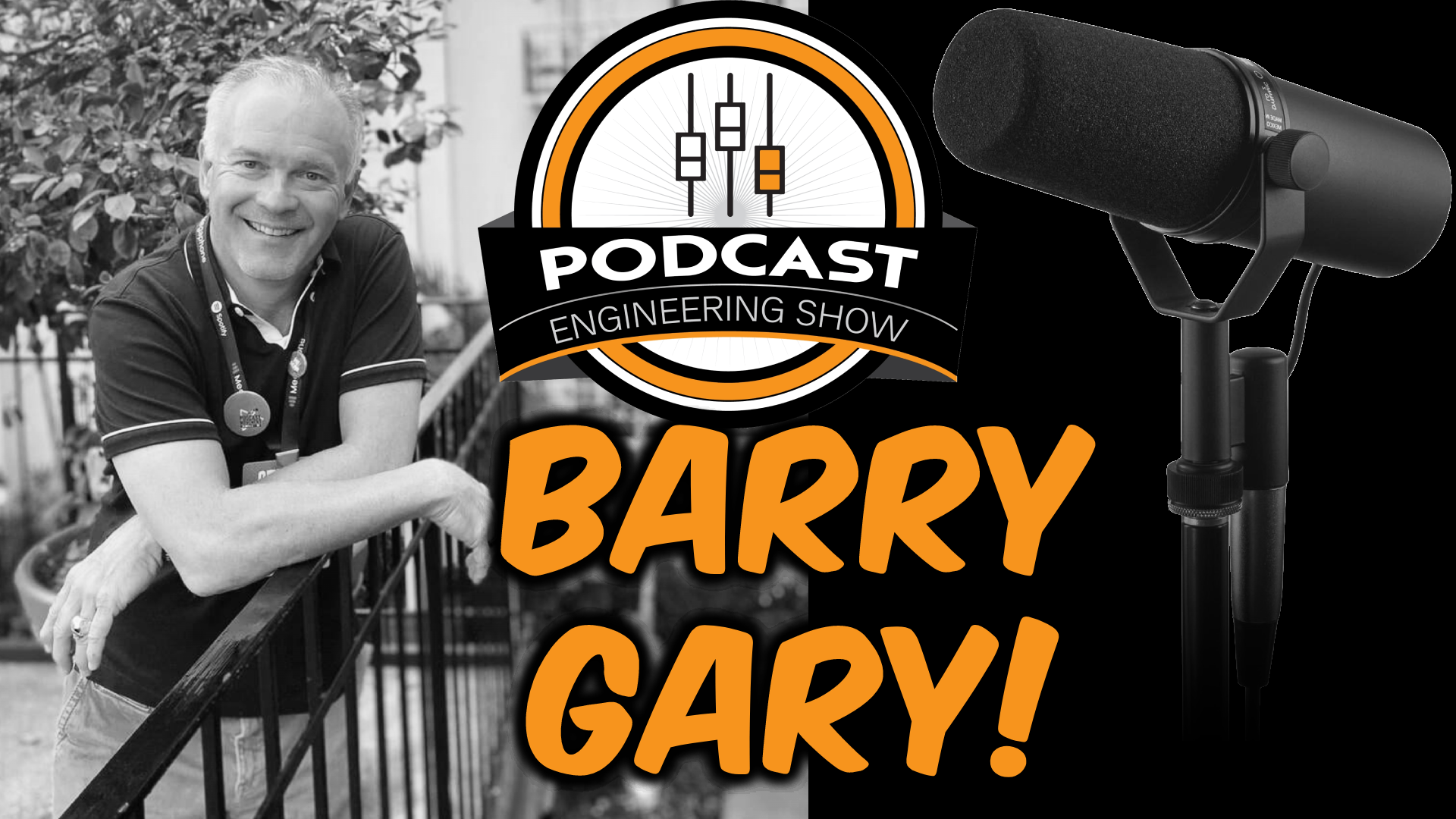
Barry Gary Providing Top-Notch Production Services to Organizations – PES 241
Returning guest Barry Gary shares so many excellent tips for producing podcasts for companies and organizations. Barry is the host of The Louisville Cycling Podcast. He also produces other podcasts including Medchat and Parenting With You. Also, here is Barry’s first appearance on this show.
Barry and I discussed many things including:
- Equipment: Shure SM7b, Cloudlifter, dbx 286s, Focusrite Scarlett 18i20, Yamaha monitors
- Apps: Adobe Audition, Riverside
- Processing: Compression, EQ
- Show development for clients
- Internal podcasts for clients
- Workflow changes: Stopped going on-site to record, and now does most of his editing in Adobe Audition now.
NEWS: In case you missed it, I’m now publishing a YouTube video everyday here on the PES channel. Please consider subscribing.
Other Notes:
- If you ever have questions please reach out!
- You can sign up to receive Daily Goody’s in your email a few times per week or a weekly roundup. Sign up here.
- The start date for the next PES semester is January 10, 2023! (fyi, the course is delivered once per quarter)
- If you’d like to share this show with any of your podcaster friends, feel free to send them a message saying, “Btw, here’s a show about podcast audio production you may find helpful” with this link: https://podcastengineeringschool.com/subscribe/)
Let me know if you have any questions or need any help with anything,
~Chris