Your cart is currently empty!
Author: Chris Curran
-
Frequency

Frequency = cycles per second. Meaning, how many times a sound wave completes one full cycle in one second.
Frequency is the property of sound that most determines pitch.
The unit of audio frequency is the hertz (Hz).
The generally accepted standard range of audible frequencies for humans is 20 to 20,000 Hz.
*If you’d like to hear what some different frequencies sound like, check out our episode 100 starting at 20 min. and 37 seconds in, where I demonstrate lots of frequencies.
Want to receive the Daily Goody in your email, daily or weekly? Subscribe free here.
And please keep in mind, the Daily Goody is only a tiny little tip, fact or lesson everyday. Please don’t expect any of these posts to be long, earth-shattering masterpieces that instantly answer every single question you can think of and completely transform you into a world class podcast engineer. “Little by little, a little becomes a lot.”
.
-
PES Graduates
Graduates of Podcast Engineering School are in the top 1% of podcast engineers in the world in terms of audio production knowledge, strategy and tactics.
As each graduate works and practices, they quickly hone their audio skills and their critical listening capabilities.
Being an elite professional opens up many opportunities in business and life.
Want to receive the Daily Goody in your email, daily or weekly? Subscribe free here.
And please keep in mind, the Daily Goody is only a tiny little tip, fact or lesson everyday. Please don’t expect any of these posts to be long, earth-shattering masterpieces that instantly answer every single question you can think of and completely transform you into a world class podcast engineer. “Little by little, a little becomes a lot.”
.
-
Podcast Editors: Choose Your Hours
Obviously one of the great advantages of being your own boss is choosing your own hours.
In addition to the convenience, it’s also helpful to clarify what hours you will work in order to focus your efforts during those times and then NOT work outside of those times. That’s how you can have a life 😉
Of course sometimes the world (clients, family, circumstances, etc.) will require you to work outside of your normal hours, but those instances are rare.
The idea is: Design your workdays and hours, and then outside of those times live the rest of your life fully. Don’t get sucked into the trap of working everyday all the time.
Want to receive the Daily Goody in your email, daily or weekly? Subscribe free here.
And please keep in mind, the Daily Goody is only a tiny little tip, fact or lesson everyday. Please don’t expect any of these posts to be long, earth-shattering masterpieces that instantly answer every single question you can think of and completely transform you into a world class podcast engineer. “Little by little, a little becomes a lot.”
.
-
The Vintage Tape Module in iZotope Ozone 8
The cool thing about this module, besides sounding really good and gluing your mix together really well, is that it’s right inside Ozone 8 where you’ll probably also be using the multiband compressor, limiter, multiband exciter, EQ and more.
Tape saturation can really warm up and smoothen out your entire mix, and this module has good options and controls.
And BTW, the reason many companies are making plugins that model actual tape saturation from the days of analog tape is because analog tape sounds better than digital in many ways!
Want to receive the Daily Goody in your email, daily or weekly? Subscribe free here.
And please keep in mind, the Daily Goody is only a tiny little tip, fact or lesson everyday. Please don’t expect any of these posts to be long, earth-shattering masterpieces that instantly answer every single question you can think of and completely transform you into a world class podcast engineer. “Little by little, a little becomes a lot.”
.
-
Editing Out Distracting Noises
Lots of times on podcasts, participants will make random distracting noises like moving their chair, throwing something down onto their desk, smacking the spacebar on their keyboard, clicking a pen, moving their microphone, and about a zillion other things.
If they make these noises WHILE they are speaking, there’s not much you can do, although with iZotope RX7 you can sometimes do a bit of magic (but that takes a lot of time!).
If they make these noises when they are NOT speaking, then it’s possible to edit out them out, and removing those noises really does make a big difference in terms of listening experience for the listeners.
Want to receive the Daily Goody in your email, daily or weekly? Subscribe free here.
And please keep in mind, the Daily Goody is only a tiny little tip, fact or lesson everyday. Please don’t expect any of these posts to be long, earth-shattering masterpieces that instantly answer every single question you can think of and completely transform you into a world class podcast engineer. “Little by little, a little becomes a lot.”
.
-
Vocal Rider from Waves
This plugin automatically boosts and cuts the level of a track to target a level that you specify. This is really handy for automatically boosting the parts of someone’s track when they start mumbling under their breath and become way too quiet, as well as automatically reducing the volume when someone laughs or yells way too loud, etc.
I use this plugin on almost every voice on every podcast episode I produce.
And it frequently goes on sale for $29 so keep a lookout 😉
Want to receive the Daily Goody in your email, daily or weekly? Subscribe free here.
And please keep in mind, the Daily Goody is only a tiny little tip, fact or lesson everyday. Please don’t expect any of these posts to be long, earth-shattering masterpieces that instantly answer every single question you can think of and completely transform you into a world class podcast engineer. “Little by little, a little becomes a lot.”
.
-
Chris’s Goody Bag, And Our New Announcer Guy – PES 140
Enjoy my brief overview of recent Daily Goody‘s (from May 24 through June 5). Here’s the link to view all those blog posts. And don’t forget that you can sign up to receive the Daily Goody in your email every day or once per week. Sign up here.
Here are the Daily Goody posts that we discussed in this episode:
- AMBEO Smart Headset Can Capture “3D” Audio
- How to Add Clarity to a Dull Sounding Recording?
- How Long Does It Take You to Edit?
- Tagging Your Final MP3/M4A Files With Metadata
- Cultivating Your Podcasting Clients
- Write Down Your Current Podcast Production Process in Detail
- Friday Audio Trivia! (May 31, 2019)
- RØDE PodMic
- My Recent On-Location Recording Setup
- My Reaper Kept Crashing After an Update…
- Ringr for Recording Guests Online
- Using an Omni-Directional Mic for News Reporter Type Interviews
Announcements (made by our new announcer guy….hehe):
- The new Focusrite Scarlett 2i2 3rd Gen is really nice.
- The next semester of PES starts September 10, 2019.
- Upcoming episodes: Travis Vengroff, Zach Moreno, Barry Gary, and Scott Somerville!
Big Thanks to everyone who comments on the website Daily Goody posts!
I appreciate you listening, and if you have any questions please let me know 🙂
If you know anyone who would like to learn more about the technical production of podcasts, please share this show with them.
.
-
Your Headphone Volume When Recording
When recording ANY audio, you should keep your headphone volume as low as possible to avoid feedback into your microphone.
Some people like to keep their headphones really loud so they can hear everything really well, but this is not a good practice when recording.
Of course during soundcheck you can crank up the volume to hear things more clearly, but before you start recording bring down the level of your headphones.
I keep my headphones at a very low volume when recording. It’s something you can easily get used to.
Want to receive the Daily Goody in your email, daily or weekly? Subscribe free here.
And please keep in mind, the Daily Goody is only a tiny little tip, fact or lesson everyday. Please don’t expect any of these posts to be long, earth-shattering masterpieces that instantly answer every single question you can think of and completely transform you into a world class podcast engineer. “Little by little, a little becomes a lot.”
.
-
The Positioning of Your Guests Headset Microphone
If your guest is wearing a traditional headset (which sits on their head like headphones and has a microphone on a little boom arm coming off one ear) there are a couple things to be aware of.
When sound checking them, make sure that their nose breath doesn’t overwhelm the mic with breath noise. Have them breath out of their nose and if you hear nasty wind noise on the mic then have them move the mic up or down about 1 inch, then test it again until you don’t hear that nose wind noise.
Once the microphone is positioned properly you have to tell your guest to NOT touch or move the microphone AT ALL. Don’t touch it, don’t move it. Because if they do, the mic will make noises which will be difficult to remove later, and in addition the new, different placement of the mic will sound very different than it did before they moved it, and it will take some effort in post-production to match the various levels and tones, etc.
Want to receive the Daily Goody in your email, daily or weekly? Subscribe free here.
And please keep in mind, the Daily Goody is only a tiny little tip, fact or lesson everyday. Please don’t expect any of these posts to be long, earth-shattering masterpieces that instantly answer every single question you can think of and completely transform you into a world class podcast engineer. “Little by little, a little becomes a lot.”
.
-
Saturation Knob from Softube (Free Plugin)
This is a free plugin, though you’ll have to download the Softube Central app to install and register the plugin.
It’s a modeled output distortion that can be used to warm up vocals and lots more.
The controls are very simple and few, so you won’t have to tweak 47 settings.
If you want to experiment with saturation on your podcast voices, this is a free way to do that.
Let me know how you make out 😉
Want to receive the Daily Goody in your email, daily or weekly? Subscribe free here.
And please keep in mind, the Daily Goody is only a tiny little tip, fact or lesson everyday. Please don’t expect any of these posts to be long, earth-shattering masterpieces that instantly answer every single question you can think of and completely transform you into a world class podcast engineer. “Little by little, a little becomes a lot.”
.
-
Dust in Your Studio
There are a few things you can do to keep your studio and equipment free from dust accumulation.
- Cover exposed equipment (when not using them) with some sort of cloth, sheets, plastic, etc.
- Use Swiffer (I use these by hand, and they also make tradition dusters) or something similar to manually remove dust from time to time. They magnetically attract dust so they do a really good job.
How do you protect your gear?
Want to receive the Daily Goody in your email, daily or weekly? Subscribe free here.
And please keep in mind, the Daily Goody is only a tiny little tip, fact or lesson everyday. Please don’t expect any of these posts to be long, earth-shattering masterpieces that instantly answer every single question you can think of and completely transform you into a world class podcast engineer. “Little by little, a little becomes a lot.”
.
-
Phantom Power
Phantom Power is DC electric power transmitted through microphone cables to operate microphones that contain active electronic circuitry. It is best known as a convenient power source for condenser microphones, though many active direct boxes also use it.
Phantom power supplies are often built into mixers, channel strips, microphone preamplifiers, etc. In addition to powering the circuitry of a microphone, traditional condenser microphones also use phantom power for polarizing the microphone’s transducer element.
A condenser microphone requires phantom power to produce a DC polarizing voltage and to power an internal amplifier required to drive long cables.
Want to receive the Daily Goody in your email, daily or weekly? Subscribe free here.
And please keep in mind, the Daily Goody is only a tiny little tip, fact or lesson everyday. Please don’t expect any of these posts to be long, earth-shattering masterpieces that instantly answer every single question you can think of and completely transform you into a world class podcast engineer. “Little by little, a little becomes a lot.”
.
-
A Related Audio Thought About Video Production
One great benefit of learning how to produce good audio is that any videos you produce will have really good audio, which is SOOOO important.
When it comes to video…
“Sound is half the picture.” ~George Lucas
Want to receive the Daily Goody in your email, daily or weekly? Subscribe free here.
And please keep in mind, the Daily Goody is only a tiny little tip, fact or lesson everyday. Please don’t expect any of these posts to be long, earth-shattering masterpieces that instantly answer every single question you can think of and completely transform you into a world class podcast engineer. “Little by little, a little becomes a lot.”
.
-
On-boarding New Clients
Starting a relationship with a new client is a wonderful experience. However, if you don’t onboard them properly you will sow seeds of problems that will appear later on down the road.
Here are a couple thoughts regarding onboarding new clients:
- Be clear on the scope of work. What EXACTLY will you be doing for the client, and what SPECIFICALLY will you NOT be doing for them.
- If you’re managing the launch of their show, be very clear on what information and assets you need from them, as well as how long it will take for the trailer or episode 1 to be publicly available.
- Website integration: Be clear on how they are going to post their episodes on their own website so you can either advise them on best practices and/or provide them with player embed code, etc.
- Turnaround time: How quickly can they expect you to produce an episode after receiving the audio files?
- Length of the agreement/contract: How many episodes over how long a period of time? Payment terms?
NOTE: This is not an exhaustive list of on-boarding considerations.
Want to receive the Daily Goody in your email, daily or weekly? Subscribe free here.
And please keep in mind, the Daily Goody is only a tiny little tip, fact or lesson everyday. Please don’t expect any of these posts to be long, earth-shattering masterpieces that instantly answer every single question you can think of and completely transform you into a world class podcast engineer. “Little by little, a little becomes a lot.”
.
-
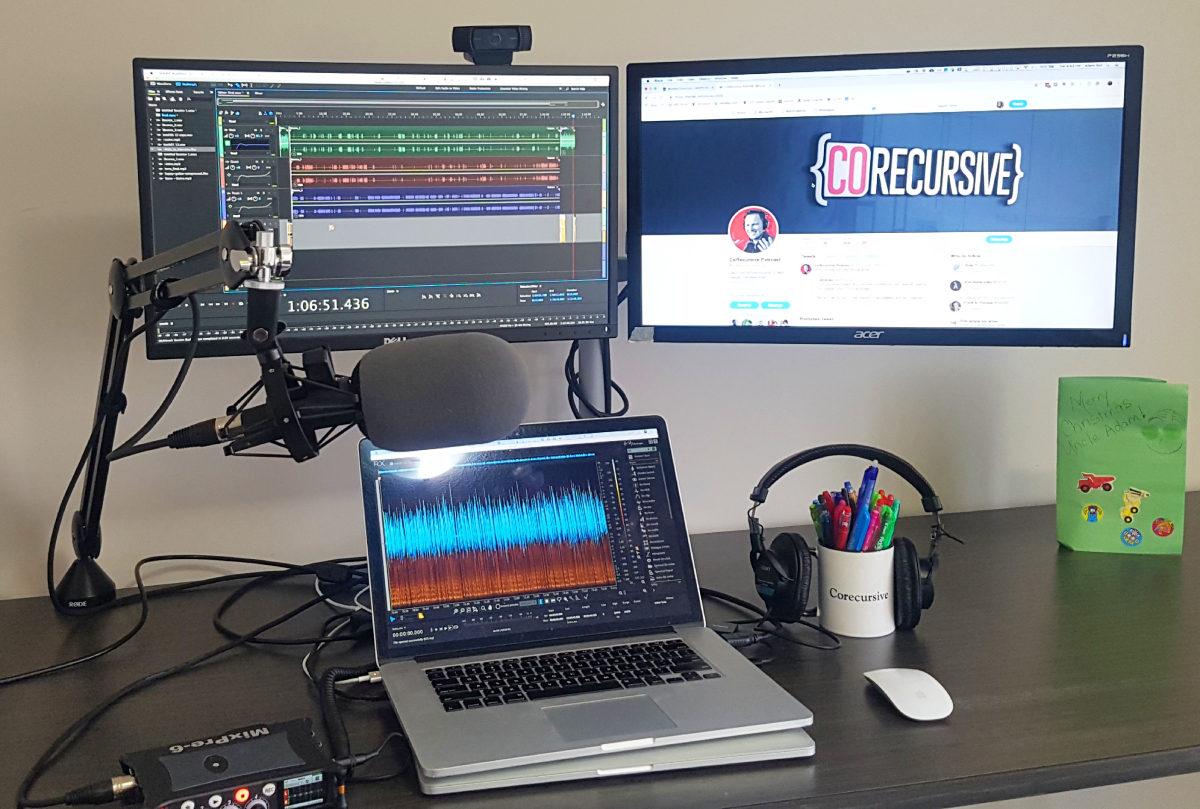
Adam Gordon Bell – PES 139
Great conversation with Adam Gordon Bell, host of CoRecursive where he and guests discuss Software Engineering. He’s on twitter @adamgordonbell
We covered a lot:
- Pyle Pro PD
- Shure A81WS
- Rode boom arm
- MixPre-6
- Macbook Pro
- Zencastr
- Adobe Audition – 2 templates
- Mixing to FLAC
- Auphonic
- RX 6 — de-reverb, vocal isolate,
Thanks for being an awesome guest, Adam!
Comment below with any questions or comments.
.
-
What Software or Service Do You Use for Mastering?
I use an ever-changing combination of Fabfilter Pro-MB (amazing multiband compressor), iZotope Ozone 8 (multiband compression, limiter, exciter) and iZotope RX7 (to set the final LUFS level and roll-off below ~35 Hz).
What software and/or services do you use? Auphonic? Adobe Match Loudness? FGX Mastering Processor?
Want to receive the Daily Goody in your email, daily or weekly? Subscribe free here.
And please keep in mind, the Daily Goody is only a tiny little tip, fact or lesson everyday. Please don’t expect any of these posts to be long, earth-shattering masterpieces that instantly answer every single question you can think of and completely transform you into a world class podcast engineer. “Little by little, a little becomes a lot.”
.
-
Editing Using Faster Playback Speed
I currently use TwistedWave for my detail editing, and unfortunately it doesn’t provide variable playback speed – I’m stuck at regular playback speed, which is a bit of a bummer. Previously I used Soundforge Pro on my PC and I would usually edit at 1.7x speed.
Chris Webster: “I use Audition and I’m at about 1.5x for pretty detailed editing and audio mastering.”
Britany Felix: “Another vote for 2x editing here. Depending on the quality of the audio and how well the host/guest speaks I’m at 1.5/2:1 for most episodes and I definitely don’t skimp on the editing. I remove/correct a lot of things other editors don’t even notice or think about.”
Want to receive the Daily Goody in your email, daily or weekly? Subscribe free here.
And please keep in mind, the Daily Goody is only a tiny little tip, fact or lesson everyday. Please don’t expect any of these posts to be long, earth-shattering masterpieces that instantly answer every single question you can think of and completely transform you into a world class podcast engineer. “Little by little, a little becomes a lot.”
.
-
Checking Balances at Low Volumes
And no, I don’t mean checking your bank balance, hehe – I mean checking the balance of the mix of the various voices and music in the podcast episode that you’re mixing.
Listening at low volumes is a great way to hear the relative levels in your mix. Part of the reason is because at low volumes, the combination of the speakers and your ears tend to emphasize the midrange frequencies, or more accurately stated, the combination of the speakers and your ears tend to not represent the high and low frequencies as well as the midrange.
I usually do this near the end of my mixing process: After I process and balance all the elements of the mix at a normal volume listening level, I’ll turn down the volume to almost nothing and listen carefully for a short time. If one voice is substantially louder than another at this volume, then I’ll adjust its volume slightly and then check the mix again at regular listening volume. Same for the level of the music.
Want to receive the Daily Goody in your email, daily or weekly? Subscribe free here.
And please keep in mind, the Daily Goody is only a tiny little tip, fact or lesson everyday. Please don’t expect any of these posts to be long, earth-shattering masterpieces that instantly answer every single question you can think of and completely transform you into a world class podcast engineer. “Little by little, a little becomes a lot.”
.
-
Echo Cancellation in Zencastr
I use Zencastr very often, but I almost never turn on the “Echo Cancellation” feature.
If a guest has headphones or earbuds, then there’s no need to use the Echo Cancellation feature.
If a guest does not have headphones or earbuds (ugh!) and is going to be listening through their computer speakers, this is the time to turn on the echo cancellation. And then Zencastr behaves just like Skype with regards to ducking one person when the other person starts to talk over them, etc. That ducking thing is possible the most painful thing for me to hear on podcasts. But I guess some people don’t notice or care. Whatevv
Anyhow, I recently did a session where I turned on the echo cancellation for the first time in a long time, and it worked really well. The person was able to listen through their speakers and there was no feedback.
Want to receive the Daily Goody in your email, daily or weekly? Subscribe free here.
And please keep in mind, the Daily Goody is only a tiny little tip, fact or lesson everyday. Please don’t expect any of these posts to be long, earth-shattering masterpieces that instantly answer every single question you can think of and completely transform you into a world class podcast engineer. “Little by little, a little becomes a lot.”
.