Your cart is currently empty!
Author: Chris Curran
-
Much Gratitude to Everyone Producing Good Audio! #Thanksgiving

Much gratitude to everyone producing good audio – thank you!!!
It is MUCH appreciated by ALL the listeners, whether they know it or not.
Keep up the great work 🙂
And like me, try to manage your plugin addiction 🙂 hehe
Want to receive the Daily Goody in your email, daily or weekly? Subscribe free here.
And please keep in mind, the Daily Goody is only a tiny little tip, fact or lesson everyday. Please don’t expect any of these posts to be long, earth-shattering masterpieces that instantly answer every single question you can think of and completely transform you into a world class podcast engineer. “Little by little, a little becomes a lot.”
.
-
Audio Hijack (Mac only) by Rogue Amoeba
Audio Hijack is an awesome Mac only application that allows you to capture audio from any source – audio interfaces, individual applications, and virtual instruments (aka custom submixes).
I use it all the time to capture local audio as well as internet and phone guests’ audio. It’s extremely stable and trustworthy.
FYI, in tandem with Audio Hijack I also use Rogue Amoeba’s Loopback application to route audio sources and create custom submixes using virtual instruments, etc.
And if you’d like to hear me interview the CEO of Rogue Amoeba, Paul Kafasis, check out this episode of my Podcast Engineering Show.
Want to receive the Daily Goody in your email, daily or weekly? Subscribe free here.
And please keep in mind, the Daily Goody is only a tiny little tip, fact or lesson everyday. Please don’t expect any of these posts to be long, earth-shattering masterpieces that instantly answer every single question you can think of and completely transform you into a world class podcast engineer. “Little by little, a little becomes a lot.”
.
-
Hardwood Floors vs. Carpeting
When recording podcast audio, hardwood floors will reflect a lot of sound causing substantial reverb in the room. This is not desirable when trying to produce good sounding audio.
Alternatively, carpeting will absorb some/most of the sound reflections and substantially cut down on the amount of reverb heard in the room.
If you’re deciding where to set up your podcast “studio,” the amount of reverb present in each prospective room should be noted and factored into your decision.
Want to receive the Daily Goody in your email, daily or weekly? Subscribe free here.
And please keep in mind, the Daily Goody is only a tiny little tip, fact or lesson everyday. Please don’t expect any of these posts to be long, earth-shattering masterpieces that instantly answer every single question you can think of and completely transform you into a world class podcast engineer. “Little by little, a little becomes a lot.”
.
-
Sound Devices MixPre-6 (Audio Interface, Recorder and Mixer)
This is an amazing unit for the price (~$900).
They also offer a slightly smaller less expensive unit (MixPre-3) and and larger more expensive unit (MixPre-10T).
I use a MixPre-6 as my everyday audio interface. It has 4 XLR inputs with exceptional quality mic pre’s and 2 other inputs via a stereo mini port.
And you can record on the unit itself IN ADDITION to recording in your computer software. Yes, it’s always good to record backups 😉
It’s a small unit which makes it very handy to take on location. In fact Sound Devices specializes in on-location recording equipment.
Want to receive the Daily Goody in your email, daily or weekly? Subscribe free here.
And please keep in mind, the Daily Goody is only a tiny little tip, fact or lesson everyday. Please don’t expect any of these posts to be long, earth-shattering masterpieces that instantly answer every single question you can think of and completely transform you into a world class podcast engineer. “Little by little, a little becomes a lot.”
.
-
Optimal Loudness to Monitor at When Mixing
At different loudness levels your ears perceive frequencies differently.
For instance, if you monitor at very quiet levels your ears will hear low frequencies more prominently and frequencies around 3 kHz less prominently. Meaning, what you hear will not sound as clear as it actually is. Try it.
In The Hitchhiker’s Guide to the Galaxy, the supercomputer called Deep Thought was asked to figure out the answer to the so-called Ultimate Question of Life, the Universe, and Everything. The answer the supercomputer gave was 42.
But here, when it comes to the question of what decibel level provides the flattest (truest) frequency response of the human ear, the answer is (approx.) 84 dB.
If you don’t know how loud 84 dB is, download one of those free “sound meter” apps to your phone and it will measure the loudness of your environment. Then, slowly turn up your monitors until the meter reads around 84 dB.
Fyi:
- Normal conversation ~65 dB
- City traffic ~85 dB
- Lawnmower ~90 dB
- Train ~100 dB
- Rock Concert ~110-120 dB
- Ralph M. Rivera on his new microphone ~900 dB
Want to receive the Daily Goody in your email, daily or weekly? Subscribe free here.
And please keep in mind, the Daily Goody is only a tiny little tip, fact or lesson everyday. Please don’t expect any of these posts to be long, earth-shattering masterpieces that instantly answer every single question you can think of and completely transform you into a world class podcast engineer. “Little by little, a little becomes a lot.”
.
-
Tactics vs. Sound Quality When Producing Podcast Audio
In the context of podcast audio production, there’s a big difference between knowing where to find various commands in the menus of your DAW and making audio sound good. Big difference.
My advice is to always do these two things in parallel:
- Actively train your ears to apprehend more details of sounds and enhance the sound of all audio tracks you produce.
- Become tactically efficient with your software, hardware, etc.
Want to receive the Daily Goody in your email, daily or weekly? Subscribe free here.
And please keep in mind, the Daily Goody is only a tiny little tip, fact or lesson everyday. Please don’t expect any of these posts to be long, earth-shattering masterpieces that instantly answer every single question you can think of and completely transform you into a world class podcast engineer. “Little by little, a little becomes a lot.”
.
-
How Long Should It Take to Complete Post-Production for One Episode?
Obviously the answer to this question depends on many factors and will also vary depending on any client-specific requirements.
Here are some factors that will affect post-production times:
- Length of the episode
- Number of participants recorded
- Number of different segments/transitions
- The thoroughness of detailed editing
- The smoothness or clumsiness of a participants speaking habits
- The sound quality of the raw recordings
- Number of sound clips to be added
- The use of other pre-recorded audio
And I’m sure there are many more factors.
Want to receive the Daily Goody in your email, daily or weekly? Subscribe free here.
And please keep in mind, the Daily Goody is only a tiny little tip, fact or lesson everyday. Please don’t expect any of these posts to be long, earth-shattering masterpieces that instantly answer every single question you can think of and completely transform you into a world class podcast engineer. “Little by little, a little becomes a lot.”
.
-
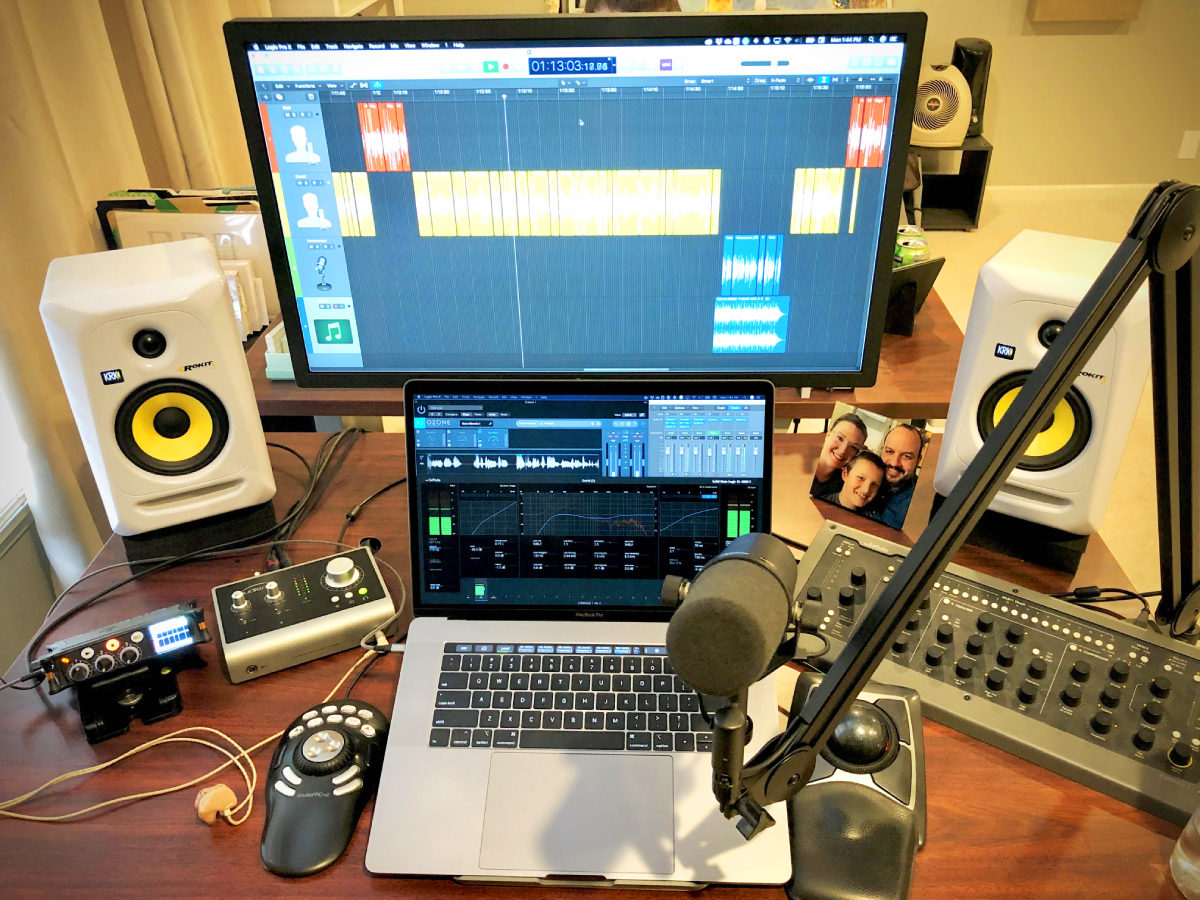
Marcus dePaula from Me Only Louder – PES 157
My guest is Marcus dePaula – audio engineer, podcast producer and website designer at Me Only Louder.
We discussed podcast production in depth (see the partial list of topics below) and at the end of the episode we shared some stories from our pro-audio pasts – Marcus engineering Live concerts and me engineering music in the studio.
We discussed:
- Two Shure SM7b’s with high-mid frequency boost enabled and Popper Blockers inserted inside the grille.
- Two Audio-Technica AT875R mini shotgun mics.
- Two Samson MBA38 mic boom arms with custom integrated Mogami 2552 mic cable and Switchcraft AAA Series Low-Profile XLR connectors
- Sound Devices MixPre-3 (1st gen) with limiters enabled
- Monoprice 4-output headphone amplifier (for guest headphones)
- 2019 15” MacBook Pro with LG 4K Ultrafine display
- Logic Pro X and Adobe Audition CC
- Kensington Expert Mouse trackball (right hand)
- Contour ShuttlePRO v2 (for left hand editing control)
- iZotope RX 7 Standard
- Softube Console 1 control surface and plugins with SSL 4000 E (gate+EQ+saturation) and British Class A Console (compressor) channel strip effects emulators
- iZotope Ozone 8 Elements – mostly for Maximizer on every track!
Audient iD14 USB audio interface (with Burr Brown DA converters) - Ultimate Ears UE7 Pro custom in-ear monitors (made in 2005)
- Sony MDR7506 headphones
- Pair of KRK Rokit 5 G3 powered monitors on foam isolation pads
- One KRK 10S powered sub
- 12 custom-built 48”x17”x3” fabric and Rockwool “Safe’n’Sound” batt insulation acoustic panels
Thanks for being a great guest, Marcus!
Comment below with any questions of comments.
.
-
If You’re Cutting Off Lots of Peaks in Mastering…
If mastering your episodes to the proper LUFS level results in lots of peaks being “chopped off,” or more accurately severely limited, it means you could use more compression in the mixing phase.
It’s not that limiting necessarily sounds bad, and…
It doesn’t mean you HAVE to use more compression, but…
Compression will compress those peaks in a good-sounding way and therefore those peaks will not be severely limited in your mastering step. Compression will also even out the loud and soft levels of the audio making it easier to understand in noisy environments.
Want to receive the Daily Goody in your email, daily or weekly? Subscribe free here.
And please keep in mind, the Daily Goody is only a tiny little tip, fact or lesson everyday. Please don’t expect any of these posts to be long, earth-shattering masterpieces that instantly answer every single question you can think of and completely transform you into a world class podcast engineer. “Little by little, a little becomes a lot.”
.
-
Demand One Pushup for Every Umm?
A few umms here and there is no big deal.
But occasionally when editing a podcast episode you are forced to “clean up” a person who says A BILLION UMMS!!! And it’s a ton of work to make them sound “normal.”
As an editor this can be very discouraging, and inevitably the following thought will cross an editors mind, aimed at the super-ummy individual in question: “Can’t you just speak like a normal person?!?!”
Of course the truth is that some people have terrible speaking habits and they have never even thought of the possibility that they could speak more clearly and consequently be perceived in a much more positive light by every single person they speak to.
I say we ship them all to Toastmasters! (where they have umm counters!)
But before that, should we publicly demand one pushup for every umm they utter? Seriously.
I know MY arms and chest would get stronger day by day because I’m definitely not 100% umm-free.
Want to receive the Daily Goody in your email, daily or weekly? Subscribe free here.
And please keep in mind, the Daily Goody is only a tiny little tip, fact or lesson everyday. Please don’t expect any of these posts to be long, earth-shattering masterpieces that instantly answer every single question you can think of and completely transform you into a world class podcast engineer. “Little by little, a little becomes a lot.”
.
-
Recent Episode on Which I Used Fabfilter Plugins ONLY
I’ve owned several Fabfilter plugins for many years (Pro-Q 2/3, Pro-MB, Pro-DS, and Saturn) but recently I purchased all the rest of their plugins (Pro-C 2, Pro-L 2, Pro-G, Pro-R, and Timeless 2).
Then I had the idea that it would be fun, and also a good way to accelerate my learning of these new plugins, to do post-production on an episode ONLY using Fabfilter plugins. That means no Waves plugins (including my Vocal Rider, CLA-76, Scheps Omni Channel, and many more), no iZotope plugins, no soothe (which I only use sometimes), and no Gullfoss (which I rarely use anyway).
I was very happy with the final product, which became episode 155 of my Podcast Engineering Show (subscribe links here)!
Listen to it here: https://podcastengineeringschool.com/andrew-gelina-pes-155/
And FYI – since this episode I’ve become even more comfortable and precise with these plugins 😉
Want to receive the Daily Goody in your email, daily or weekly? Subscribe free here.
And please keep in mind, the Daily Goody is only a tiny little tip, fact or lesson everyday. Please don’t expect any of these posts to be long, earth-shattering masterpieces that instantly answer every single question you can think of and completely transform you into a world class podcast engineer. “Little by little, a little becomes a lot.”
.
-
Voice Meeter?
I’ve never tried this Voice Meeter software but apparently it enables you to route and mix various audio sources and applications WITHIN your computer. It works on Windows
and Mac, unlike the amazing (and probably superior) Audio Hijack which is Mac only.I haven’t confirmed that Voice Meeter does the following, but in general, internally routing audio from various apps is handy because it allows you to, for instance, simultaneously record a Skype guest on his/her own track, record a Chrome guest (Zencastr, Squadcast, etc.) on his/her own track, record a FaceTime guest on his/her own track, as well as any other app’s audio on its own track. Audio Hijack does this beautifully, but I haven’t confirmed that Voice Meeter operates this way as well.
Have you used Voice Meeter? I’d love to hear about your experience using it.
Want to receive the Daily Goody in your email, daily or weekly? Subscribe free here.
And please keep in mind, the Daily Goody is only a tiny little tip, fact or lesson everyday. Please don’t expect any of these posts to be long, earth-shattering masterpieces that instantly answer every single question you can think of and completely transform you into a world class podcast engineer. “Little by little, a little becomes a lot.”
.
-
If Your Guest Is Using a Tabletop Conference Call Microphone…
Some guests will connect to the recording session from a conference room and use the conference call system on the table there.
First of all, Ugh…
To make sure that the audio you capture doesn’t sound like absolute rubbish:
- Make sure they are wearing headphones
- Make sure get as close as they possibly can to the microphone
- Instruct them not to even “touch” the table, because every time they put their hand down on the table you’ll hear a big thump through the microphone.
- Make sure they don’t move around or make noise during the interview
- You may need to use a bit of de-reverb and/or noise reduction in post
And even after all the audio coaching and training you give them before recording the interview, there will most likely be some distracting noises that you will have to attempt to remove later.
Want to receive the Daily Goody in your email, daily or weekly? Subscribe free here.
And please keep in mind, the Daily Goody is only a tiny little tip, fact or lesson everyday. Please don’t expect any of these posts to be long, earth-shattering masterpieces that instantly answer every single question you can think of and completely transform you into a world class podcast engineer. “Little by little, a little becomes a lot.”
.
-
FabFilter Pro-C 2 Compressor Plugin
I recently purchased this plugin after using several other Fabfilter plugins for years and loving them all.
The FabFilter Pro-C 2 is a compressor of a very high caliber.
I’m still playing around with all the various controls, presets and settings, etc. And of course experimenting with it on various voices in my day-to-day podcast production.
They offer a 30 day free trial, but beware – Fabfilter plugins are quite expensive. (Though worth every penny in my opinion!)
Want to receive the Daily Goody in your email, daily or weekly? Subscribe free here.
And please keep in mind, the Daily Goody is only a tiny little tip, fact or lesson everyday. Please don’t expect any of these posts to be long, earth-shattering masterpieces that instantly answer every single question you can think of and completely transform you into a world class podcast engineer. “Little by little, a little becomes a lot.”
.
-
When’s the Last Time You Rearranged Your Studio Setup?
I haven’t rearranged my studio setup since I bought my iMacPro about 2 years ago. That was a significant change for me because now I’m sitting at a different desk as well as doing everything “in the box.”
But now I want to make one change. I want to bring my channel strip closer to me. It’s still on the old table where it’s been for 4 years and it’s a slight pain not to be able to see it or adjust its settings without getting up and walking around a table, etc. Hopefully soon I will move it closer to me onto the desk where I sit now, though I tend to mentally ponder and plan moves like this for A WHILE before I actually physically move anything 😉
So, when’s the last time you rearranged your studio setup? And what changes did you make?
Want to receive the Daily Goody in your email, daily or weekly? Subscribe free here.
And please keep in mind, the Daily Goody is only a tiny little tip, fact or lesson everyday. Please don’t expect any of these posts to be long, earth-shattering masterpieces that instantly answer every single question you can think of and completely transform you into a world class podcast engineer. “Little by little, a little becomes a lot.”
.
-
An Editing Distinction and Chris’s Goody Bag – PES 156

First Ralph M. Rivera and I discuss an interesting distinction and the relationship between content/story and audio editing/production.
Then I overview recent Daily Goody‘s (from Sep. 13 – Sep. 25). Here’s the link to view all those blog posts. And don’t forget that you can sign up to receive the Daily Goody in your email every day or once per week. Sign up here.
Here are the Daily Goody posts that we discussed in this episode:
- Friday the 13th Trivia
- The Audio Controls Within Auphonic
- Being Profitable as a Podcast Producer/Editor
- Private Slack Group for PES Students and Alumni
- Audio Sample Rate
- Electro-Voice RE20 Microphone
- Keeping Your Studio Uncluttered
- Adobe Audition
- A Guest Who Can Record His/Her Own Audio Locally
- If Your Recording Level is Really Low…
- Your Post Production Process
- Not Blindly Using Preset Plugin Chains
- Manipulating an Audio File
Announcement: The start date for the next PES will be January 14, 2020
Did you learn anything from this episode? Let me know by commenting below.
I appreciate you listening, and if you have any questions please let me know 🙂
If you know anyone who would like to learn more about the technical production of podcasts, please share this show with them.
Punarmilāma!
.
-
Small External Hard Drive for Session Files
I work off of this small drive for all my current and recent session files. It’s a G-Technology 1TB G-DRIVE mobile SSD R-Series.
Although I never unplug it or even move it or take it on the road, etc., one of the reasons I purchased it was for its portability. It’s very small – smaller than a mobile phone.
And since it has 1TB of storage, it’s only about once every six months that I have to delete older files to make room for new session files.
Want to receive the Daily Goody in your email, daily or weekly? Subscribe free here.
And please keep in mind, the Daily Goody is only a tiny little tip, fact or lesson everyday. Please don’t expect any of these posts to be long, earth-shattering masterpieces that instantly answer every single question you can think of and completely transform you into a world class podcast engineer. “Little by little, a little becomes a lot.”
.
-
The Dynamic Range of a Participants Voice
Dynamic range in this context refers to the difference in loudness between when a host or guest speaks at their softest, lowest level and when they speak their loudest, highest level.
Some hosts/guests speak at a consistent volume and this would be considered a relatively small dynamic range. They never get very loud or very soft.
Other hosts/guests go from screaming loudly to whispering and back and forth constantly. This would be considered a relatively large dynamic range. Oh, and drastically changing your proximity to the microphone will also cause a larger dynamic range.
Do you treat these two types of hosts/guests differently in post-production? How so?
Want to receive the Daily Goody in your email, daily or weekly? Subscribe free here.
And please keep in mind, the Daily Goody is only a tiny little tip, fact or lesson everyday. Please don’t expect any of these posts to be long, earth-shattering masterpieces that instantly answer every single question you can think of and completely transform you into a world class podcast engineer. “Little by little, a little becomes a lot.”
.
-
Hey, I Did a Thing!
I made a video! And I’ll be making many more; I’m just getting started 😉
Check it out! Why Listen to The Podcast Engineering Show (To Learn Podcast Audio Production!)
Want to receive the Daily Goody in your email, daily or weekly? Subscribe free here.
And please keep in mind, the Daily Goody is only a tiny little tip, fact or lesson everyday. Please don’t expect any of these posts to be long, earth-shattering masterpieces that instantly answer every single question you can think of and completely transform you into a world class podcast engineer. “Little by little, a little becomes a lot.”
.