Your cart is currently empty!
Author: Chris Curran
-
What Different Frequency Ranges Sound Like

I demonstrate lots of different frequency ranges in episode 100 of The Podcast Engineering Show starting at 20 min. and 37 seconds into the episode.
Enjoy listening!
Want to receive the Daily Goody in your email, daily or weekly? Subscribe free here.
And please keep in mind, the Daily Goody is only a tiny little tip, fact or lesson everyday. Please don’t expect any of these posts to be long, earth-shattering masterpieces that instantly answer every single question you can think of and completely transform you into a world class podcast engineer. “Little by little, a little becomes a lot.”
.
-
Explore Your Software
Whatever software you use to produce podcasts, you probably only use about 5-10% of the features available within that software.
You may be completely happy with your current knowledge and workflow, but be aware: If you explore the capabilities of your software you may be able to produce episodes in less time with higher audio quality.
Of course YouTube is a great place to begin exploring for free 😉
Want to receive the Daily Goody in your email, daily or weekly? Subscribe free here.
And please keep in mind, the Daily Goody is only a tiny little tip, fact or lesson everyday. Please don’t expect any of these posts to be long, earth-shattering masterpieces that instantly answer every single question you can think of and completely transform you into a world class podcast engineer. “Little by little, a little becomes a lot.”
.
-
iZotope Ozone 9 Is Now Available!
iZotope Ozone is one of the best mastering suites available today! I use several of its modules on every podcast episode.
BTW, students of PES get major discounts on iZotope applications.
Ozone 9 Features: (some only available in the Advanced version)
- Master Assistant
- Dynamics
- Maximizer
- Equalizer
- Exciter
- Match EQ
- Imager
- Vintage Limiter
- Vintage Compressor
- Vintage EQ
- Vintage Tape
- Spectral Shaper
- Dynamic EQ
- And more!
Want to receive the Daily Goody in your email, daily or weekly? Subscribe free here.
And please keep in mind, the Daily Goody is only a tiny little tip, fact or lesson everyday. Please don’t expect any of these posts to be long, earth-shattering masterpieces that instantly answer every single question you can think of and completely transform you into a world class podcast engineer. “Little by little, a little becomes a lot.”
.
-
Clients Providing Timestamps for Edits
If you’re editing someone else’s podcast episodes, at least part of your job is to remove umms, lipsmacks, and shorten long periods of silence, etc. Of course your client doesn’t need to point out every single umm and lipsmack, etc., because you can hear and see them yourself.
But when it comes to removing sections of the actual discussion, you may want to require your clients to provide timestamps for editing out specific parts of the conversation. For instance, “Cut out from 7:38 to 7:52,” etc.
This way you never run the risk of removing audio that your client actually wants in the episode.
Want to receive the Daily Goody in your email, daily or weekly? Subscribe free here.
And please keep in mind, the Daily Goody is only a tiny little tip, fact or lesson everyday. Please don’t expect any of these posts to be long, earth-shattering masterpieces that instantly answer every single question you can think of and completely transform you into a world class podcast engineer. “Little by little, a little becomes a lot.”
.
-
The De-rustle Module in iZotope RX7 Advanced
The De-rustle module in iZotope RX 7 Advanced removes the noise or rustle generated by a lavalier microphone rubbing or brushing against a person’s clothing during a recording. Lav rustle can vary unpredictably over time and exhibit a wide variety of sonic characteristics from high frequency “crackling” to low frequency “thuds.”
I recently used this module on headset audio with breath noises and thuds with very good results. It’s not exactly made for that scenario but sometimes you have to try different modules due to the unique nature of your source audio. I tried to use the De-breath and De-plosive modules to fix this particular problem, but I wasn’t getting the results I wanted, so I tried the De-rustle and it worked much better in this case.
Want to receive the Daily Goody in your email, daily or weekly? Subscribe free here.
And please keep in mind, the Daily Goody is only a tiny little tip, fact or lesson everyday. Please don’t expect any of these posts to be long, earth-shattering masterpieces that instantly answer every single question you can think of and completely transform you into a world class podcast engineer. “Little by little, a little becomes a lot.”
.
-
Gain Staging
Gain staging is the process of managing the relative levels in each step of an audio signal flow to prevent introduction of noise and distortion. Ideal gain staging occurs when each component in an audio signal flow is receiving and transmitting signal in the optimum region of its dynamic range.
Here are a bunch of places in your signal flow where you should optimize your levels and gain staging: (Note: your particular signal flow will probably not contain all of the following)
- Microphone proximity
- Microphone preamp level (on your audio interface or computer settings)
- Input and output levels on hardware like channel strips, compressors, EQ’s, etc.
- Mixer channel fader
- Mixer master fader
- Recorder input level
- Input and output levels in plugins
- And many more
Noise and distortion can be introduced when the output of one component is so low that the input level of the next component must be cranked really high to increase the level back to a normal level.
Want to receive the Daily Goody in your email, daily or weekly? Subscribe free here.
And please keep in mind, the Daily Goody is only a tiny little tip, fact or lesson everyday. Please don’t expect any of these posts to be long, earth-shattering masterpieces that instantly answer every single question you can think of and completely transform you into a world class podcast engineer. “Little by little, a little becomes a lot.”
.
-
Chris’s Goody Bag – PES 150
Enjoy my brief overview of recent Daily Goody‘s (from Aug. 2 – Aug. 13). Here’s the link to view all those blog posts. And don’t forget that you can sign up to receive the Daily Goody in your email every day or once per week. Sign up here.
Thanks to Focusrite for sponsoring this episode! If you haven’t checked out the new Focusrite Scarlett 3rd Gen. series of interfaces yet, you can see them here.
NOTE: I did not do any post processing on any of the audio in this episode, in order for you to hear the difference between the two microphones as well as the Scarlett 2i2 3rd gen.
Sounds a lot different from a normal episode, right? That’s because of the lack of compression and EQ, etc.
Here are the Daily Goody posts that we discussed in this episode:
- Food and Drink in Your Studio
- Hindenburg Journalist Pro
- Zoom.us for Recording Remote Podcast Guests
- How to Avoid Being Unpleasantly Surprised by the Quality of a Recording Session
- Setting the Attack Time of Compressors
- Edits That Are Too Tight
- Using Auphonic as Your Mastering Step
- Podcast Editor’s Club on Facebook
- Which Album(s) Have You Listened to the Most Times in Your Entire Life?
- The Brand New Focusrite Scarlett 2i2 (3rd Gen)
- Bringing Gear on the Road
Announcements:
- The start date for the next PES will be January 14, 2020
- Upcoming episodes: Andrew Chadwick and Sarah Wendel!
Big Thanks to everyone who comments on the website Daily Goody posts!
I appreciate you listening, and if you have any questions please let me know 🙂
If you know anyone who would like to learn more about the technical production of podcasts, please share this show with them.
Punarmilāma!
.
-
How Thoroughly Should You Soundcheck a Remote Guest?
It seems to me there has to be a compromise between spending an hour or more soundchecking the guest to make sure every little detail is in order vs. not sound checking at all and hoping for the best.
Here are some areas of concern when soundchecking a guest:
- Their computer health/speed
- Input/output settings
- Wearing headphones/earbuds
- Internet connection and speed
- Background noise
- Mic technique
- Connection method
Most soundchecks I do take around 5-10 minutes depending on the guests equipment, knowledge and experience.
Which do you think is most important?
Want to receive the Daily Goody in your email, daily or weekly? Subscribe free here.
And please keep in mind, the Daily Goody is only a tiny little tip, fact or lesson everyday. Please don’t expect any of these posts to be long, earth-shattering masterpieces that instantly answer every single question you can think of and completely transform you into a world class podcast engineer. “Little by little, a little becomes a lot.”
.
-
Keeping Chrome Up To Date
Many issues can be avoided when using Chrome by keeping it up to date. And it takes less than a minute to verify and update.
Issues may include not being able to hear other people, not being able to choose your input and output devices, microphone signal not going through, clicks in the audio, etc.
To verify and update your Chrome version, click on: The three dots in the very top right of the Chrome window, then Help, then About Google Chrome
If you are connecting with guests via Zencastr or Squadcast, etc. you should walk them through the process of verifying their Chrome version and updating it if necessary.
Squadcast and Zencastr etc. do a good job of staying on top of Chrome updates and making sure that their services continue to work well using the latest Chrome version.
Want to receive the Daily Goody in your email, daily or weekly? Subscribe free here.
And please keep in mind, the Daily Goody is only a tiny little tip, fact or lesson everyday. Please don’t expect any of these posts to be long, earth-shattering masterpieces that instantly answer every single question you can think of and completely transform you into a world class podcast engineer. “Little by little, a little becomes a lot.”
.
-
What is the largest number of participants…
For your podcast, what is the largest number of participants you will want to record in the same physical space?
Keep in mind that to record each participant on their own track you’ll need a separate microphone for each of those participants, and a recorder or interface which has enough inputs to accept that many microphones. Unless you want to use one microphone in the middle of a table to pick up everyone……but you never want to do that, trust me.
Want to receive the Daily Goody in your email, daily or weekly? Subscribe free here.
And please keep in mind, the Daily Goody is only a tiny little tip, fact or lesson everyday. Please don’t expect any of these posts to be long, earth-shattering masterpieces that instantly answer every single question you can think of and completely transform you into a world class podcast engineer. “Little by little, a little becomes a lot.”
.
-
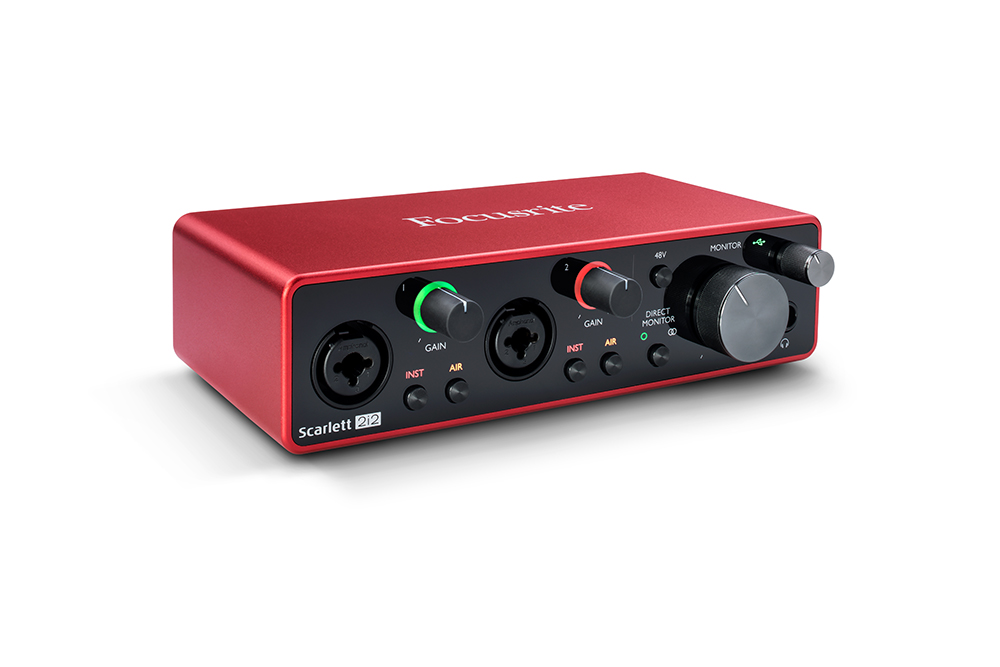
The “Air” Button on Focusrite Scarlett 3rd Gen. Interfaces
The Air mode on Focusrite Scarlett 3rd Gen. interfaces emulates the famous boost in the mid-high frequency range of Focusrite’s original ISA mic preamps at the famous AIR Studios, adding unique high-end detail which was a renowned characteristic.
Basically it adds some nice, smooth high frequency clarity which sounds tremendous on audio that needs more clarity.
“Air mode breathes life into vocals, adding unique high-end detail.” (from the Focusrite website)

“Brightening Up” Podcast Guests
When recording podcasts, guests will often use a non-professional microphone like earbuds or the built-in computer microphone because they don’t own any other microphones. In some of those cases the Air button can make the guest sound less muffled by adding clarity.
Even some “darker sounding” professional microphones like the Shure SM7b can sound much better after activating Air mode on a Focusrite Scarlett 3rd Gen. interface.
Choices on the Number of Inputs
Focusrite’s 3rd Generation Scarlett interfaces include input/output configurations to suit almost any situation; choose from Solo, 2i2, 4i4 8i6, 18i8 or 18i20, which range from 1-8 XLR inputs.
Want to receive the Daily Goody in your email, daily or weekly? Subscribe free here.
And please keep in mind, the Daily Goody is only a tiny little tip, fact or lesson everyday. Please don’t expect any of these posts to be long, earth-shattering masterpieces that instantly answer every single question you can think of and completely transform you into a world class podcast engineer. “Little by little, a little becomes a lot.”
.
-
Surge Protectors
A power surge is basically a spike in your home’s electrical current. The spike is very brief, usually lasting less than a thousandth of a second, but it can still cause damage to your audio gear and home appliances.
To protect your gear you can use a surge protector, so instead of plugging your audio gear directly into the wall, you plug them into a power strip that contains a surge protector.
Here’s a good CNET article that covers all aspects of this topic: 10 things you should know about surge protectors — https://www.cnet.com/how-to/10-things-you-should-know-about-surge-protectors/
Want to receive the Daily Goody in your email, daily or weekly? Subscribe free here.
And please keep in mind, the Daily Goody is only a tiny little tip, fact or lesson everyday. Please don’t expect any of these posts to be long, earth-shattering masterpieces that instantly answer every single question you can think of and completely transform you into a world class podcast engineer. “Little by little, a little becomes a lot.”
.
-
Podcast Editors Conference at Podfest 2020
Our friends Steve Stewart and Mark Deal (of the Podcast Editors Club) are organizing this event! And I’ll be presenting there. And this one-day conference is actually part of Podfest 2020 in Orlando so you can attend both!
From their website:
Do you edit podcasts professionally or want to? Learn the business of podcast production in this 1-day laser focused event designed for the podcast post-production professional. Gain valuable insights and learn how to improve the profitability of your audio production business.
Sign up for early details here: http://PodcastEditorsConference.com
Want to receive the Daily Goody in your email, daily or weekly? Subscribe free here.
And please keep in mind, the Daily Goody is only a tiny little tip, fact or lesson everyday. Please don’t expect any of these posts to be long, earth-shattering masterpieces that instantly answer every single question you can think of and completely transform you into a world class podcast engineer. “Little by little, a little becomes a lot.”
.
-
Marketing Your Podcast Editing/Production Services
I’m no marketing expert, but marketing your services to secure new production clients is perhaps the most vital part of growing a successful business.
In general, you can either spend your money on marketing (buying ads, etc.) or spend your time doing free marketing like social media posts, generating longer form content, etc, or some of both.
First question to consider: How much time and money are you willing and able to invest in marketing your business?
Want to receive the Daily Goody in your email, daily or weekly? Subscribe free here.
And please keep in mind, the Daily Goody is only a tiny little tip, fact or lesson everyday. Please don’t expect any of these posts to be long, earth-shattering masterpieces that instantly answer every single question you can think of and completely transform you into a world class podcast engineer. “Little by little, a little becomes a lot.”
.
-
Tom Kelly – PES 149
My guest is Tom Kelly – audio engineer, podcast producer and editor at Clean Cut Audio. Check out his own shows – Reminiscent, Podcast Me Anything, and Podcarnage.
We discussed almost a million things, including:
- Shure SM7b
- Apogee Ensemble
- Pro Tools 12
- Double enders
- AKG Perception 420
- Macbook Pro (maxed out)
- Waves WLM meter on Master Buss to determine LUFS level.
- Noise Shaping 1, 2, or 3 dither – when downsampling from 24 bit to 16 bit.
MP3 – 128kbps stereo, - Keyboard shortcuts
- Kensington SlimBlade trackball
- Strip silence, threshold of -29 db
- RX6 voice de-noise
- RX6 de-reverb
- Waves de-esser
- FabFilter Pro-Q 3
- Waves Vocal Rider
- Waves API 2500
- All vocals sent to stereo aux
- LinMB
- Maxim (only catching clips/peaks, not actually doing any dynamic work)
- Dither noise-shaping 3
- WAV files: 16 bit / 44.1 kHz
- MP3s: 128kbps stereo
- Yamaha HS7s
- ATH-M50 headphones
- Squadcast
- Klipsch earbuds
Thanks for being a great guest, Tom!
Comment below with any questions or comments.
.
-
SWS/S&M Extension – A Reaper Plugin Extension
The SWS/S&M Extension is a collection of features that seamlessly integrate into REAPER, the Digital Audio Workstation (DAW) software by Cockos, Inc. It is a collaborative and open source project.
Download and install for free.
Some Features:
- Loudness
- Marker actions
- Resources
- Snapshots
- Cycle Actions
- Contextual toolbars
- … and many other things!
Want to receive the Daily Goody in your email, daily or weekly? Subscribe free here.
And please keep in mind, the Daily Goody is only a tiny little tip, fact or lesson everyday. Please don’t expect any of these posts to be long, earth-shattering masterpieces that instantly answer every single question you can think of and completely transform you into a world class podcast engineer. “Little by little, a little becomes a lot.”
.
-
Manipulating an Audio File
As a professional working on audio you need to be able to manipulate an audio file in many ways for the purpose of fixing mistakes, polishing the sound, mixing various audio together, adhering to publishing specifications, etc.
Therefore it’s handy to have various software and processors at your disposal with which to manipulate audio.
And here’s a good attitude to cultivate: “Send me whatever files you have and I’ll turn them into the highest quality professional audio possible.”
Want to receive the Daily Goody in your email, daily or weekly? Subscribe free here.
And please keep in mind, the Daily Goody is only a tiny little tip, fact or lesson everyday. Please don’t expect any of these posts to be long, earth-shattering masterpieces that instantly answer every single question you can think of and completely transform you into a world class podcast engineer. “Little by little, a little becomes a lot.”
.
-
Not Blindly Using Preset Plugin Chains
It’s good to have a saved plugin chain for a person’s voice if you’re processing their voice regularly, and it’s usually comprised of EQ and compression, etc.
In my experience tweaking those presets every episode is almost always necessary, even if it’s the same person’s voice recorded through the same microphone, etc. Because voices change slightly day to day (level, timbre, dynamics, etc.), plus the other voices on the episode that you will be mixing person #1’s voice WITH will be different as well.
Use your ears (critical listening) on every voice on every episode, and tweak accordingly 😉
Want to receive the Daily Goody in your email, daily or weekly? Subscribe free here.
And please keep in mind, the Daily Goody is only a tiny little tip, fact or lesson everyday. Please don’t expect any of these posts to be long, earth-shattering masterpieces that instantly answer every single question you can think of and completely transform you into a world class podcast engineer. “Little by little, a little becomes a lot.”
.
-
Your Post Production Process
What steps are included in your current post-production process?
Do you struggle with any particular processes?
Would you like to remove or add any steps?
Want to receive the Daily Goody in your email, daily or weekly? Subscribe free here.
And please keep in mind, the Daily Goody is only a tiny little tip, fact or lesson everyday. Please don’t expect any of these posts to be long, earth-shattering masterpieces that instantly answer every single question you can think of and completely transform you into a world class podcast engineer. “Little by little, a little becomes a lot.”
.